











QUICK SUMMARY
Building a voicebot is easy. Making it survive real-world call center chaos is not.
This guide goes beyond setup to show how to build a voicebot that handles noise, scales, and human expectations. You’ll learn architecture, build vs buy decisions, production pitfalls, KPIs, and seamless agent handoff. If your goal is reliability, not just deployment, this is your playbook.
It’s 11:47 AM. Peak call volume.
A customer interrupts mid-sentence, switches language halfway through, and pauses, expecting the system to keep up.
Your voicebot catches the intent, but misses the nuance. It responds… almost correctly, just not what the caller needed.
And in that split second, the caller decides whether this will be smoooooth… or frustrating.
Voicebot solutions today are easy to deploy.. Making it handle real conversations, noise, unpredictability, and scale is where most systems fall short.
This guide focuses on what actually makes a voicebot production-ready, not just functional.
Because in the real world, “almost working” is the same as not working at all.
Now, before we get into how to build one, it’s worth understanding what you’re really replacing and the “why” of this shift.
IVR vs Voicebot: What is Driving the Shift in Modern Call Centers
From IVR to voicebot, the shift in modern call centers is driven by the need to move from rigid, menu-based interactions to faster, more natural conversations that actually resolve queries.
Call any support line, and you can usually tell within seconds what you’re dealing with.
“Press 1 for this, press 2 for that”… or a system that simply asks what you need and responds.
That difference isn’t just the interface. It’s a complete shift in how conversations are handled.
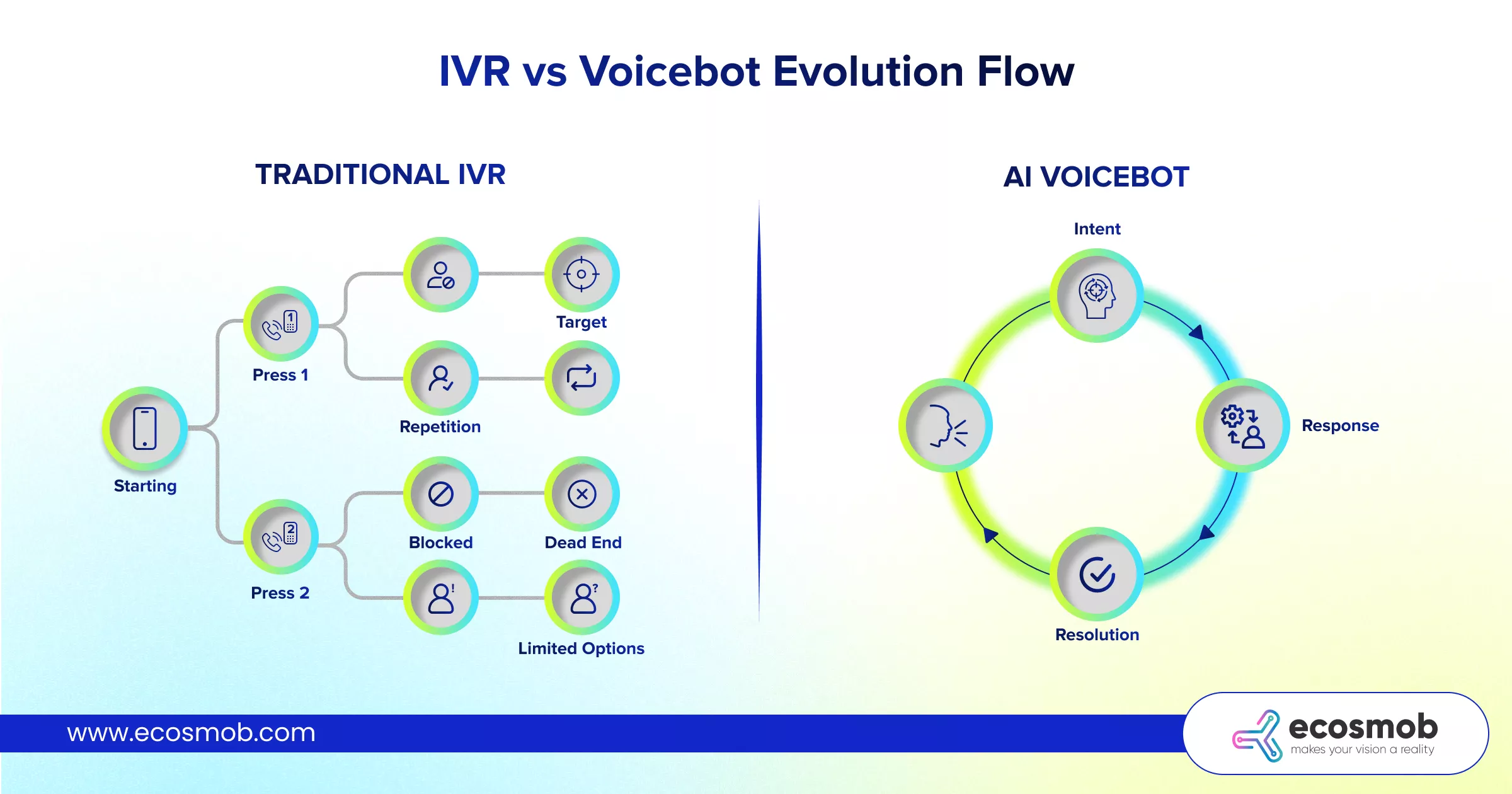
What is IVR?
A menu-based telephony system that lets callers interact using keypad inputs or basic voice commands to navigate predefined options.
Traditional systems are built on predefined paths. They rely on DTMF inputs, where users press numbers to navigate menus.
It works well when:
- The query is simple and expected
- The caller follows the exact flow
- Options are clearly mapped
But the moment a caller deviates, presses the wrong key, or doesn’t find their issue in the menu, friction starts to build.
IVR is efficient for structured tasks, but it struggles the moment conversations become unpredictable.
What is Voicebot?
An AI-powered conversational system that understands natural speech, interprets intent, and responds dynamically to handle customer queries.
Voicebots change the interaction model completely. Instead of navigating options, callers simply speak.
Behind the scenes, AI models:
- Understand intent, not just input
- Extract context from natural speech
- Adapt responses dynamically
This allows conversations to feel more natural and direct, especially when queries are not neatly categorized.
Voicebots shift the experience from navigation to conversation.
Businesses and call centers are adopting voicebots, and this shift is driven by real operational pressure.
- Speed: Customers want instant resolution, not menu navigation
- Personalization: Responses tailored to user context and history
- Automation depth: Handle more complex queries without agent intervention
As call volumes grow and expectations rise, rigid systems start becoming bottlenecks.
Voicebots help businesses move from handling calls to actually resolving them.
Despite the shift, IVR isn’t disappearing. It still plays a critical role.
- As a fallback layer when AI confidence is low
- For compliance-driven flows like consent and disclosures
- In highly structured scenarios where precision matters
In many real-world setups, IVR and voicebots work together rather than replacing each other entirely.
The goal isn’t to remove IVR, but to evolve it into a smarter, more flexible system. Now, let’s break down what actually goes into building a voicebot for call center that can handle this level of complexity.
Don’t wait for real calls to expose the gaps; build for them now.
Core Architecture of an AI-Powered Voicebot for Call Centers
A voicebot may sound like a single system to the caller. In reality, it’s a chain of tightly coordinated components working in milliseconds, where even a slight delay or misfire can break the experience.
Think of it less like one tool and more like a relay race; every layer has to pass the baton cleanly.
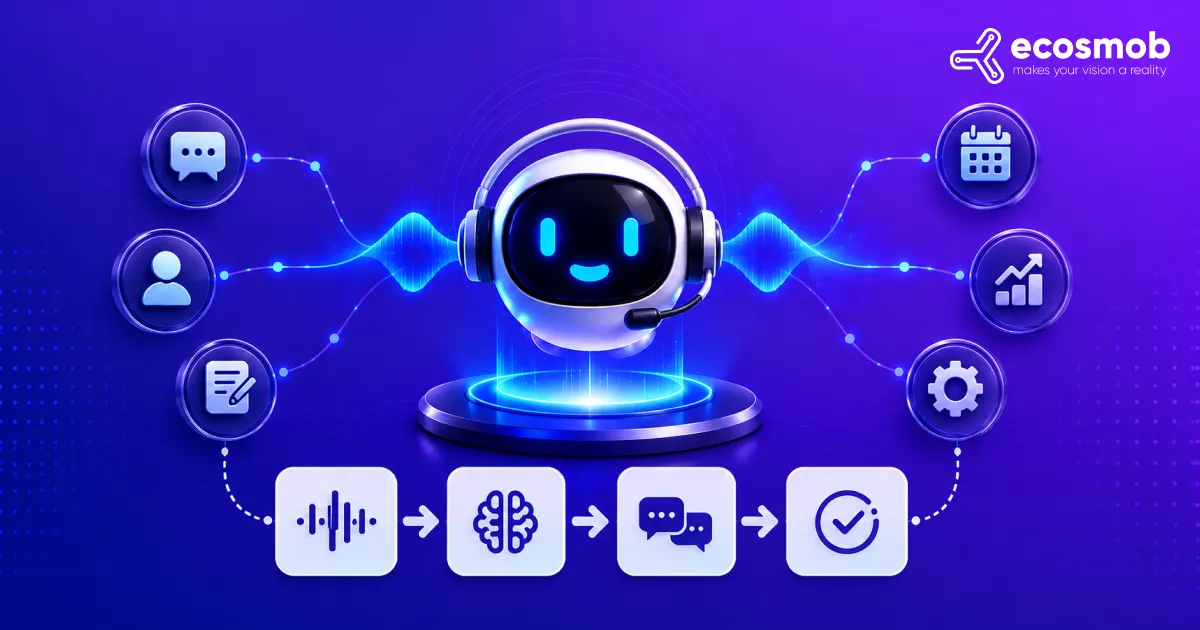
Here’s what happens in a typical interaction:
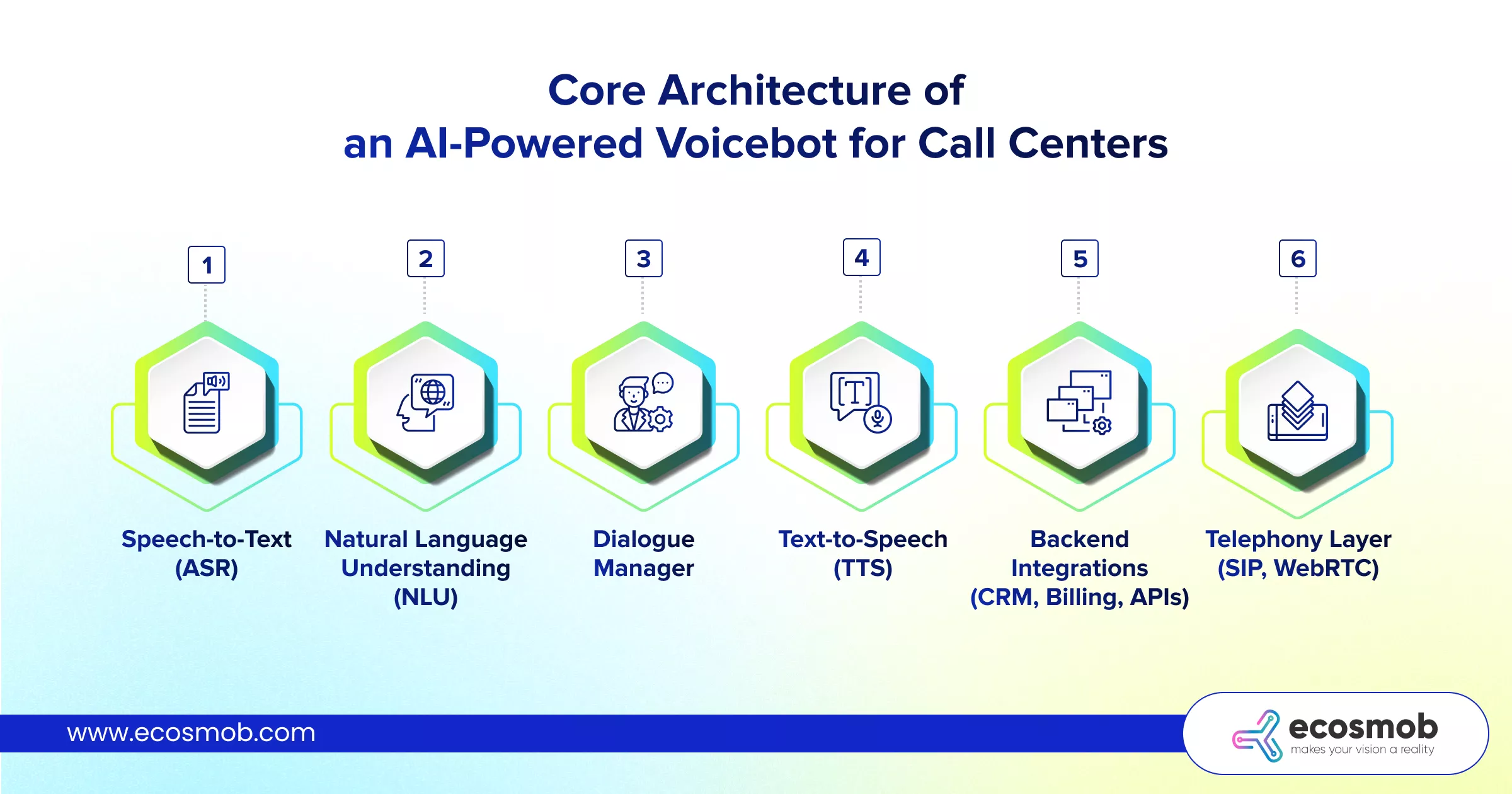
1. Speech-to-Text (ASR)
The moment a caller speaks, Automatic Speech Recognition converts voice into text.
This is your first point of failure.
Accents, background noise, and overlapping speech can distort input before your system even begins to “understand.”
If ASR struggles, everything downstream inherits that error.
2. Natural Language Understanding (NLU)
Once converted, the system interprets what the user actually means.
It identifies:
- Intent (what the user wants)
- Entities (key details like account number, date, issue type)
This is where “almost correct” responses often originate, when intent is partially understood but not fully accurate.
NLU determines whether your response is relevant or merely close enough to be confusing.
3. Dialogue Manager
This is the decision engine.
It:
- Decides the next response
- Maintains conversation flow
- Handles fallbacks and clarifications
A strong dialogue manager doesn’t just respond; it guides the conversation when users go off track.
This layer determines whether conversations feel smooth or fragmented.
4. Text-to-Speech (TTS)
Once the response is ready, TTS converts it back into voice.
Quality matters here more than most teams expect.
Flat or unnatural responses break trust, even if the answer is technically correct.
Delivery shapes perception as much as accuracy.
5. Backend Integrations (CRM, Billing, APIs)
Voicebots rarely operate in isolation.
They connect with:
- Voicebot and CRM integrated systems for customer context
- Billing systems for account actions
- Internal APIs for real-time data
This is where real value is created, not just answering queries, but taking action. Without integrations, a voicebot can talk, but it can’t resolve.
6. Telephony Layer (SIP, WebRTC)
This is how calls actually reach your system.
- SIP handles call routing and signaling
- WebRTC enables browser-based or app-based calling
It ensures low-latency, reliable communication between caller and system. A strong backend means little if the call quality itself is unstable.
What Separates a Working System from a Production-Ready One?
Beyond components, a few architectural decisions make all the difference:
- Real-time processing vs batch latency
Conversations need sub-second responses. Delays break the flow instantly. - Stateless vs stateful conversations
Stateless systems treat each input independently.
Stateful systems remember context, making conversations feel continuous. - API orchestration layer
Instead of calling systems randomly, a structured orchestration layer manages retries, failures, and response prioritization.
Because in production, it’s not just about having components, it’s about how efficiently they work together under pressure.
While architecture is important, the way it is executed matters most!
The difference is in the details you plan for, and the ones you don’t.
How to Build a Voicebot for Call Centers?
To build a voicebot for call centers, start by defining focused use cases, designing clear conversation flows, training on real-world speech, integrating with backend systems, and testing under production conditions.
Building with AI in call centers isn’t about piling on features. It’s about getting a few critical interactions right, consistently, and then scaling with control.
Step 1: Define Use Cases Clearly
Not every query needs automation. Start where it actually makes an impact.
Focus on:
- High-volume, repeatable queries
- Clearly defined intents (balance check, order status, ticket updates)
Avoid:
- Complex, edge-case-heavy conversations early on
This gives your system a controlled environment to learn and perform.
Step 2: Design Conversation Flows
This is where structure meets unpredictability.
Key elements:
- Intent mapping: What is the user trying to do?
- Entity extraction: What details are needed to complete it?
- Fail-safe paths: What happens when the system doesn’t understand?
A well-designed flow doesn’t assume perfect input.
It anticipates confusion and guides the user back.
Step 3: Train the AI Model for Real Conversations
Clean data creates false confidence. Real conversations don’t sound clean.
Your training should include:
- Regional dialects and mixed-language inputs
- Background noise (call center chatter, traffic, interruptions)
- Variations in how people actually ask the same question
Also, treat training as ongoing:
- Capture failed interactions
- Retrain regularly
- Improve based on real usage patterns
A voicebot isn’t trained once; it evolves continuously.
Step 4: Integrate Backend Systems
This is where your voicebot moves from answering to resolving.
Typical integrations include:
- CRM systems for customer data
- Ticketing tools for issue tracking
- Billing systems for transactions
Also decide:
- Real-time data fetch: Accurate but dependent on API speed
- Cached responses: Faster but may risk outdated info
Without integrations, your voicebot can talk, but it can’t act.
Step 5: Test in Controlled Environments
Before going live, simulate what reality will throw at you.
Test for:
- Background noise and interruptions
- Peak traffic and concurrency
- Edge cases and unexpected inputs
Don’t just test happy paths.
Test what happens when things go wrong.
If you don’t test for chaos, production will do it for you. Because what works in testing isn’t always what survives in production.
Next, let’s look at what actually breaks once your voicebot goes live, and how to prepare for it.
What Breaks in Voicebot Production Environments
Latency, speech recognition errors, cold starts, intent drift, and scaling issues are what typically break a voicebot in production.
Everything looks stable until real calls start stacking up. Then the small, almost invisible gaps begin to show.
Production doesn’t introduce new problems. It exposes the ones you’re testing that didn’t push hard enough.
1. Latency spikes
A slight delay in the API response, and your voicebot pauses just long enough to feel awkward. For the system, it’s milliseconds; for the caller, it’s hesitation.
2. ASR errors under noise
Background chatter, poor connections, overlapping speech, this isn’t training data anymore. The misheard input leads to the wrong intent, and the conversation drifts instantly.
3. Cold start delays
The first interaction after inactivity often lags. That “hello” moment, where speed matters most, feels slow.
4. Intent drift
Users don’t follow flows. They interrupt, rephrase, jump topics, and if your system expects structure, it starts losing context fast.
5. Concurrency issues
What works for 50 calls may not hold at 5,000. The Peak traffic exposes limits in scaling, routing, and response handling.
So, what to do instead?
1. Pre-warmed models
Keep systems ready to respond instantly, rather than spinning up on demand. It removes that first interaction lag.
2. Edge processing where possible
Process closer to the user to reduce dependency on distant servers. Less travel time, faster responses.
3. Fallback intents and graceful degradation
When the system isn’t confident, it shouldn’t guess. It should recover, clarify, or route intelligently.
4. Retry logic for APIs
External systems fail. Networks fluctuate. Build retry mechanisms so a single failure doesn’t break the conversation.
Because resilience isn’t built by avoiding failure, but by planning for it. And that’s why production readiness isn’t about perfection; it’s about consistency under pressure.
Now that you know what breaks, the next step is deciding how to build or adopt a system that can handle it.
Every missed intent and delayed response adds up; fix them before they show.
Build or Buy a Voicebot for Your Call Center
You should build a voicebot if you need deep customization and control, and buy one if speed and quick deployment matter more. Solutions like Ecosmob’s Voicebot connector help you get there without starting from scratch.
On the surface, it looks like a technical decision. In reality, it’s a trade-off between control, speed, and long-term flexibility.
| Factor | Build | Buy |
| Time to launch | Slow | Fast |
| Customization | High | Limited |
| Cost() | High | Lower |
| Cost | Controlled | Recurring |
| Compliance control | Deep | Vendor-dependant |
| AI tuning | Full | Restricted |
Each option solves a different problem. The mistake most teams make is choosing based on what feels easier today, not what holds up tomorrow.
When Building Makes Sense
Building gives you control. Not just over features, but over how your system behaves under pressure. It works best when:
- You need deep customization across flows, integrations, and logic
- Compliance and data control are non-negotiable
- You have the team and time to iterate continuously
This approach is heavier upfront, but it gives you flexibility as complexity grows. Build when your voicebot is core to your business, not just a support layer.
When Buying Makes Sense
Buying gives you speed. You skip the heavy lifting and get to deployment faster. It works best when:
- You need a quick go-to-market
- Your use cases are standard and well-defined
- You don’t have a large in-house AI or engineering team
The trade-off is dependency on vendor capabilities, pricing, and limitations. Buy when speed matters more than deep control.
And, what if you go hybrid then?
In many cases, the answer isn’t strictly one or the other.
- Start with a platform to launch quickly
- Then evolve into custom layers where needed
- Or build core logic while leveraging external tools for specific components
This balances speed with long-term flexibility.
Because the goal isn’t to choose a side, it’s to reduce risk while scaling capability. And the decision logic that works here is:
- Small team, limited bandwidth → Buy
- Enterprise with strict compliance → Build or hybrid
- Fast go-to-market pressure → Buy first, evolve later
The decision isn’t about what’s better. It’s about what fits your current stage without limiting your next one.
Because a voicebot isn’t a one-time build, it’s a system you’ll keep shaping as your operations grow.
What KPIs Matter for Voicebots in Call Centers?
The KPIs that actually matter for voicebots are containment rate, average handle time (AHT), CSAT, fallback rate, and response latency, and only start to matter when you’re tracking them through real-time monitoring.
The tricky part? Most dashboards look fine even when the experience isn’t.
That’s because tracking numbers is easy. Understanding what they mean is where the real value sits.
1. Containment Rate
This tells you how many calls your voicebot handles without human intervention.
- Ideal benchmark: 60–80% (varies by use case)
- If it’s low: your bot isn’t understanding intent well enough
What to do: Improve intent mapping, expand training data, and reduce unnecessary handoffs.
If containment is strong, your automation is actually working.
2. Average Handle Time (AHT)
The total time taken per interaction.
- Lower isn’t always better; relevant and efficient is
- Long AHT usually signals confusion or repeated prompts
What to do: Simplify flows, reduce back-and-forth, and improve response clarity.
AHT reflects how smoothly conversations move, not just how fast they end.
3. CSAT (Customer Satisfaction Score)
Direct feedback from users after the interaction.
- This is where perception shows up
- A technically correct bot can still score low if the experience feels off
What to do: Identify drop-off points and moments of frustration in the flow.
CSAT tells you how the interaction felt, not just how it performed.
4. Fallback Rate
How often does your voicebot fail to understand and fall back?
- High fallback = weak training or unclear input handling
What to do: Retrain the model, improve NLU coverage, and refine edge cases.
Fallback rate exposes the gaps your system isn’t prepared for.
5. Latency per Response
How long does your system take to reply?
- Target: under 1–2 seconds
- Even slight delays feel like hesitation to users
What to do: Optimize APIs, reduce processing delays, and improve infrastructure.
Speed isn’t a feature; it’s part of the experience.
What most teams miss?
These metrics aren’t independent. They influence each other.
- High latency → higher AHT → lower CSAT
- Poor intent accuracy → higher fallback → lower containment
Looking at them in isolation hides the real problem. Because performance isn’t one number, it’s how all of them move together.
Because performance isn’t one number, it’s how all of them move together.
Now let’s bring it all together.
The Bottom Line?
The voicebot market isn’t just growing, it’s accelerating fast.
From roughly $8–10 billion today to projections crossing $25 billion by 2030 and beyond, with growth rates above 20% annually, this isn’t a trend; it’s a shift in how businesses handle conversations.
That growth comes with a catch. As adoption rises, so do expectations.
Customers don’t compare your voicebot to your previous system; they compare it to the best experience they’ve had anywhere.
That’s why production readiness matters.
Not just building something that works, but something that performs consistently under real-world pressure, across noise, scale, and unpredictability.
Because in a market growing this fast, the gap between “working” and “working well” is where experience is won or lost.
Ecosmob builds AI-powered voicebot solutions engineered for production, with scalable architecture, deep customization, and real-world performance in mind.
FAQs
What is a voicebot for call centers?
A voicebot is an AI-powered system that understands natural speech, identifies user intent, and responds in real time to handle customer queries over calls.
How is a voicebot different from IVR?
IVR follows predefined menu paths using keypad inputs, while a voicebot enables natural, conversational interaction and adapts based on what the caller says.
How long does it take to build a voicebot for a call center?
A basic voicebot can be built in a few weeks, but a production-ready system typically takes a few months, depending on complexity, integrations, and testing.
What are the key components of a voicebot architecture?
A voicebot includes Speech-to-Text (ASR), Natural Language Understanding (NLU), a Dialogue Manager, Text-to-Speech (TTS), backend integrations, and a telephony layer.
What are common challenges in voicebot deployment?
Latency issues, speech-recognition errors in noisy environments, intent misinterpretation, poor handoffs, and scaling challenges under high call volumes.