












QUICK SUMMARY
Migrating a massive legacy SIP infrastructure to the cloud is complex and high-risk if handled as a single event. A failed migration can lead to extended outages and revenue loss.
This blog outlines a proven SIP migration plan. We cover how to utilize your SBC as a stable anchor, implement region-by-region modernization, and identify specific compliance requirements often missed during the transition. If you are responsible for legacy SIP migration to cloud environments, this is your technical blueprint for a stable transition.
For telecom architects, the challenge of SIP modernization for enterprises is not just about moving virtual machines or changing protocols, but about continuity. Legacy communication systems are usually deeply integrated into business workflows. Replacing them all at once (a “Big Bang” migration) creates a single point of failure that can paralyze an organization.
The most effective approach for large-scale SIP migration is to decouple the migration of the signaling layer from the migration of the users. By running the legacy system and the new cloud environment in parallel, you can move users incrementally (by department, floor, or region) without ever taking the entire system offline.
This blog details the architectural patterns required to execute a zero-downtime VoIP migration, automated rollback mechanisms, and compliance validation.
Use Parallel Operation for a Risk-Free SIP Migration
Instead of shutting down the legacy system to start the new one, successful migrations rely on a period of parallel operation. During this phase, both the legacy PBX and the new cloud SIP infrastructure are active and integrated.
Here’s how to structure the hybrid environment:
- Unified Ingress: Place a routing layer (SBC or SIP Proxy) in front of both systems. This layer acts as the single entry point for all carrier traffic.
- Traffic Segmentation: Identify low-risk traffic segments (e.g., internal extension dialing or outbound calls for non-customer-facing teams).
- Selective Routing: Configure the routing layer to send only specific segments to the new cloud cluster while keeping mission-critical inbound calls on the legacy hardware.
This approach allows you to validate the stability of the cloud stack with real production traffic while maintaining the legacy system as a failsafe.
“Big Bang” vs. Parallel SIP Migration
| Feature | Big Bang Migration | Parallel (Phased) Migration |
| Cutover Window | Single Event (High Risk) | Continuous Process (Low Risk) |
| Rollback Time | Hours (Full restore required) | Seconds (Route change) |
| User Impact | All users are affected simultaneously | Isolated user groups |
| Testing Scope | Rehearsed testing | Real production traffic |
| Complexity | Low complexity, High risk | Higher complexity, Low risk |
Anchor Your SIP Migration with an SBC for Zero Downtime
To achieve zero downtime during SIP migration, you need a network component that remains static while the backend infrastructure changes. In a legacy SIP migration to cloud project, the Session Border Controller (SBC) serves as this anchor.
The “Hairpin” Routing Architecture
Here, the SBC decouples the carrier trunk from the internal PBX.
- Inbound Call: A call arrives from the PSTN carrier to your SBC.
- Database Lookup: The SBC checks a local routing table or an external database (ENUM/HTTP lookup) to determine the user’s status.
- User A (Legacy): Route to On-Premise PBX IP.
- User B (Migrated): Route to Cloud SIP Proxy/UCaaS Endpoint.
- Forwarding: The SBC routes the invite to the correct destination.
But how does this guarantee continuity?
When migrating a user, you simply update the routing rule in the SBC or the lookup database. The carrier configuration remains untouched, and the user’s public phone number does not change. If the new cloud node experiences issues, you can instantly revert the routing rule to point back to the legacy IP.
AI-Assisted Route Verification
Manual SBC routing updates are prone to typos/human error during cutovers. But AI validates:
- Syntax checks on route groups before activation
- Dry-run simulations against production traffic patterns
- Post-change drift detection (routes diverging from plan)
This will help you prevent “silent” routing failures that drop calls post-migration.
Migrating with zero downtime sounds impossible? It's not.
What is the Best Strategy for a Region-by-Region SIP Migration?
For global enterprises, a simultaneous migration is often impossible due to data sovereignty (GDPR) and latency constraints. A SIP migration plan must be segmented by geography.
Phase 1: The Pilot Region
Select a region that is operationally distinct but non-critical. A branch office in a time zone that aligns with your engineering team’s working hours is ideal.
- Deploy the cloud SIP stack in the corresponding local cloud region (e.g., AWS us-east-2 for Ohio).
- Migrate a small percentage (e.g., 5-10%) of users.
- Monitor for specific “Day 2” issues: Jitter, echo, and BLF (Busy Lamp Field) latency.
AI Migration Readiness Score
An AI-assisted assessment aggregates data you already have into a single readiness view:
- Platform & Feature Parity
- Network Health Baseline
- Integration & Dependency Map
- Operational Signals
AI rolls each into a high/medium/low risk indicator (Migration Readiness Score per region).
Use this score to decide where to start, where to delay, and which risks to fix before moving any users.
Phase 2: Geographic Expansion
Once the pilot is validated, expand based on traffic patterns to ensure support availability.
- APAC First: Migrate Asia-Pacific regions first. Their end-of-day aligns with the start of the European day, giving your team a window to patch issues before the next major region comes online.
- EMEA Next: Proceed with Europe, the Middle East, and Africa.
- AMER Last: Finish with the Americas, which often carry the highest traffic volume for US-based enterprises.
Technical Requirement: Local Survivability
Moving to the cloud removes the physical resilience of on-premise hardware.
To mitigate this, deploy “Survivable Branch Appliances” (lightweight SBCs) at critical physical locations. If the internet connection to the cloud fails, these appliances take over basic routing (internal calls and emergency dialing) to ensure site safety.
Migrate so well that your users don’t even notice!
How to Configure Automated Rollbacks for Instant Recovery?
A robust migration strategy assumes that the new environment may encounter issues under peak load. Your rollback mechanism must be automated and faster than a manual intervention.
SBC Routing Policies (Instant Failover)
The most reliable rollback method utilizes SIP response codes.
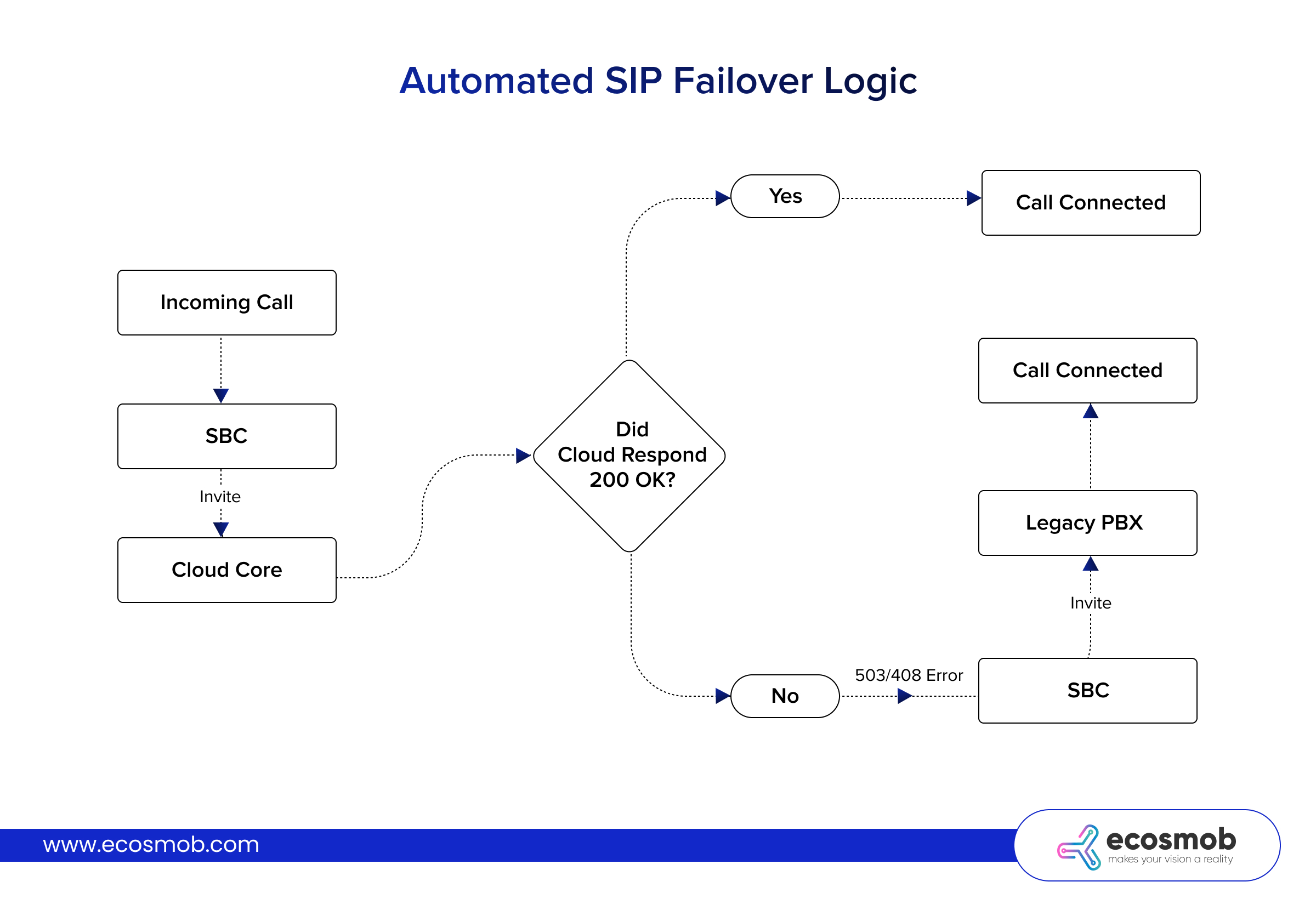
Configure the SBC with “Route Groups” that prioritize the cloud path but retain the legacy path as a backup.
- Primary Route: Cloud SIP Core.
- Secondary Route: Legacy PBX.
- Trigger: If the cloud responds with 503 Service Unavailable, 408 Request Timeout, or 500 Server Internal Error, the SBC automatically attempts the Secondary Route.
This results in a call setup delay of approximately 1–2 seconds, but the call completes successfully via the legacy infrastructure. This automated failover protects availability without requiring immediate engineering intervention.
 AI-Enhanced Rollback
SBC failover handles hard failures (503/408 errors), but connected calls with poor quality silently hurt users. AI-enhanced rollback detects these “soft failures” (high jitter, packet loss, one-way audio) and shifts traffic proactively.
How AI rollback works:
- Monitors RTP metrics across migrated users during parallel operation
- Learns baseline call quality per region/endpoint during pilot phase
- Detects quality degradation patterns before complaints arrive
- Shifts affected traffic back to the legacy infrastructure gradually
This gives you rollback, which isn’t just fast, it’s intelligent. Users experience seamless quality while engineers fix cloud issues, maintaining trust during the entire SIP migration plan.
Compliance Risks and Hidden Costs of SIP Migration
Beyond technical connectivity, migration impacts regulatory compliance and operational budgets.
Compliance Revalidation
E911/Emergency Services
Legacy PBXs are often hard-coded to physical locations. Cloud endpoints are nomadic. You must implement dynamic E911 solutions that update the user’s location based on their current subnet or application input.
Call Recording
Financial institutions subject to MiFID II or PCI-DSS must ensure continuous recording. Cloud encryption (SRTP) can break legacy port-mirroring recorders. Ensure your call recording solution is compatible with the new architecture before migrating users.
Hidden Costs to Budget For
- Parallel Licensing: You will likely incur maintenance costs for the legacy hardware and subscription fees for the new cloud platform simultaneously during the transition period.
- Bandwidth Hairpinning: Legacy calls often stayed on the LAN. Cloud calls traverse the internet. This increases egress bandwidth consumption and may require SD-WAN capacity upgrades.
- Transcoding Resources: Legacy endpoints may utilize G.729, while cloud platforms prefer Opus or G.711. If your SBC does not have sufficient transcoding capacity, CPU utilization will spike, causing audio degradation.
Ecosmob Expert Tip
Many enterprises assume migration requires porting numbers to a new cloud carrier. This is risky and slow. Instead, keep your existing carrier trunks terminated at your SBC. This allows you to migrate the internal platform (PBX to Cloud) without touching the external connectivity.
Once the platform is stable, you can look at changing carriers separately.
This isolation of variables is the key to a stable migration.
Moving from hardware-based legacy systems to a cloud-native architecture is rarely blocked by protocol incompatibility. The protocols (SIP, RTP) remain largely the same. The primary risk is operational disruption.
By adopting a parallel operation strategy and utilizing your SBC as a stable anchor, you eliminate the high risks. This approach transforms a migration from a high-stress emergency into a manageable, incremental checklist.
The goal is a transition so smooth that your users remain unaware of the underlying infrastructure change.
Ready to design a zero-downtime migration strategy?
FAQs
What is the biggest risk in migrating legacy SIP to the cloud?
The most significant risk is a lack of "Feature Parity." Legacy systems often have decades of custom configurations (complex hunt groups, analog paging, door phones) that cloud platforms may not support natively. Migrations fail when business workflows dependent on these features are broken.
What is a realistic timeline for enterprise SIP migration?
For an enterprise with 5,000+ users, a realistic timeline is 6 to 12 months. This includes a Pilot phase (1 month), a Region 1 rollout (2 months), and subsequent accelerated rollouts. Compressing this timeline often leads to rollbacks due to overlooked edge cases.
How does cloud migration impact Voice Quality of Service (QoS)?
Cloud migration introduces variable latency as traffic traverses the public internet or SD-WAN instead of dedicated MPLS. To maintain quality, implement DSCP tagging on the local network and consider "Direct Connect" or private peering options with your cloud provider to bypass the public internet.
Why is SBC Anchoring superior to DNS-based migration?
DNS changes rely on propagation, which can take hours to update across the internet. If a rollback is needed, you are stuck waiting for caches to clear. SBC Anchoring happens at the network layer; a routing rule change is instant, guaranteeing immediate rollback capabilities.
Do you need to change your SIP Trunk provider for SIP migration?
No. Using a "Bring Your Own Carrier" (BYOC) model allows you to maintain existing carrier contracts and phone numbers. Your SBC simply terminates the carrier trunk and directs traffic to the new cloud PBX instead of the legacy system.