Voice breaking mid-sentence. Video lagging just enough to feel awkward. When this happens during your call, you might blame your internet connection. But sometimes, the real problem is timing.
RTP exists because real-time data doesn’t wait for perfection. It prioritizes speed, order, and continuity over retries.
Your VoIP solutions need more than data delivery. Traditional protocols focus on correctness: if something is lost, resend it. If it arrives late, reorder it. That works for emails and downloads, but not for live conversations. By the time a delayed packet arrives, the moment has already passed.
That’s where the RTP comes in. The RTP full form is Real Time Transport Protocol.
This real time transport protocol carries audio and video across IP networks, using sequence numbers and timestamps to help receivers manage playback.
You’ll often encounter RTP in networking when working with voice and video applications. Let’s look at how it works and why it matters for real-time communication.



NAT restrictions and firewall rules can disrupt media even after a call connects. Build an RTP setup that handles complex network environments.

What is RTP (Real Time Transport Protocol)?
Real Time Transport Protocol is a network protocol that carries audio and video data across IP networks in real time. It adds information such as sequence numbers, timestamps, and payload types to media packets. This helps the receiving application identify, organize, and play incoming media correctly.
Unlike protocols designed for transferring files, RTP prioritizes timely media delivery. A voice packet arriving several seconds late is rarely useful in a live conversation.
RTP is commonly used in:
- VoIP calls: Carries voice packets between communicating endpoints.
- Video conferencing: Transports audio and video streams during meetings.
- Live streaming: Delivers real-time media in supported streaming architectures.
- WebRTC applications: Support real-time audio and video communication, with SRTP providing media encryption.
RTP does not guarantee that every packet will arrive or that packets will reach their destination on time. Instead, it provides the information required to manage media playback over networks that may experience packet loss, delay, and jitter.
Real Time Protocol vs Real Time Transport Protocol
The terms real time protocol and Real Time Transport Protocol are sometimes used interchangeably in searches. However, RTP is the specific standardized protocol used to transport real-time audio and video. Here’s how to understand the distinction.
| Real Time Protocol | Real Time Transport Protocol (RTP) |
| A general, informal term for protocols that support real-time communications. | A specific standardized protocol for transporting real-time media. |
| Does not identify one particular protocol. | Defined in RFC 3550 |
| Can refer broadly to technologies supporting time-sensitive data exchange. | Carries audio and video packets with sequence numbers and timestamps |
| May describe different real-time communication mechanisms. | Commonly operates over UDP in VoIP and streaming applications. |
In short: Real-time protocol is a broad description, whereas Real Time Transport Protocol is a specific protocol designed for real-time media transport.
But where does RTP fit into your network, and how does it move media between devices?
What is RTP in Networking and How Does It Work?
RTP carries real-time audio and video over IP networks, usually using UDP (User Datagram Protocol). It works alongside RTCP for media feedback and SIP for session setup.
When you make a VoIP call or join a video conference, several protocols work together to move your media from one device to another. RTP handles the actual audio and video transport, while other protocols manage the connection and provide feedback.
I find it easiest to understand RTP in networking by looking at where it sits in the communication stack.
Where Does RTP Fit in the IP Network Stack?
RTP operates above the transport layer and typically runs over UDP, which carries its packets across IP networks. This combination helps minimize delivery delays, making it suitable for real-time voice and video.
Here’s how the layers work together:
- Application layer: The application generates audio or video data and uses RTP to organize it into media packets.
- Transport layer: UDP carries RTP packets between endpoints without waiting for retransmissions.
- Network layer: IP routes those packets across the network to their destination.
- Link layer: The underlying network technology moves packets across each individual connection.
The typical packet flow looks like this:
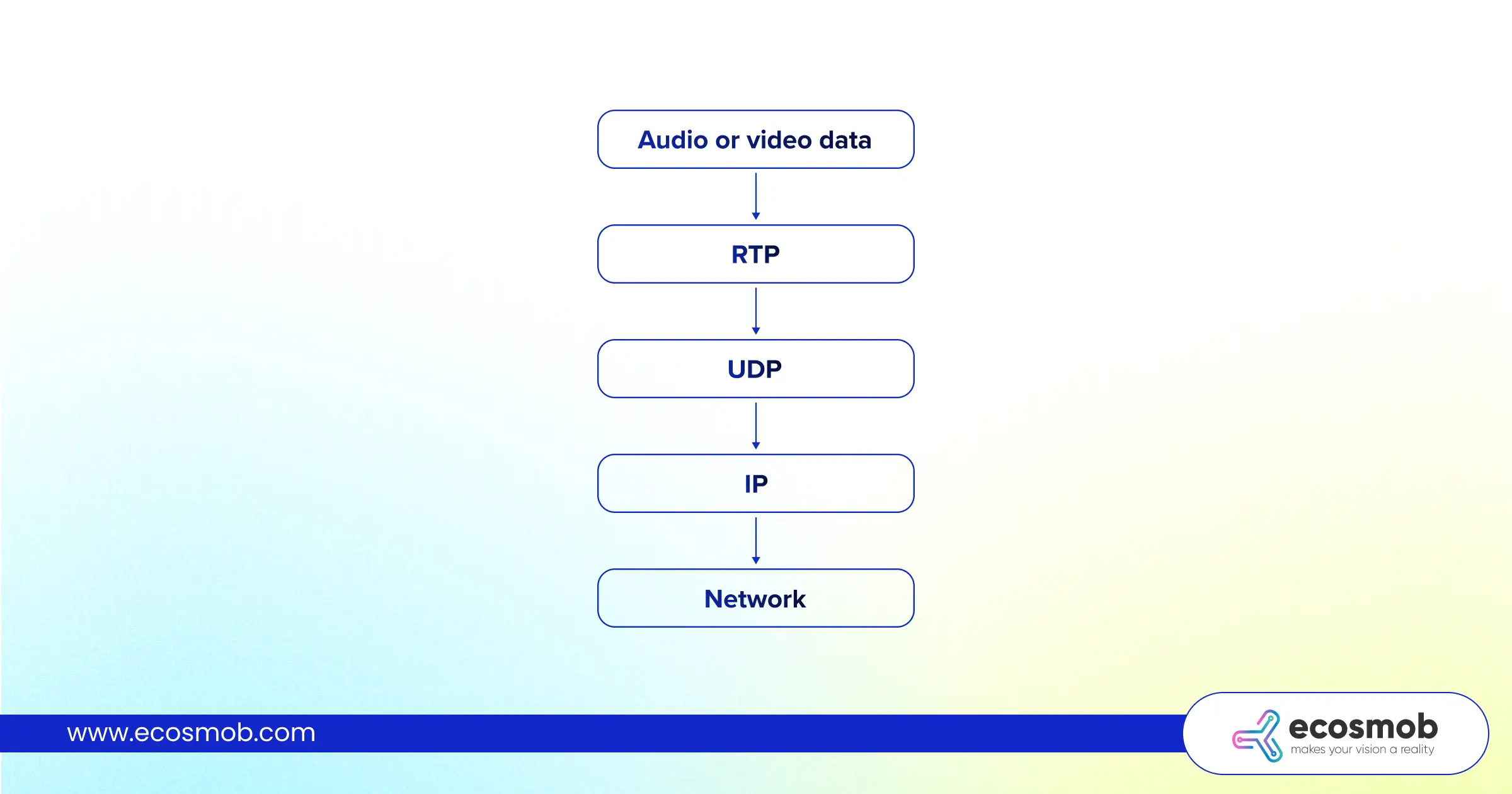
UDP does not guarantee packet delivery or ordering. RTP adds sequence numbers and timestamps so the receiving application can detect packet loss, identify packet order, and manage playback timing.
Which Ports Does RTP Use?
RTP does not use one fixed port number for every call. Instead, endpoints typically negotiate media ports during session setup, often through Session Description Protocol (SDP).
In traditional RTP configurations, an RTP stream commonly uses an even-numbered UDP port, while its associated RTCP stream uses the next odd-numbered port. However, this is not a universal requirement. RTP and RTCP can also share a port through RTP/RTCP multiplexing.
This matters when you configure firewalls, NAT traversal, or Session Border Controllers (SBCs).
An SBC helps manage media traffic and secure communication across network boundaries. These capabilities are also among the reasons why you should have an SBC in your VoIP phone system, particularly when managing calls across different networks.
If your network blocks the negotiated media ports, a call may connect successfully but still have one-way audio or no audio at all.
How Do RTP, RTCP, and SIP Work Together?
RTP, RTCP, and SIP handle different parts of a real-time communication session. They complement each other rather than replace one another.
| Protocol | Primary role |
| SIP | Establishes, manages, and terminates communication sessions. |
| RTP | Transports audio and video packets between endpoints. |
| RTCP | Reports media quality information, including packet loss, jitter, and timing data. |
For example, when you start a VoIP call, SIP protocol signaling helps establish the session, while SDP communicates media parameters, including the RTP ports and codecs. RTP then carries the audio packets, while RTCP provides feedback about transmission quality.
This separation allows your communication system to manage call signaling and media delivery independently. Understanding these roles also makes it easier to troubleshoot audio delays, packet loss, and one-way media issues.
Next, let’s look at how RTP handles media packets from sender to receiver.
How Does RTP Work?
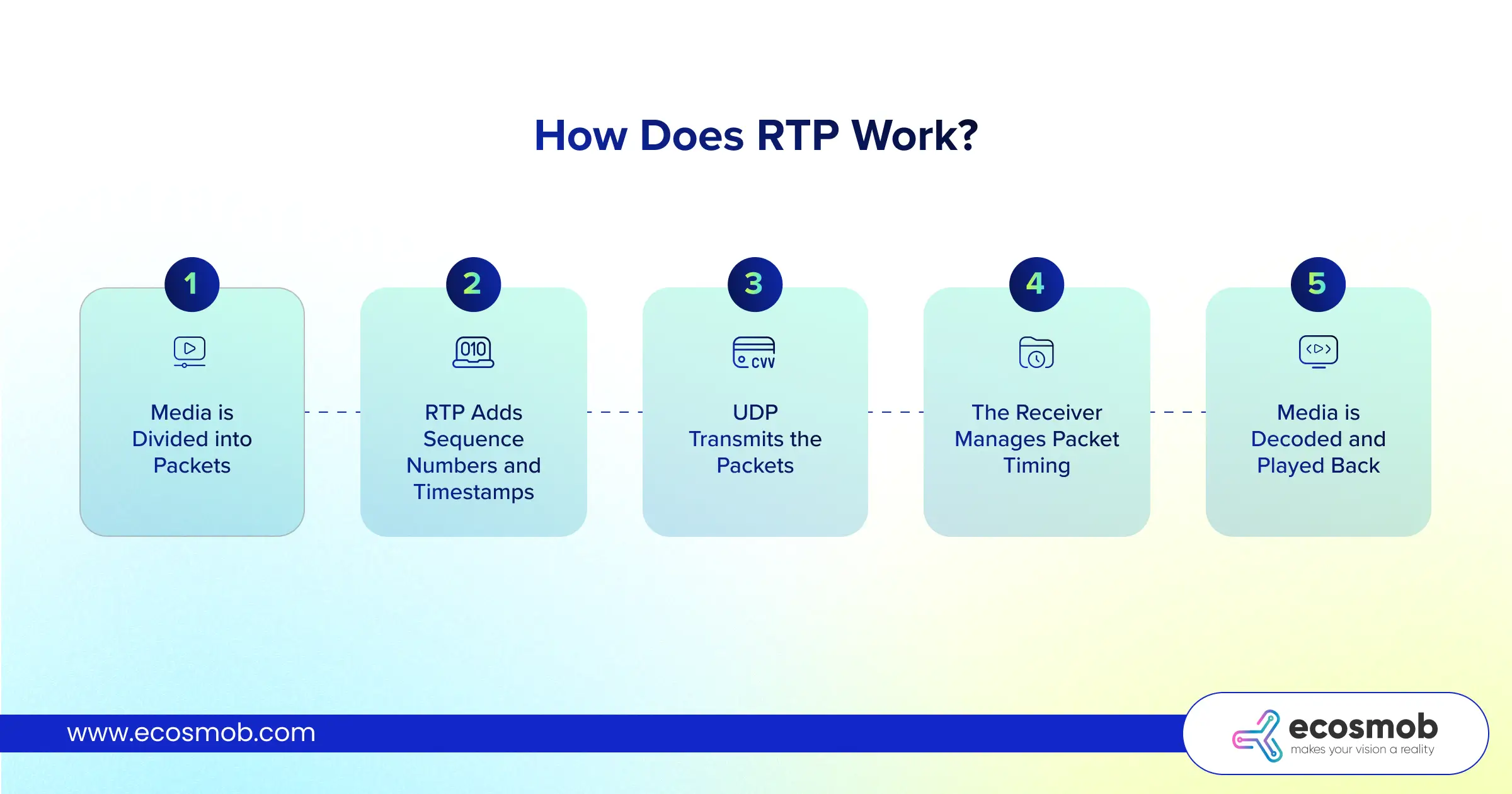
RTP breaks audio and video into packets, adds timing and sequence information, and helps the receiver reconstruct the media in the correct order.
When you speak during a VoIP call or share video in a conference, your media doesn’t travel as one continuous stream. It moves in smaller packets. RTP adds the information needed to identify and manage these packets during transmission.
Here’s how the process works:
1. Media Is Divided into Packets
At the sender’s end, audio or video data is encoded and divided into smaller packets. Each packet carries a portion of the media, making it easier to transmit across the network.
2. RTP Adds Sequence Numbers and Timestamps
RTP adds a header to each packet containing information such as:
- Sequence number: Helps the receiver identify packet order and detect missing packets.
- Timestamp: Indicates when the media sample should be played relative to the stream’s timing.
- Payload type: Identifies the media format being carried.
- SSRC: Identifies the source of the RTP stream.
These fields help the receiving application understand how the media packets relate to one another.
3. UDP Transmits the Packets
RTP packets are typically carried over UDP, which prioritizes low-latency delivery rather than waiting for lost packets to be retransmitted.
This is useful for live communication because a late audio packet may be less useful than a missing one.
4. The Receiver Manages Packet Timing
Packets may arrive late, out of order, or with varying delays. The receiving application uses sequence numbers, timestamps, and a jitter buffer to manage these variations before playback.
5. Media Is Decoded and Played Back
The receiver reorders available packets, processes the media, and passes it to the decoder for playback. Missing packets may still affect the output, but RTP itself does not guarantee their recovery.
What happens when hundreds or thousands of these media streams run simultaneously?
Your system must handle more than individual packet delivery. It also needs enough media-processing capacity and network resources to support concurrent calls. This is where a well-planned RTP scaling architecture to handle concurrent media streams becomes important.
The key takeaway: RTP organizes media for real-time delivery, while the receiving application handles packet timing and playback.
Next, let’s look at how RTP supports live audio and video streaming.
What is RTP Live Streaming and Where Is It Used?
In short, RTP live streaming enables the delivery of audio and video as they are captured, making it useful for applications where playback delays can disrupt the experience.
When you watch a live broadcast, join a video meeting, or make a VoIP call, you expect the media to reach you with minimal delay. RTP supports this by carrying audio and video packets between the sender and receiver in real time.
Unlike on-demand streaming, live communication depends on keeping transmission delays low. This demand is reflected in the global Web Real-Time Communication market, valued at USD 8.7 billion in 2024 and projected to reach USD 81.1 billion by 2030, growing at a CAGR of 45.7%.
RTP provides timing and sequence information to help receiving applications process incoming media without waiting for the entire stream.
1. Live Audio and Video Communication
RTP is widely used in applications that require continuous audio and video delivery, including:
- VoIP calls: Carries voice packets between callers to support real-time conversations.
- Video conferencing: Transports audio and video streams between participants.
- Live broadcasts: Delivers live media feeds to receiving applications and compatible streaming systems.
For example, during a video conference, RTP carries the audio and video streams while the receiving application manages packet timing and playback. This helps maintain synchronization, even when packets experience different network delays.
2. IPTV and Media Broadcasting
Internet Protocol Television (IPTV) uses IP networks to deliver television content. RTP can carry live audio and video streams in these environments, often over UDP.
Broadcasters and service providers can use RTP to transport media from distribution systems to receiving devices. RTCP may also provide feedback about packet loss and transmission quality, helping operators monitor stream performance.
3. WebRTC-Based Real-Time Communication
WebRTC supports real-time audio and video communication directly between browsers and applications. It uses RTP-based media transport, with SRTP providing encryption for media streams.
If you’re building a browser-based calling or conferencing application, WebRTC handles much of the connection setup and media negotiation. Its flexibility makes WebRTC video conferencing in different industries possible, from healthcare consultations and online education to remote collaboration. RTP-based transport carries the actual media once the session is established.
RTP live streaming is useful wherever audio and video need to reach their destination with minimal delay, from everyday calls to large-scale media delivery.
Next, let’s look at the RTP header and the information it carries in every packet.
What is the RTP Header Format?
The RTP header format is a structured set of fields added to each RTP packet that enables correct sequencing, timing, identification, and decoding of real-time audio and video streams.
Think of it as a compact control layer riding with every packet, quietly ensuring that what you hear and see arrives in the right order, at the right time, and in the right format.
Key Fields in the RTP Header:
- Version – Indicates the RTP version (typically version 2), ensuring compatibility between sender and receiver.
- Sequence Number – A continuously incrementing number assigned to each packet.
- Timestamp – Represents the exact moment the packet was generated in the media stream.
- SSRC (Synchronization Source) – A unique identifier for each media stream in a session.
- Payload Type – Defines the codec used for encoding the media (audio/video format).
- Padding (P) – Indicates whether padding bytes are added after the media payload.
- Extension (X) – Signals the presence of an optional header extension.
- CSRC Count (CC) – Specifies the number of contributing source identifiers.
- Marker (M) – Marks significant events in the media stream, depending on the payload format.
How RTP Header Fields Support Media Delivery
Each field serves a specific purpose during transmission and playback.
- Sequence numbers: Help the receiver detect missing packets and arrange received packets in sequence.
- Timestamps: Help maintain the correct playback timing, especially when packets experience network delays.
- Payload type: Tells the receiver how to interpret the media data.
- SSRC: Helps distinguish between different media sources in a session.
These fields do not guarantee packet delivery. They give the receiving application the information it needs to manage the media stream.
Next, let’s look at how jitter buffers handle variations in packet arrival times.
What is a Jitter Buffer in RTP Streaming?
In short, a jitter buffer temporarily stores incoming RTP packets to manage variations in arrival times. It helps maintain steady audio and video playback despite network jitter.
RTP packets may not always arrive at equal intervals. Network congestion, routing changes, and varying network delays can cause some packets to arrive later than others.
Without a mechanism to manage these variations, you may experience choppy audio, gaps, or uneven video playback. A jitter buffer helps reduce these disruptions by briefly holding incoming packets before playback.
How Does a Jitter Buffer Work?
A jitter buffer follows a simple process:
- Receives RTP packets: It collects incoming packets from the network.
- Stores packets temporarily: It holds them for a short period to account for differences in arrival times.
- Reorders packets: It uses RTP sequence numbers and timestamps to help arrange packets for playback.
- Delivers media for playback: It releases packets at a steady rate for decoding and playback.
Types of Jitter Buffers
RTP applications generally use two types of jitter buffers:
- Fixed jitter buffer: Uses a predefined buffering delay. It offers predictable playback timing but may not adapt well to changing network conditions.
- Adaptive jitter buffer: Adjusts its buffering delay based on observed network jitter. It can balance playback continuity against added latency.
An adaptive buffer can help when network conditions fluctuate. However, increasing the buffer size also adds delay, which can affect interactive conversations.
A jitter buffer helps manage packet timing, but it cannot recover every lost packet or eliminate network congestion.
Next, let’s look at how SRTP protects RTP media during transmission.
What is SRTP and How Does It Secure RTP Streaming?
In short, Secure Real-Time Transport Protocol (SRTP) protects RTP media streams through encryption, message authentication, and replay protection. It helps keep voice and video communication private and secure during transmission.
RTP handles real-time media delivery, but it does not encrypt the audio or video it carries. Without additional security, media packets could be exposed to unauthorized access or tampering.
SRTP addresses this gap by adding security mechanisms to RTP. It is commonly used in VoIP calls, video conferencing, and WebRTC applications.
How Does SRTP Work?
SRTP applies several security measures to RTP packets:
- Encryption: Protects media content from unauthorized viewing or listening.
- Authentication: Helps verify that packets come from an authorized source.
- Integrity protection: Detects whether media packets have been modified during transmission.
- Replay protection: Prevents attackers from capturing and retransmitting previously sent packets.
These mechanisms help secure media without changing RTP’s core role in transporting real-time audio and video.
RTP vs SRTP
| Feature | RTP | SRTP |
| Media delivery | Transports real-time audio and video | Transports real-time audio and video securely |
| Encryption | Not provided by default | Encrypts media payloads |
| Authentication | Not provided by default | Supports authentication and integrity protection |
| Replay protection | Not provided by default | Supports replay protection |
| Common use | Basic real-time media transport | Secure VoIP and video communication |
Where Is SRTP Used?
SRTP is widely used in applications where media privacy matters.
- VoIP systems: Protects voice packets exchanged during calls.
- Video conferencing: Secures audio and video streams between participants.
- WebRTC applications: Uses DTLS-SRTP to establish keys and secure media communication between endpoints.
RTP keeps media moving, while SRTP adds protection to that media during transmission. Next, let’s explore the benefits RTP brings to real-time communication systems.
RTP and SRTP explain how media travels and stays protected.
But how do VoIP platforms manage these media streams during actual calls? Let’s look at FreeSWITCH and Kamailio.
How RTP Works with FreeSWITCH and Kamailio
In short, FreeSWITCH handles media processing and RTP streams, while Kamailio primarily manages SIP signaling and call routing. Together, they can support flexible VoIP architectures.
RTP plays an important role in VoIP platforms such as FreeSWITCH and Kamailio-based deployments. However, these platforms handle different parts of the communication process.
1. RTP Media Handling in FreeSWITCH
FreeSWITCH is a media server that processes real-time audio and video streams. During a call, it can receive RTP packets, process media, and send streams to other endpoints or media servers.
Depending on your call architecture, FreeSWITCH can support:
- Media bridging: Connects media streams between call participants.
- Transcoding: Converts media between supported codecs when endpoints use different formats.
- Media processing: Supports functions such as conferencing, recording, and playback.
- RTP stream management: Handles media transport between connected endpoints and the media server.
2. How Kamailio Works with RTP
Kamailio is primarily a SIP server used for call routing, registration, and session management. It does not process RTP media by default.
Instead, it can work with media components such as RTPengine to manage media traffic. For example, RTPengine can relay RTP streams, assist with NAT traversal, and support media handling when endpoints cannot exchange packets directly.
A typical deployment may use Kamailio for SIP signaling and RTPengine or FreeSWITCH for media-related functions, depending on the architecture.
3. Building RTP-Based VoIP Architectures
When you combine these components, you can build flexible communication systems that separate signaling from media handling. This makes it easier to manage call routing, media processing, and network requirements independently.
Your architecture should account for codec compatibility, RTP port ranges, NAT traversal, media security, and concurrent stream capacity. These decisions are important when planning real-time communication development for growing communication workloads.
The right division of responsibilities helps your VoIP platform handle media efficiently while keeping signaling and media infrastructure manageable.
With these components working together, you have a clearer picture of how RTP supports real-time communication. Let’s recap what matters most.


A connected call means little if users can’t hear each other clearly.
Make every media stream count with a more reliable RTP setup.
Recap…
RTP keeps real-time media moving through packet sequencing, timestamps, and efficient transport. With jitter buffers, SRTP, and platforms like FreeSWITCH and Kamailio, you can build secure, scalable communication systems.
But getting these components right requires more than understanding the protocol. Ecosmob brings the expertise to design and develop robust real-time communication solutions.
Don’t let media handling issues limit your platform’s next stage of growth. Let’s build an architecture ready for what’s next.
Frequently Asked Questions
RTP stands for Real-Time Transport Protocol. In telecom, it carries audio and video data across IP networks, supporting real-time applications such as VoIP calls and video conferencing.
RTP typically uses UDP (User Datagram Protocol) because it supports low-latency media delivery without waiting for packet retransmissions. However, RTP is transport-independent and can also operate over other suitable transport protocols.
RTP transports real-time audio and video packets, while RTCP provides feedback about the quality of media delivery. RTCP reports information such as packet loss, jitter, and timing to help applications monitor and manage communication quality.
RTP transports real-time audio and video but does not provide built-in encryption. SRTP adds security features such as encryption, authentication, integrity protection, and replay protection to help secure media streams.
RTP does not use a fixed port number. Its media ports are typically negotiated during session setup through SDP. In traditional configurations, RTP commonly uses an even-numbered UDP port, with RTCP using the next odd-numbered port. RTP and RTCP can also share a port through multiplexing.