Your voicebot answers correctly. It just answers too late.
And that half-second pause is quietly killing trust, conversions, and call deflection, one caller at a time.
Most teams try to fix this by changing the AI. That’s rarely the real issue. The delay usually comes from the factors affecting latency in real-time voice AI conversations, speech recognition speed, response generation, audio buffering, or poor scaling under load.
To a customer, even a one-second pause feels awkward. Two seconds feel broken. That’s often all it takes for engagement to drop.
The good part?
You don’t always need a full rebuild to reduce lag in AI voicebot solutions. Some delays are fixable. Others are baked into the architecture, and that’s when it makes more sense to fix voicebot delay by replacing the right pieces.
Let’s break down what’s really slowing your voicebot down, and what you can actually do about it.
How Voicebot Latency Affects Customer Experience and Business Revenue
A slow voicebot doesn’t just annoy users; chronic issues like jitter and latency quietly bleed your business from multiple sides at once. The damage compounds fast, and most teams don’t realize how expensive it’s getting until churn, complaints, and support costs spike.
First, your first-call resolution drops.
When users face delayed replies, broken turn-taking, or timing mismatches, they repeat themselves, interrupt the bot, or quit midway. The bot fails to capture intent cleanly, errors increase, and what could’ve been solved in one call spills into callbacks, escalations, or live agent transfers. That instantly inflates your operational cost per interaction.
Second, call abandonment shoots up.
Humans have a very low tolerance for silence in conversations. Even short pauses feel longer on a phone call. When users sense delay, they hang up, especially in sales, payments, healthcare, and urgent support. Every abandoned call is lost revenue, lost data, and often a lost customer.
Third, your agent workload quietly explodes.
A slow bot pushes more calls to human agents as fallbacks. That kills the very ROI your voicebot was supposed to deliver. Teams then hire more agents to handle overflow, which means:
- Higher staffing costs
- More queue pressure
- Lower agent morale dealing with already-frustrated callers
You end up paying twice, for the bot and for the human backup it was meant to reduce.
Fourth, your brand takes a direct credibility hit.
Customers don’t say, “Your AI had high inference latency.” They say, “Your support is broken.” A laggy voicebot feels unreliable, cheap, and untrustworthy. In competitive markets, that image sticks, and it pushes users straight to competitors who simply feel faster and smoother.
Finally, latency creates real compliance risks.
In regulated industries, broken call timing can lead to:
- Missed consent capture
- Failed identity verification
- Incomplete disclosures
- Improper call recordings
That’s not a user experience issue anymore; that’s a legal and regulatory risk.
Now that the business damage of latency is clear, it’s time to break down the actual technical reasons your voicebot is slowing everything down.
What causes Voicebot Latency?
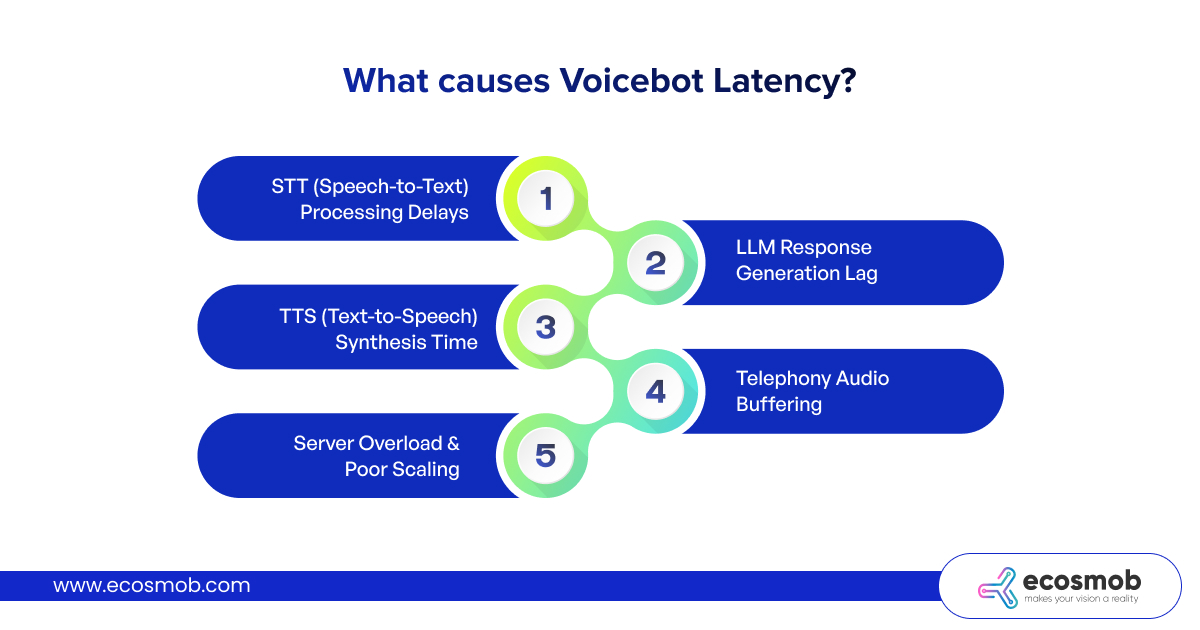 In a normal real-time conversation, a reply comes back within 250 to 500 milliseconds. It feels instant, so the flow stays smooth. Once the response goes past 500 milliseconds, your brain starts to notice the gap. When that pause stretches to a second or more, the conversation feels broken, that’s latency. So what causes Voicebot latency?
Let’s break them down in plain terms.
1. STT (Speech-to-Text) Processing Delays
Everything starts with how fast your system can understand what the caller says. If this step is slow, the entire conversation is already behind.
This usually happens when:
- The STT engine isn’t built for real-time streaming
- The system waits for the user to finish speaking instead of processing mid-speech
- Audio quality is poor, and the model struggles with noise
- STT servers are far from the caller, adding network distance
Even tiny delays here create audible silence. And once the user senses that pause, the conversation already feels broken, no matter how fast the rest of your stack is.
2. LLM Response Generation Lag
After the bot understands the words, it still has to think. This is where many systems slow down the most.
Latency shows up when:
- The model is oversized for simple tasks
- Prompts are bloated with unnecessary context
- The system waits for the full answer instead of streaming partial responses
- Inference servers are overloaded with simultaneous requests
This is where businesses often make the wrong move by upgrading to even bigger models, when what they really need is smarter prompt design, response streaming, and proper model sizing.
3. TTS (Text-to-Speech) Synthesis Time
Once the bot knows what to say, it still has to generate audio. And this stage adds more delay than most teams expect.
Common issues include:
- Heavy, ultra-realistic neural voices that take longer to render
- Long responses are processed in one big chunk instead of small streams
- No caching for common phrases like greetings or confirmations
- TTS engines running on weak infrastructure
High-quality voices matter, but when realism starts slowing response time, users feel the lag instantly. Speed always comes before polish in real conversations.
4. Telephony Audio Buffering
Even if your AI stack is fast, your calls can still feel slow because of how audio moves across the network.
Latency creeps in when:
- The wrong audio codecs are used
- Networks suffer from jitter or packet loss
- SIP or WebRTC routing takes long, inefficient paths
- Echo cancellation and noise suppression add extra buffering
This is one of the most ignored causes of voicebot delay. Many teams tune AI endlessly while the real latency lives inside the call transport itself.
5. Server Overload & Poor Scaling
A voicebot that feels fast during testing can collapse under real traffic.
This happens when:
- STT, LLM, and TTS fight for the same limited compute resources
- There’s no autoscaling during sudden call surge chaos
- Cold starts slow everything down when new servers spin up
- Call queues grow faster than the system can process them
This is where systems shift from “slightly slow” to “completely unusable” in minutes, and where agent fallback suddenly explodes.
Once you see how many moving parts shape response time, one thing becomes obvious:
Voicebot latency isn’t a single bug to patch. It’s a system-level failure that needs system-level fixes.
And until those layers are fixed together, all the tuning in the world won’t stop the lag.
Now that you know where the slowdown actually comes from, the next step is tackling each of those layers the right way, without breaking what already works.
How to Reduce Lag in Voicebot Systems Step by Step
Once you know why your voicebot is slow, the next move is making it faster without tearing everything down on day one. These are the practical steps most teams start with, the ones that can quickly shave off a few hundred milliseconds and make conversations feel less painful. But they all have limits, and you need to know where those limits are.
1. Codec and Audio Optimization
If the audio layer is messy, everything on top of it will feel slow, no matter how “smart” your AI is.
Start by:
- Using the right codecs for real-time voice instead of whatever default your system shipped with
- Reducing unnecessary transcoding between systems
- Cleaning up jitter, packet loss, and echo as much as possible at the network and telephony level
This doesn’t make your AI think faster, but it does remove a lot of dead air caused by buffering and audio correction in the background.
2. Tune STT and TTS Engines for Real-Time
Next, tighten the “listen” and “speak” layers.
For STT (Speech-to-Text):
- Switch to streaming STT instead of waiting for the user to finish speaking
- Improve audio quality at the source (mics, noise filters, input gain) so the model doesn’t struggle
- Bring STT closer to the user geographically where possible
For TTS (Text-to-Speech):
- Prefer fast, high-quality voices over ultra-perfect, heavy ones that take too long to render
- Stream speech in chunks so the bot starts talking while the rest of the response is still being generated
- Cache common sentences like greetings, confirmations, and compliance statements
This step alone often makes the bot feel “snappier” without any major architectural change.
3. Cache Frequent Intents and Responses
Not every interaction needs live reasoning.
Identify:
- High-volume, repetitive questions
- Standard flows like balance checks, order status, OTP confirmations, and appointment reminders
Then:
- Prebuild responses or partial flows for those
- Cache results where it’s safe and predictable
For these use cases, your voicebot shouldn’t be “thinking from scratch” every time. Caching takes load off your AI stack and removes milliseconds you don’t need to spend.
4. Right-Size Your Models Instead of Overbuilding
Most teams overestimate how much model power they actually need.
You can usually:
- Move simple flows off huge LLMs and onto smaller, faster models or intent engines
- Strip prompts of fluff and excess context the model doesn’t truly need
- Stream partial answers instead of waiting for the full response before speaking
The goal is not “biggest model wins.” The goal is: good enough intelligence at low enough latency that the call feels like a conversation, not a loading screen.
5. Scale Infrastructure Before It Starts Choking
A voicebot that works fine in QA can completely collapse in production if the backend can’t keep up.
You’ll need to:
- Separate STT, LLM, and TTS workloads so they’re not fighting for the same compute
- Set up autoscaling for peak traffic, not just average volume
- Reduce cold starts by keeping critical services warm
- Monitor queue build-up and response time in real time, not just in reports later
Scaling doesn’t magically fix bad design, but it stops small delays from turning into total breakdowns under load.
The Hard Truth: These Are Fixes, Not a Cure
All of this, codecs, tuning, caching, model resizing, and scaling, will make your current system faster. In some environments, they’re enough to get you back to “acceptable” performance.
But here’s the part most vendors don’t say out loud:
If your underlying architecture wasn’t designed for real-time, low-latency voice from day one, these improvements will eventually hit a ceiling.
You can optimize pieces forever and still end up with:
- A bot that’s “better than before” but never truly real-time
- Latency that comes back during traffic spikes
- A system that’s too complex and fragile to evolve
At that point, it stops being a tuning problem and becomes an architectural decision: keep patching, or redesign for real-time performance end to end.
If you’ve tried these optimizations and the lag keeps creeping back, that’s not a tuning problem anymore, it’s a structural one. And there are clear warning signs when you’ve reached that point.
⚠️ When Optimization isn’t Enough – Signs You Need a Rebuild
- Fixes on top of fixes → That’s duct tape, not performance.
- Built for IVR, not real-time AI → It was never meant to be fast.
- Stuck with slow vendors → Your speed depends on their roadmap.
- AI bolted onto legacy telecom → Ferrari engine, bullock cart.
- Speed vs compliance fight each other → The foundation is wrong.
Short version: If this sounds like your setup, stop tuning. Start rebuilding. 😄
Once you accept that performance problems are architectural, the next logical step is to understand what a voicebot built for real-time performance actually looks like under the hood.
How a Modern Low-Latency Voicebot Architecture Works
Fast voicebots don’t come from luck, upgrades, or expensive models. They come from one thing: architecture designed for real-time from the ground up. Here’s what that actually means in practice.
1. Real-Time Media Handling
Slow systems treat audio like a file: record first, process later.
Fast systems treat audio like a live stream.
Modern architectures:
- Stream audio the instant the user starts speaking
- Process speech while it’s still coming in
- Start generating responses before the user even finishes the sentence
This alone removes that awkward “dead air” that makes bots feel broken.
2. Edge vs Cloud Processing
If your voice, STT, LLM, and TTS are all sitting far from your users, latency is unavoidable.
Modern stacks:
- Push STT and media processing closer to the caller (edge)
- Keep heavy reasoning in the cloud only where it truly adds value
- Route based on geography instead of one-size-fits-all regions
Less distance = less waiting. Physics still wins.
3. Direct AI Inference vs API Relay Chains
Every extra API call is another delay waiting to happen.
Slow setups: Voicebot → Middleware → Vendor A → Vendor B → Vendor C → Back to Voicebot
Modern setups: Voicebot → Direct inference → Response stream
Fewer hops. Fewer handoffs. Fewer surprises under load.
4. Failover Logic & Fallback Routing Built In
Low latency isn’t just about being fast when everything works.
It’s about staying fast when things break.
Modern architectures include:
- Automatic failover between STT, LLM, and TTS engines
- Carrier-level routing backups
- Live agent fallback without dumping the full context
The call doesn’t freeze, restart, or collapse just because one component hiccups.
5. Intelligent Silence Handling & Barge-In Detection
This is what separates “talking software” from real conversation.
Modern voicebots:
- Detect silence naturally instead of using rigid timeouts
- Allow users to interrupt the bot mid-sentence (barge-in)
- Adjust response speed based on user behavior
This is why fast bots don’t just respond quickly, they feel human.
The Core Difference That Actually Matters
Old systems are built like pipelines:
Listen → Wait → Think → Wait → Speak → Wait
Modern systems run like streams:
Listen, think, and speak at the same time.
That shift, from sequential to parallel, is where real-time performance is actually born.
This single difference changes everything, and it leads directly to one practical choice: repair what you have or replace it.
| Repair Your Voicebot If… | Replace Your Voicebot If… |
| Latency is mild and only shows under peak load | Latency is constant, even at low traffic |
| Your core platform was built for real-time audio | Your system was built for IVR or recordings |
| You control your infrastructure and vendors | You’re locked into slow third-party vendors |
| STT, LLM, and TTS can be upgraded independently | Everything is tightly coupled and fragile |
| Compliance already works without slowing things down | Speed breaks compliance or compliance kills speed |
| You need short-term performance improvement | You need long-term scalability and reliability |
Whichever side of that table you land on, one thing is non-negotiable: the people building your voicebot must actually know how to engineer for speed.
What to Look for in a Low-Latency Voicebot Solution Provider
Choosing the right low-latency voicebot solution provider isn’t about who talks the best AI game. It’s about who can actually deliver fast, stable conversations at scale.
Real-time media expertise, not just AI hype – They should understand live audio, streaming, jitter, and barge-in, not only text-based bots and demos.
Direct telephony integration – Fewer hops between the caller and the AI means fewer chances for delay to creep in.
Custom architecture control – You need flexibility to tune, scale, and adapt for your use case, not a locked box you can’t touch.
Proven latency benchmarks – Real numbers from real call loads, not vague “it’s fast” promises.
Security, compliance, and uptime guarantees – Because speed is useless if your system fails audits or crashes during peak traffic.
Alright, let’s wrap this up with the key takeaways you should walk away with.
The Bottom Line?
Most slow voicebots fail in the long run because they’re patched on top of systems that were never built for real-time conversations. High-performing voicebots work differently, they stream audio live, run STT, AI, and TTS in parallel, and are engineered for speed, scale, and reliability from day one. And the longer businesses delay a real fix, the more they quietly lose in abandoned calls, rising agent load, damaged trust, and missed revenue. At some point, tuning stops being “smart optimization” and starts becoming expensive avoidance.
Here is how Ecosmob can help!
The Ecosmob team redesigns voice AI for real-time performance, not just surface-level speed. For businesses that can’t afford lag, failures, or compliance risks, they offer a safer alternative to plug-and-play bot platforms, custom-built voicebot systems designed for scale, stability, and low latency, delivered as a long-term performance partnership, not just another vendor handoff.
Frequently Asked Questions
Long pauses usually come from delays across multiple layers, slow streaming in Speech-to-Text, oversized AI models taking too long to respond, Text-to-Speech generating audio in one large block, or audio buffering in the telephony layer. In most real systems, the pause isn’t caused by one issue; it’s the result of small delays stacking up across the entire pipeline.
The key is balancing realism with render speed. Use fast neural voices instead of ultra-heavy ones, stream speech in small chunks so playback starts instantly, cache common phrases like greetings and confirmations, and make sure your TTS engine runs on properly sized infrastructure. You don’t need to sacrifice quality; you just need smarter delivery.
Start with the basics: use the right audio codecs, reduce unnecessary transcoding, stabilize network jitter, and simplify SIP or WebRTC routing paths. Also, review echo cancellation and noise suppression settings; over-aggressive tuning often adds hidden buffering. If the transport layer is slow, even the fastest AI will still sound laggy.
You need workload separation and real scaling. Run STT, AI inference, and TTS on independent resources, enable autoscaling for peak traffic (not just average load), minimize cold starts, and monitor queue depth in real time. Systems that share compute across all layers tend to collapse first under heavy call volume.
Autoscaling works best when it’s tied to real performance signals, active sessions, response latency, and queue length, not just CPU usage. Keep baseline capacity warm to avoid cold-start delays, apply burst scaling for traffic spikes, and use geographic routing so traffic is distributed closer to users for lower response time.