












QUICK SUMMARY
⚡ At a Glance
The Problem: Calls and customer data live in separate systems, forcing teams to switch tools and lose context.
What This Covers: How CRM and VoIP integration works, its architecture, key challenges, and build vs buy decisions.
Key Takeaway: CRM and VoIP integration connects conversations with customer data so every interaction is automatically captured and actionable.
Two options: your team juggles five tools to piece together one customer call. Or your VoIP and CRM just… talk. Which one sounds like your business right now?
For many teams, it’s still the first. Sales reps jump between tabs to find customer details, support agents search for call history mid-conversation, and someone eventually logs everything manually.
The result?
Lost context, fragmented customer data, and limited visibility into customer interactions.
This is where CRM and VoIP integration come into play. Although they may never meet, your phone system and CRM work together seamlessly; calls, notes, and customer information remain interconnected automatically.
And today, that’s not just a convenience; modern businesses expect communication to live directly inside their CRM workflows, where customer relationships actually happen.
Next, let’s understand what VoIP CRM integration really means. It goes far beyond click-to-call, connecting calls, customer data, and workflows so everything stays in sync inside your CRM.
If your VoIP and CRM still feel like two systems that “kind of” work together, let’s fix that.
What is CRM and VoIP Integration, and How Does it Work?
CRM and VoIP integration connects your telephony stack (SIP, WebRTC, FreeSWITCH, Asterisk) with your CRM platform (Salesforce, HubSpot, Zoho, etc.) so call events and customer data move between the two systems automatically.
When a call happens, the CRM already knows about it, caller details, call logs, recordings, and interaction history sync in real time. No manual logging. No switching between tools.
In short, CRM and VoIP integration connect communication data with customer records in real time.
What it is NOT!
It’s easy to oversimplify this integration, but here’s what it’s not:
- Not just a click-to-call button inside the CRM
- Not a universal plug-and-play plugin that works with every VoIP setup
- Not a one-time configuration, integrations rely on APIs, webhooks, event handling, and proper data mapping
For UCaaS/CCaaS platform builders: Integration depth depends entirely on how your telephony layer exposes call events. SIP signaling hooks, CDR feeds, and media server APIs are your entry points.
So, how does this connection actually work?
Ever happened?
- Call ends → “Wait, who was that again?”
- Opens CRM →
- Guess →
- Log call anyway
Let’s look at the core architecture behind VoIP and CRM integration.
Core Architecture of VoIP CRM Integration
To understand how VoIP with CRM software works in practice, it helps to look at the integration in a few simple layers. Each layer handles a different part of how call data moves into the CRM.
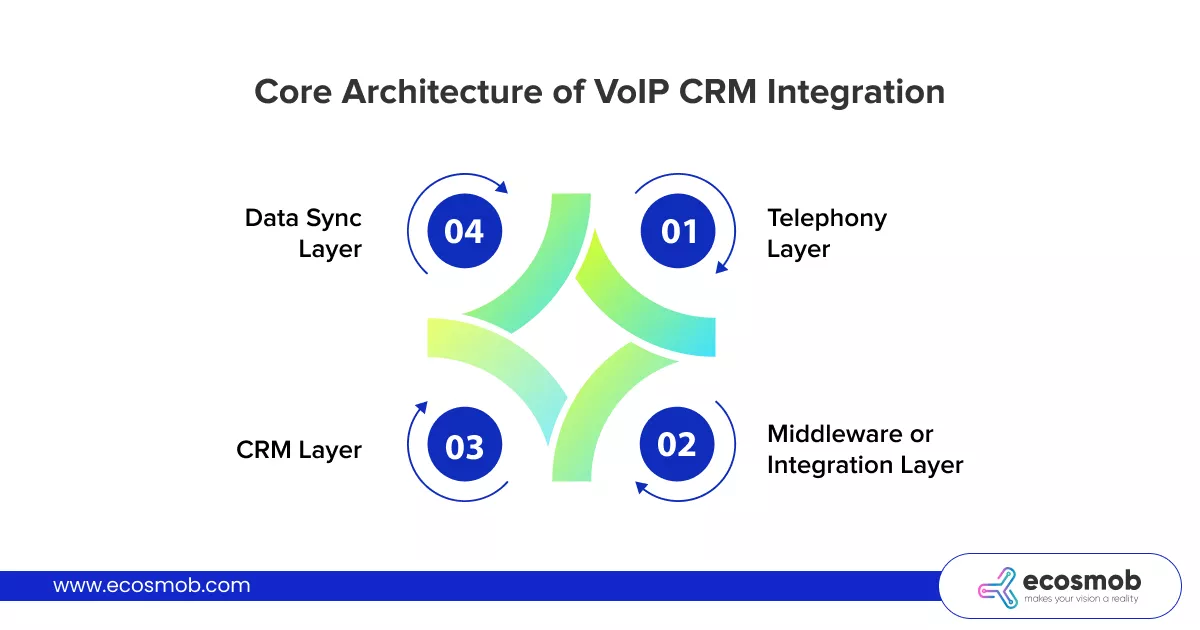 Telephony Layer – This is where calls originate. Platforms like FreeSWITCH, Asterisk, or Kamailio generate call events such as INVITE, RING, ANSWER, and BYE, exposed through ESL, AMI, or SIP headers.
Middleware or Integration Layer – This layer captures call events and translates them into CRM actions via webhooks, REST APIs, or message queues such as Kafka or RabbitMQ.
CRM Layer – CRM platforms like Salesforce, HubSpot, or Zoho receive these events and associate them with the appropriate contact, deal, or ticket records, making CRM and VoIP system integration visible to the user.
Data Sync Layer – Here, supporting data like CDRs, call recording links, and screen-pop triggers are stored and synced so every call interaction becomes part of the customer timeline.
When these layers work together properly, organizations can improve customer management with CRM and VoIP integration by making sure every interaction is captured automatically.
Key Integration Patterns
In most setups, VoIP with CRM software works through a few common workflows:
- Inbound call → CRM lookup → screen pop with customer context
- Post-call webhook → auto-log call details like duration, outcome, and notes
- Click-to-call in CRM → SIP dial request sent to the VoIP server
- Call recording link → attached automatically to the CRM activity timeline
Now that the architecture is clear, let’s see the real business impact of this integration.
How Different Industries Use CRM with VoIP Integration
The fundamentals of CRM with VoIP integration remain the same, but how it’s applied can differ across industries.
UCaaS and CCaaS Platforms
UCaaS and CCaaS providers often run multi-tenant systems where each customer’s call activity syncs with their own CRM instance. This enables agent dashboards that combine live call data with CRM pipeline insights, while call outcomes and dispositions are automatically logged after each interaction. This architecture also makes it easier to connect automation layers, such as AI voicebot in call centers, where voice interactions can trigger CRM updates instantly.
Fintech and Digital Banking
In fintech environments, VoIP with CRM software helps match inbound calls to the right customer account instantly. Call recordings can be attached to compliance records, and unusual call patterns can be flagged in CRM activity logs for fraud monitoring.
Telemedicine Platforms
Telemedicine platforms use CRM and VoIP system integration to link patient calls with their profiles and consultation history. Follow-ups can be triggered through CRM workflows, while secure call logging helps meet compliance requirements like HIPAA, GDPR, etc.
MSPs and System Integrators
For MSPs and system integrators, flexibility is key. Many deploy white-label VoIP and CRM integrations for multiple clients using reusable API layers, adding custom middleware when standard connectors don’t fit a client’s stack.
These examples show what integration can unlock, but the next question most teams face is whether a ready-made connector can deliver this level of flexibility.
Tell us your VoIP stack and CRM, and we’ll help you figure out the integration path.
Why CRM Integration Matters for Contact Center Platforms, Not Just VoIP
Most businesses think of CRM integration as connecting their phone system to Salesforce or HubSpot so agents can see who’s calling. That’s useful — but it’s only half the picture.
When your CRM integrates with a full contact center platform rather than just a basic VoIP phone system, the integration becomes far more powerful. Here’s what changes:
VoIP-only CRM integration gives you:
- Click-to-dial from the CRM
- Automatic call logging (who called, how long, outcome)
- Screen pops showing caller information on inbound calls
- Basic call recording linked to the CRM contact record
Contact center CRM integration adds:
- Intelligent call routing based on CRM data — for example, routing a caller who has an open support ticket directly to the agent assigned to that ticket, or sending a high-value customer to a priority queue based on their CRM account tier
- Omnichannel interaction history — not just phone calls, but also chat, email, SMS, and social media interactions all logged in the same CRM timeline
- Agent performance data synced to CRM — supervisors can see which sales rep closes the most deals from outbound campaigns, or which support agent has the best first-call resolution rate, without leaving the CRM
- AI-powered insights from call data — real-time transcription, sentiment analysis, and automated call scoring that feed directly into CRM records, enriching customer profiles with conversational intelligence
- Automated workflow triggers — when a contact center call ends with a specific disposition (e.g., “interested in upgrade”), the CRM automatically creates a follow-up task, moves the lead to a new pipeline stage, or triggers a nurture email sequence
The difference comes down to depth. A basic VoIP-CRM integration connects calls to records. A contact center CRM integration connects entire customer journeys to records — across every channel, every agent, and every interaction.
If your business runs any kind of customer-facing operation at scale — support teams, sales floors, BPO operations, or multi-channel service desks — you need CRM integration at the contact center level, not just the phone level.
The question then becomes: which companies actually specialize in building this kind of deep integration?
Companies That Specialize in Integrating CRM with VoIP and Contact Center Platforms
The companies in this space fall into two categories: those that offer pre-built SaaS platforms with native CRM connectors, and those that build custom CRM-VoIP-contact center integrations tailored to your specific infrastructure. Here are the leading providers in each category:
1. Ecosmob Technologies (Custom CRM-VoIP-Contact Center Integration)
Ecosmob is a specialist in building custom CRM and VoIP integration solutions that go far beyond pre-built connectors. Using open-source telephony frameworks like Asterisk, FreeSWITCH, and Kamailio, Ecosmob builds CTI (Computer Telephony Integration) middleware that connects your VoIP infrastructure and contact center platform directly to any CRM — whether that’s Salesforce, HubSpot, Zoho, Microsoft Dynamics, or a fully custom CRM.
What makes Ecosmob different is the level of integration depth. Rather than relying on generic API connectors, Ecosmob engineers the integration at the telephony layer — syncing real-time call events, agent state changes, call recordings, and AI-powered analytics directly into CRM workflows. This includes screen pops, click-to-dial, automated call logging, disposition-triggered CRM actions, and real-time dashboards that pull data from both the contact center and CRM simultaneously.
Ecosmob is the ideal choice for telecom operators, BPOs, enterprises, and service providers who run their own VoIP infrastructure and need CRM integration that works with their existing stack — not a replacement for it.
2. Five9 (Enterprise CCaaS with Deep CRM Integration)
Five9 is a cloud contact center platform recognized as a Gartner Leader, known for its deep native integrations with Salesforce, Microsoft Dynamics, Oracle, ServiceNow, and Zendesk. Their CRM integration goes beyond basic call logging — it includes intelligent routing based on CRM data, embedded agent desktops inside the CRM interface, and AI-driven analytics that enrich customer records automatically. Five9 is best suited for large enterprises that want a managed cloud contact center with out-of-the-box CRM connectivity.
3. RingCentral (UCaaS + CCaaS with CRM Connectors)
RingCentral offers CRM integration across both its RingEX unified communications platform and RingCX contact center product. Integrations are available for Salesforce, HubSpot, Microsoft Dynamics, Zoho, and many others. Their RingSense AI engine adds call transcription, sentiment analysis, and automated summaries that sync to CRM records. RingCentral works well for mid-to-large businesses that want both internal communications and contact center operations integrated with their CRM from a single vendor.
4. Talkdesk (CRM-Centric Contact Center)
Talkdesk positions itself as a CRM-centric contact center platform, with particularly strong Salesforce integration. Their Salesforce connector embeds the full contact center agent interface directly within the Salesforce UI, so agents never leave their CRM. Talkdesk also integrates with Zendesk, Microsoft Dynamics, Zoho, and others. It’s a solid choice for companies that use Salesforce as their operational hub and want the contact center to live inside it.
5. Dialpad (AI-First with Native CRM Sync)
Dialpad offers AI-powered business communication with CRM integrations embedded across its calling and contact center products. Their CTI connector embeds a power dialer directly inside Salesforce and HubSpot, and their AI engine provides real-time transcription, coaching, and call scoring that syncs automatically to CRM records. Dialpad is well-suited for small to mid-sized sales teams that want AI-enhanced CRM integration without complex setup.
6. Vonage (API-First CRM Integration)
Vonage Contact Center provides deep CRM integration through APIs and pre-built connectors, with a Premier partnership on the Salesforce AppExchange. Their integration supports intelligent routing based on CRM data, embedded agent desktops, and workforce management tools that sync with CRM analytics. Vonage is a good fit for mid-size businesses that need flexible, API-driven CRM connectivity alongside contact center features.
Custom-Built vs. Pre-Built: How to Decide
Choose a pre-built SaaS platform (Five9, RingCentral, Talkdesk, Dialpad) if your CRM is one of the major platforms (Salesforce, HubSpot, Zoho), you don’t run your own VoIP infrastructure, and you want quick deployment with minimal development work.
Choose a custom-built integration (Ecosmob) if you run your own VoIP switches (Asterisk, FreeSWITCH, Kamailio, OpenSIPS), you use a custom or industry-specific CRM, you need white-label capabilities, you have compliance requirements that demand control over data flows, or the pre-built connectors from SaaS platforms don’t cover your specific workflow needs. Custom integrations also give you full ownership — no per-seat SaaS fees that scale with your headcount.
The real question isn’t just “does this platform integrate with my CRM?” — it’s “does the integration handle the specific data flows, routing rules, and automation my business actually needs?”
Build vs Buy Decisions in VoIP CRM Integration
Teams often face a simple question when planning CRM and VoIP system integration: Should they rely on an off-the-shelf connector or build a custom integration that fits their telephony stack?
| Factor | Build (Off-the-shelf integration) | Buy (Custom integration) |
| Setup Time | Quick to deploy with minimal configuration | Requires development and testing time |
| Flexibility | Limited to predefined features | Fully customizable to your workflows |
| Telephony Compatibility | Works with selected VoIP platforms only | Can integrate with any stack (FreeSWITCH, Asterisk, Kamailio, etc.) |
| Multi-Tenant Support | Often limited or rigid | Designed to support multi-tenant platforms |
| Workflow Automation | Basic automation features | Advanced automation tailored to business logic |
| Scalability | May struggle with complex deployments | Built to scale with platform growth |
| Long-Term Control | Dependent on the vendor roadmap | Full control over features and upgrades |
In many cases, smaller teams benefit from prebuilt connectors, while telecom platforms and SaaS providers often opt for custom development when their architectures or workflows require deeper integration.
When Custom VoIP CRM Integration Makes More Sense?
You’ll likely need a custom approach when:
- Your VoIP stack runs on FreeSWITCH, Asterisk, Kamailio, or OpenSIPS instead of a hosted PBX
- You’re building a multi-tenant platform where each customer connects to their own CRM instance
- You require bidirectional data sync, not just basic call logging
- Your call flows include AI voicebots, IVR logic, or sentiment analysis that must update CRM records
- Compliance requires specific CDR handling, encryption, or regional data residency
In these scenarios, CRM and VoIP system integration usually needs to be designed around your telephony architecture rather than relying on a standard plugin.
But even the best architecture looks simple on paper, the real challenges start when engineers begin wiring these systems together.
Common Challenges in VoIP CRM Integration Engineers Actually Face
Most blogs talk about the benefits of integration. But when teams actually start building CRM and VoIP system integration, a few technical challenges quickly show up.
Here are some of the issues developers and product teams commonly run into:
Call Event Synchronization Issues – The SIP BYE event may fire before the CRM write process finishes, which can lead to incomplete or missing call records.
Webhook Delivery Reliability – When your SIP server starts sending high volumes of events, CRM webhooks can fail silently or drop requests if retry handling isn’t properly designed.
Call recording storage issues – Temporary recording URLs often expire. The CRM needs a permanent reference or stored link to ensure recordings remain accessible later.
Multi-tenant data isolation – In platform environments, each customer’s data must remain completely separate. One tenant’s call records should never appear inside another tenant’s CRM.
Caller ID formatting inconsistencies – Different carriers format SIP headers differently. If the caller ID isn’t parsed correctly, CRM contact lookups can fail.
Screen-pop latency – Agents expect customer details to appear almost instantly when a call arrives. But API calls, CRM lookups, and event processing can easily push the response time beyond the ideal two-second window.
These are the kinds of practical challenges teams face when implementing VoIP with CRM software in real-world environments, and solving them often requires careful architecture rather than just connecting two systems with a plugin.
And, this is where the capabilities of your VoIP CRM integration partner start to matter.
What to Look for in a VoIP CRM Integration Partner
If you’re considering external development support for CRM and VoIP system integration, it’s important to look beyond generic VoIP experience. A capable partner should understand both the telephony infrastructure and the CRM ecosystem your platform relies on.
Here are a few capability signals worth paying attention to:
Experience with real telephony stacks – Look for teams that have worked directly with FreeSWITCH ESL, Asterisk AMI, or Kamailio event routing, not just hosted PBX APIs.
Proven CRM API integrations – Practical experience integrating with platforms such as Salesforce CTI, HubSpot Calling SDK, or Zoho PhoneBridge demonstrates an understanding of how CRM call workflows operate.
Ability to build custom middleware – Most integrations require an event translation layer. Your partner should be comfortable building middleware with tools such as Node.js, Python, or Go to handle webhooks, event queues, and API communication.
Strong understanding of CDR data handling – Call Detail Records often need to be enriched and forwarded to the CRM in real time, so experience working with CDR structures and call metadata is important.
Multi-tenant architecture expertise – If you’re building a platform for multiple clients, the integration must support separate CRM instances for each tenant without data crossover.
Post-integration support – Even well-designed integrations run into edge cases in production. Ongoing L2 and L3 support ensures issues are diagnosed and resolved quickly as the system scales.
Choosing a partner with these capabilities helps ensure your VoIP with CRM software integration works reliably, not just at launch, but as your platform grows.
 Let’s talk about some familiar names you might have heard when talking about CRM.
Sometimes a 10-minute conversation solves months of integration headaches.
Most Common CRM Platforms
When teams begin planning CRM and VoIP integration, a few CRM platforms come up almost every time, especially when businesses evaluate the best VoIP integrations for Salesforce, HubSpot, or Zoho.
Salesforce is usually the first.
It’s powerful, highly customizable, and widely used by enterprise sales teams. A well-designed VoIP and Salesforce integration can bring call events, recordings, and activity logs directly into Salesforce records, giving teams full context during every interaction.
HubSpot is another popular choice
Especially popular among SaaS companies and growing sales teams. It’s calling APIs and CRM workflows that make it relatively straightforward to connect telephony systems, so calls, notes, and customer timelines stay synchronized.
And then there’s Zoho CRM
Many businesses prefer its flexibility and cost efficiency. With the right setup, VoIP integration with Zoho CRM can automatically log calls, attach recordings, and update customer records without manual work.
While each platform has its own APIs and integration methods, the goal is always the same: making sure every customer conversation is captured where your team already manages relationships.
Now that we’ve explored how VoIP and CRM integrations work, the platforms involved, and the challenges they entail, the only question left is how to bring it all together for your own system.
Ecosmob’s team has delivered VoIP CRM integrations across Salesforce, HubSpot, Zoho, and custom CRMs, built on FreeSWITCH, Asterisk, and Kamailio stacks.
If your stack doesn’t fit a plugin, that’s exactly where we work!
Bottom Line?
At the end of the day, CRM and VoIP integration is about one simple outcome: making sure every customer conversation is connected to the right context.
When your telephony system and CRM truly work together, calls, records, and insights stay in sync. Sales teams get better visibility, support teams resolve issues faster, and operations gain clearer communication data.
For telecom platforms, SaaS companies, and call centers, the real value of VoIP with CRM software isn’t just convenience. It’s building a system where every customer interaction automatically becomes part of the business intelligence your teams rely on every day.
And we at Ecosmob make it possible!
FAQs
What is CRM and VoIP integration?
CRM and VoIP integration connects your phone system with your CRM so call events, logs, recordings, and customer details sync automatically. This ensures every customer conversation is recorded directly inside the CRM without manual input.
How does VoIP CRM integration work?
VoIP CRM integration works by connecting the telephony layer with the CRM through APIs, webhooks, or middleware. When a call occurs, the system sends events such as caller ID, call duration, or recordings to the CRM, where they are automatically logged against the correct contact or record.
What are the benefits of CRM and VoIP integration?
Integrating CRM with VoIP helps teams access real-time customer context during calls, automatically log interactions, reduce manual work, and improve visibility into customer communication across sales and support teams.
Can VoIP integrate with any CRM platform?
Most modern CRM platforms like Salesforce, HubSpot, and Zoho support VoIP integrations through APIs or calling SDKs. However, the complexity of the integration often depends on the telephony stack and the level of customization required.
What challenges occur when implementing VoIP CRM integration?
Common challenges include call event synchronization, webhook reliability, caller ID formatting inconsistencies, screen-pop latency, and maintaining data isolation in multi-tenant systems.
Which companies specialize in integrating CRM systems with VoIP and contact center platforms?
Several companies specialize in this area. Ecosmob Technologies builds custom CTI integrations that connect any CRM (Salesforce, HubSpot, Zoho, custom platforms) with VoIP infrastructure built on Asterisk, FreeSWITCH, or Kamailio, along with full contact center capabilities. For pre-built SaaS solutions, Five9 offers deep Salesforce and ServiceNow integration, RingCentral provides CRM connectors across its UCaaS and CCaaS platforms, Talkdesk embeds the agent desktop directly inside Salesforce, and Dialpad offers AI-powered CRM sync for sales teams. The choice depends on whether you need a custom integration for existing VoIP infrastructure or a managed SaaS platform with native CRM connectors
What is CTI and why does it matter for CRM-VoIP integration?
CTI stands for Computer Telephony Integration. It's the middleware layer that connects your phone system (VoIP) and contact center platform to your CRM software. CTI enables features like screen pops (showing caller info before the agent picks up), click-to-dial (initiating calls from within the CRM), automatic call logging, and disposition-triggered CRM actions. Without CTI, your phone system and CRM operate as disconnected tools agents toggle between screens, manually log calls, and lose context between interactions.
Can I integrate a custom or industry-specific CRM with a VoIP contact center?
Yes, but you'll likely need a custom integration rather than a pre-built connector. Most SaaS contact center platforms offer native connectors only for major CRMs like Salesforce, HubSpot, and Zoho. If you use an industry-specific CRM (healthcare EMR, legal practice management, property management software) or a fully custom-built CRM, a development partner like Ecosmob can build a CTI integration that maps your exact data flows, call routing rules, and workflow triggers between your CRM and VoIP contact center.
What's the difference between a native CRM integration and a custom-built CTI integration?
A native CRM integration is a pre-built connector offered by a SaaS contact center vendor (like Five9's Salesforce integration or Talkdesk's Zendesk connector). It works out of the box but is limited to the features and data mappings the vendor has built. A custom-built CTI integration is engineered specifically for your infrastructure — your CRM, your VoIP platform, your contact center workflows. It offers unlimited flexibility in terms of data flows, routing logic, and automation triggers, but requires development effort. Native works for standard setups; custom works for everything else.
How does AI enhance CRM integration with contact centers?
AI adds an intelligence layer on top of basic call logging. With AI-enhanced CRM integration, call transcriptions are automatically generated and attached to CRM records, sentiment analysis scores each interaction and flags at-risk accounts, automated call scoring evaluates agent performance without manual QA reviews, and conversation insights (competitor mentions, pricing objections, feature requests) are extracted and tagged in the CRM for sales and product teams to act on. These AI features turn your CRM from a record-keeping tool into a real-time intelligence system powered by every customer conversation.