

Have you ever been in a VoIP call where you feel stuck in a time warp, waiting for your words to catch up with the conversation?
Frustrating, isn’t it?
VoIP connection issues, often called lag, are the silent saboteur of seamless communication, and they deserve a head-on approach.
What Is VoIP Latency?
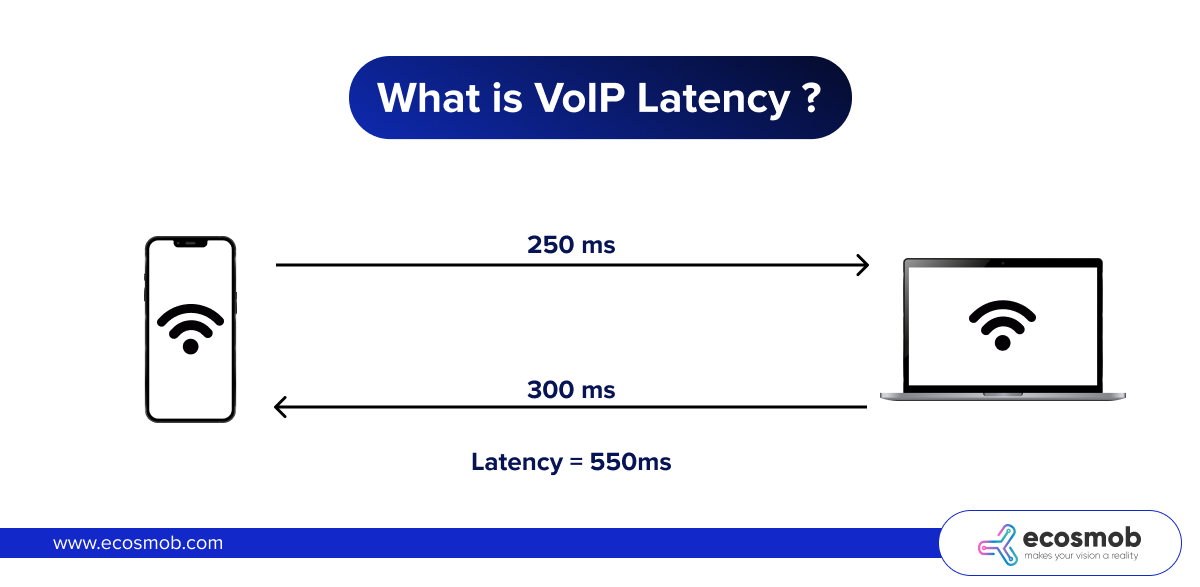
VoIP latency is the time delay, measured in milliseconds (ms), between a voice signal being sent and received during an internet-based call. It is caused by network congestion, codec processing, physical distance between endpoints, and routing through multiple network hops. The ITU-T G.114 standard recommends keeping one-way VoIP latency below 150 ms for high-quality calls. Anything above 300 ms causes noticeable disruption to conversation flow.
What Is Acceptable Latency for VoIP?
Not all latency is equal. The impact on call quality depends on how far the delay goes. The table below is based on the ITU-T G.114 standard, which is the international benchmark for voice quality in IP networks.
| Latency Range | Impact on Call Quality |
| 0 to 150 ms (one-way) | Excellent. The delay is not noticeable to either party. |
| 150 to 300 ms (one-way) | Acceptable. There is a slight delay but calls remain usable. |
| 300 to 400 ms (one-way) | Poor. Delays are noticeable and conversations feel unnatural. |
| Above 400 ms (one-way) | Unacceptable. Serious disruption. Callers frequently talk over each other. |
Source: ITU-T G.114 recommendation on one-way delay for voice over IP communications.
 Common Causes of VoIP Latency
Latency doesn’t just pop out of nowhere. It’s a culmination of factors that play together – some within your control and others not so much. Let’s break it down –
- Packet Transmission Delays – Your voice data is broken into packets and sent across the internet. Depending on the path these packets take, there might be delays.
- Network Congestion – Think of the internet as a highway. When it’s jammed with traffic, everything slows down – including your VoIP call quality issue.
- Jitter – Jitter is the variability in packet arrival times. If packets arrive out of order, additional processing time is required to reassemble them correctly.
- Buffering and Codec Delays – VoIP systems use codecs to compress and decompress audio. While necessary, these processes add milliseconds of delay.
- Distance – The farther your voice packets need to travel, the greater the delay. International calls, for example, are more prone to higher latency.
How do I fix VoIP latency?
The good news?
You don’t have to sit back and endure laggy calls. Here are some practical answers to the question of how to reduce latency in VoIP and enhance your VoIP experience
Optimize Your Network
- Prioritize VoIP Traffic – Use Quality of Service (QoS) settings on your router to prioritize VoIP traffic over other types of data.
- Upgrade Your Bandwidth – Ensure you have enough bandwidth to support your VoIP calls, especially during peak usage times.
- Minimize Network Congestion – Reduce other high-bandwidth activities (like streaming or large downloads) during calls.
What to Choose for VoIP Latency Requirements
- Invest in a Good Router – Modern routers with VoIP-friendly features can significantly reduce latency.
- Use Wired Connections – Whenever possible, opt for Ethernet over Wi-Fi. Wired connections are more stable and have lower latency.
- Upgrade Your Headset – Poor-quality audio equipment can exacerbate latency issues. A high-quality headset ensures clearer and faster audio processing.
Select the Right VoIP Provider
Not all VoIP services are created equal. Choose a provider that offers –
- Low-Latency Infrastructure – Look for providers with servers geographically close to you.
- Strong Codec Support – Modern codecs like Opus and G.722 offer high-quality audio with minimal latency.
- Reliable Jitter Buffers – These tools help smooth out packet delivery inconsistencies.
Monitor and Troubleshoot
- Run Regular Speed Tests – Check your internet speed to ensure it meets the requirements for VoIP calls.
- Ping and Trace Routes – These tools help identify latency sources in your network.
- Work with IT Support – If latency issues persist, consult with your IT team or provider’s support to diagnose and resolve the problem.
Emerging Solutions to Combat Latency
The tech world is constantly innovating, and latency reduction is no exception. Here are some exciting developments:
- 5G Networks – With faster speeds and lower latency, 5G has the potential to revolutionize VoIP quality.
- Edge Computing – By processing data closer to the source, edge computing reduces the distance packets travel, thereby cutting latency.
- AI-Powered Optimization – AI in VoIP can dynamically adjust network settings to prioritize traffic and minimize delays.
Not sure where your latency problem is coming from? Download our step-by-step VoIP latency troubleshooting checklist and work through the 10 most common causes in order.
VoIP Latency Requirements by Industry
Different industries have different tolerances for latency. What is acceptable for a casual internal call may not be acceptable in a high-volume contact center or a telemedicine appointment.
Contact Centers and Call Centers
Contact centers are the most latency-sensitive VoIP environment. Agents handle back-to-back calls all day, and even a small delay creates a poor customer experience. The industry target is under 100 ms one-way. Any higher and customers start noticing pauses, which leads to repeated talking, frustration, and longer call handling times.
Remote Teams and Enterprise UCaaS
For remote or hybrid teams using platforms like Microsoft Teams, Zoom Phone, or Webex Calling, the typical acceptable threshold is under 150 ms one-way. These platforms have built-in jitter buffers and echo cancellation that help compensate for minor variation. For teams on regular international calls, latency between distant regions can push above this threshold and will need to be managed through QoS rules or regional SIP trunking.
Healthcare and Telemedicine
Telemedicine calls require both clear audio and reliable uptime. While the latency thresholds are similar to general enterprise use (under 150 ms), healthcare organizations also need to factor in compliance requirements. Dropped calls or poor audio during a clinical consultation can have serious consequences, so redundant connections and QoS priority rules for VoIP traffic are strongly recommended.
Financial Services
Trading floors and financial advisory firms often require near-real-time voice communication. Latency targets in these environments can be stricter than the ITU-T standard, with some firms targeting under 50 ms for trader communications. Any delay in a verbal instruction can have financial consequences, making low-latency dedicated connections a priority.
Conclusion
VoIP latency challenges are like that one uninvited guest at a party who spoils the fun.
But with the right tools, techniques, and mindset, you can show it the door. From optimizing your network to leveraging emerging technologies, Ecosmob helps you tackle latency head-on and ensures your calls are crisp, clear, and free-flowing.
So, the next time you’re on a VoIP call, you can focus on the conversation – not the lag.
Frequently Asked Questions
The ITU-T G.114 standard recommends keeping one-way VoIP latency below 150 ms for good call quality. Latency between 150 ms and 300 ms is still usable but will be noticeable to callers. Anything above 300 ms causes significant disruption and should be investigated and resolved.
The most common causes are network congestion, slow or unstable internet connections, routing through too many network hops, codec processing delays, and long physical distance between the caller and the VoIP server. Wi-Fi interference and missing QoS rules on your router are also frequent contributors.
Start by enabling QoS on your router to prioritize VoIP traffic. Switch to a wired Ethernet connection if you are currently on Wi-Fi. Check your internet speed during peak hours and consider upgrading your plan if bandwidth is the issue. Also try disabling SIP ALG on your router, as this is a common and easy-to-miss cause of VoIP problems.
Latency is the total delay for a packet to travel from sender to receiver. Jitter is the variation in that delay between consecutive packets. A call can have acceptable average latency but still sound choppy if jitter is high, because packets arrive at uneven intervals. Both need to be controlled for a good call experience.
One-way latency above 300 ms is generally considered too high for practical use. At this level, callers will frequently talk over each other because of the delay. For call centers and high-volume environments, the target should be under 100 ms to keep conversations feeling natural and responsive.
VoIP can work over Wi-Fi, but performance depends on signal strength, interference, and how many other devices are sharing the network. For regular or high-volume calling, a wired connection is more reliable. If Wi-Fi is required, keeping the router close to the desk and using the 5 GHz band instead of 2.4 GHz helps reduce latency and interference.