
Most businesses trying to deploy AI voice assistants hit the same wall: prebuilt voice assistants don’t fit their workflows. They mishear queries, fail at multi-turn dialogue, or break when integrated into contact center software.
But the real reason most fail? They were never designed around your business logic to begin with.
If you’re serious about building an AI voice assistant for your business, this blog shows how to do it right, step-by-step.
What Is an AI Voice Assistant?
An AI voice assistant is a software agent that can interact with humans over voice using NLU (Natural Language Understanding). Unlike scripted IVRs or simple call flows, these assistants listen, understand, respond, and even act.
They’re not limited to speech recognition. They determine intent, do sentiment analysis, manage multi-turn conversations, and trigger backend processes, whether that’s logging a ticket, checking an account status, or routing to the right department.
They can be embedded into:
- Phone support systems
- Inbound and outbound call campaigns
- Voice-enabled kiosks
- Mobile or web apps
Core Technologies Behind AI Voice Assistants
Let’s look at the foundational components of an AI-based voice assistant system, and how they work together.
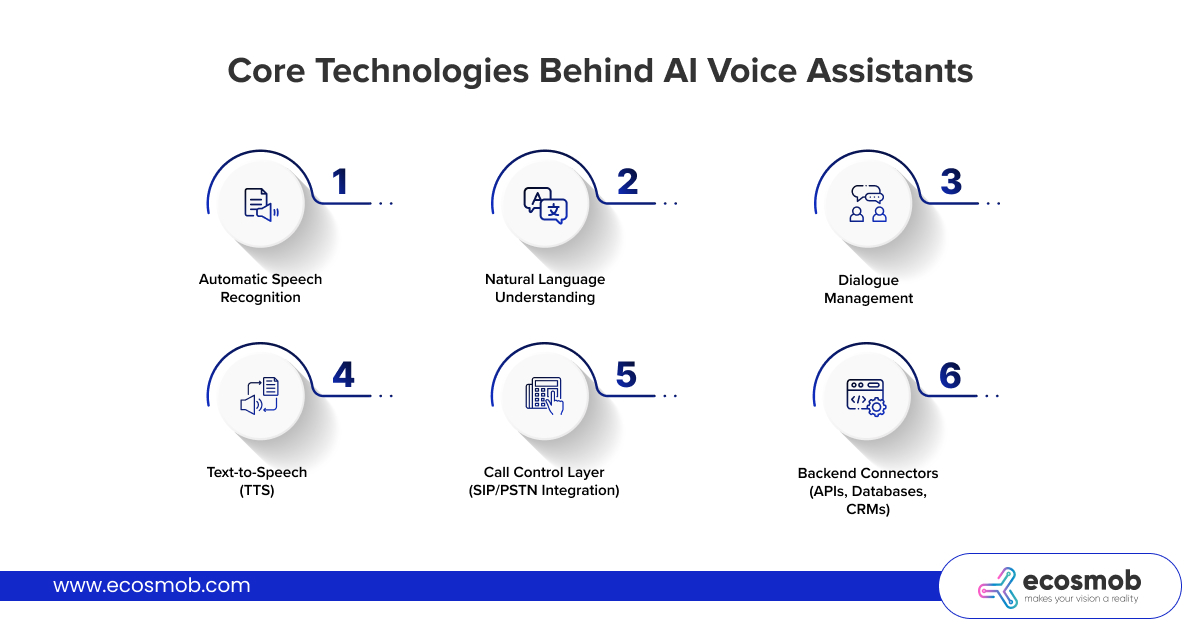 1. Automatic Speech Recognition (ASR)
ASR converts spoken language into text. It is the front line of your voicebot, and accuracy here impacts everything else. Cloud options (like Google, Azure, or Amazon) offer quick deployment, while open-source engines (like Vosk or Whisper) offer more control.
2. Natural Language Understanding (NLU)
NLU processes the ASR output and extracts intent and entities from the sentence. It decides whether a user is trying to “check order status” or “cancel an account”. This component drives conversational intelligence and must be trained on your business-specific data.
3. Dialogue Management
Dialogue managers track the conversation state and context, deciding what the AI voicebot should say or do next. This is what enables multi-turn conversations like:
“Hi, I need to reschedule my delivery.”
“Sure, what date works best for you?”
4. Text-to-Speech (TTS)
TTS turns the assistant’s response into human-sounding audio. Advanced models (like Google WaveNet, Amazon Neural TTS, or Murf AI voice cloning) offer natural prosody, emphasis, and multilingual support. All of this is key if you want to deliver a smooth customer experience.
5. Call Control Layer (SIP/PSTN Integration)
To interact on real calls, the assistant must connect to telephony systems using SIP or cloud PBX APIs. This layer handles real-time audio streaming, call pickup, transfers, and DTMF fallback.
6. Backend Connectors (APIs, Databases, CRMs)
A voice assistant is only useful if it can perform actions. API integrations with CRM systems, ticketing tools, or internal databases allow it to fetch account info, update records, or trigger workflows.
Step-by-Step: How to Build a Custom AI Voice Assistant?
It may seem like stitching APIs together is all that’s needed, but there’s a lot more to it.
Here’s a structured development flow to develop an AI voice assistant for your business, and how to tailor it to your needs.
1. Define Use Case & KPIs
Start by identifying exactly what your bot should handle. Is it for inbound support, outbound campaigns, appointment scheduling, or something else? Define key flows and metrics like AHT (Average Handle Time) reduction, call containment, or FCR (First Call Resolution) improvement.
2. Design Conversation Flows & Scenarios
Map out user intents, common edge cases, interruptions, and fallback logic. This step ensures your bot isn’t just functional, but truly conversational. Design recovery paths for when speech fails, and build prompts that guide the user smoothly.
3. Choose or Build Core Tech Stack
You’ll need to choose ASR, NLU, TTS, and possibly a dialog manager. For enterprise-grade bots, go beyond Dialogflow or Lex and consider Rasa, NVIDIA NeMo, or custom-trained LLMs. Match each component to your latency, data control, and deployment needs.
4. Implement Real-Time Call Integration
Use SIP, WebRTC, or cloud telephony APIs to connect the bot to voice channels. Handle call pickup, audio streaming, pause/resume logic, and telephony events. This is where OpenSIPS or Asterisk may come in, depending on your setup.
5. Test, Tune, and Train
Running real-world simulations is very important. Monitor where users drop off or misfire. Improve NLU training with real utterances. Add retry logic, barge-in handling, silence detection, and logging hooks. This is a continuous cycle.
💡Ecosmob Expert Tip
- If you’re planning to deploy at scale, don’t hard-code the dialog logic inside the telephony platform. Use a decoupled dialog engine with APIs for flexibility, easier training, and better monitoring.
AI Voice Assistant Architecture
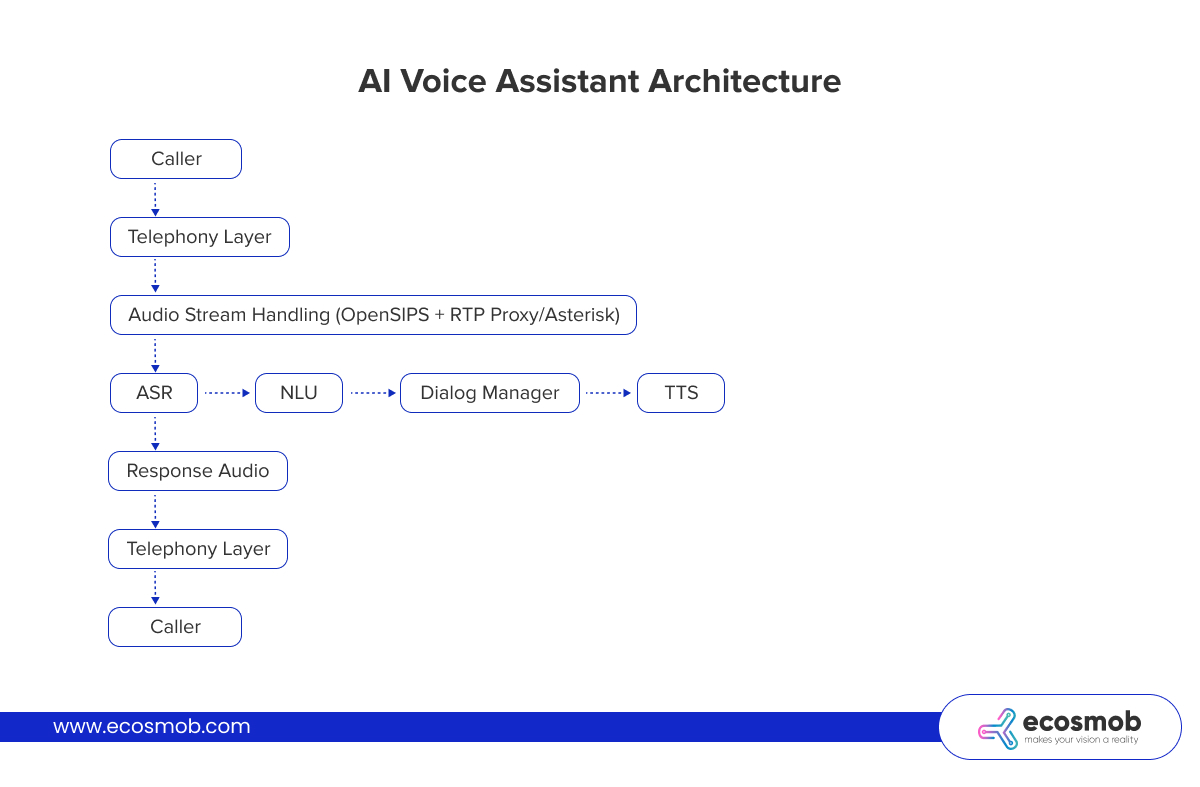
Let’s do a quick breakdown of each component of the architecture.
- Telephony Layer: Connects PSTN/SIP traffic to the bot. Handles signaling, call initiation, transfers.
- Audio Stream Handler: Converts voice into real-time RTP packets and forwards them to the ASR. May use Asterisk, RTP proxy, or custom voicebot connectors.
- ASR Engine: Converts audio into text for processing.
- NLU + Dialog Manager: Extracts meaning, determines next steps, tracks conversation state.
- TTS Engine: Converts textual replies into audio.
- Bot Middleware: Manages API calls, CRM lookups, error handling, and system logic.
AI Voice Assistants for Enterprises Use Cases
Voice assistants are starting to operate beyond just basic customer service. They’re being used across verticals now.
Customer Support Automation
Handle high-volume queries like “Where’s my order?” or “Reset my password” using real-time voice conversations.
Appointment Booking & Reminders
Automate inbound and outbound scheduling tasks for clinics, salons, or field teams with calendar APIs.
Order Status & Payments
Let users call in to check status, confirm orders, or make payments entirely via voice, without agent involvement.
Outbound Campaigns & Surveys
Run voice-based outreach (feedback, renewals, collections) at scale while maintaining human-like tone and interactivity.
Agent Assist
Use voicebots to gather initial caller context before routing to human agents with full conversation history and CRM data.
Cost to Develop an AI Voice Assistant
This can vary a lot. So to have an understanding of the estimated cost to create an AI voice assistant, here’s a list of the biggest cost drivers to be aware of:
- Use Case Complexity: More branching, integrations, or decision points = higher development effort
- Tech Stack Licensing: Open source vs. commercial APIs for ASR, TTS, NLU
- Integration Scope: Connecting with CRMs, ERPs, payment systems, or calendars adds development time
- Voice Quality Expectations: Studio-quality TTS and noise-resistant ASR often cost more
- Language & Accent Support: Multilingual or accent-heavy deployments need extra training
- Deployment Model: On-prem vs. cloud vs. hybrid, based on your compliance and latency needs
How to Integrate an AI Voice Assistant with CRM or Contact Center?
To make your AI voice assistant for business truly useful, it has to do more than just talk. It must interact with your backend systems (especially your CRM or contact center platform) to fetch data, update records, and personalize conversations.
1. Enable Intent-Based API Triggers
When the voicebot recognizes an intent (e.g., “check my order”), it should trigger an API call to your CRM or ticketing system. This is typically handled through secure REST APIs.
Example: Bot identifies “track order” intent and pulls latest order info.
2. Use Call Metadata to Personalize CRM Lookups
Use the caller ID or IVR input (e.g., account number) to query CRM records before or during the conversation. This allows the bot to greet users by name or skip unnecessary questions.
Example: User says name or enters account number → System pre-fetches CRM record → Bot continues with context
3. Sync Voicebot Outcomes Back into CRM
After the call ends or a workflow completes, the assistant should push structured data back into the CRM:
- Disposition (e.g., “call resolved”)
- Tags (e.g., “billing issue”)
- User actions (e.g., “updated email address”)
- Notes for human agents (if escalated)
4. Use Middleware to Bridge Voicebot and CRM Logic
A middleware layer (custom or existing) is often used to:
- Translate bot intents into API calls
- Manage authentication (OAuth, tokens)
- Handle retries, errors, or rate limits
- Log all events for audit or training
5. Integrate with Contact Center Systems via CTI or APIs
If you’re working with off-the-shelf contact center systems or custom SIP-based setups, you’ll need:
- CTI (Computer Telephony Integration) for agent transfers
- Queueing APIs to check agent availability
- Live agent data sync to hand off transcripts and context
Best Practices to Develop AI Voice Assistants
Before you begin, here are some best practices to keep in mind while you develop your AI voice assistant, so you don’t have to learn them the hard way!
1. Use Modular Architecture
Keep ASR/NLU separate from your telephony and middleware. This allows you to change providers, improve one layer without rewriting the rest, and scale each independently.
2. Train NLU with Real Utterances
Use data from call logs or pilot tests to refine the NLU. Avoid training only on what you expect, and train on what users actually say.
3. Add Fallback & Escalation Paths
Always give the user a way out, either to rephrase, retry, or escalate. You’ll lose trust fast if they get stuck in a loop with no exit.
4. Monitor Every Conversation
Log inputs, intents, misfires, and drop-offs. Use this to tune performance and justify ROI to stakeholders.
5. Handle Interruptions & Barge-Ins
Real users don’t wait. Your bot needs to handle overlapping speech, silence detection, and mid-prompt changes of intent.
If you’re planning to develop an AI voice assistant for business, remember this: a great one isn’t just about the technology and all the latest components used. It’s mainly about fitting that technology into your workflows, teams, and goals.
Off-the-shelf bots can’t do that. But custom AI voice bot development can, if it’s designed right.
Need help building one that fits your tech stack and delivers real ROI?
Connect with our experts who can design, develop, and deploy it right.
Frequently Asked Questions
An AI voice assistant is a voice interface that understands speech, processes commands or questions using NLU, and responds in real time using TTS. It’s often integrated with business logic and databases.
Start by defining a narrow use case, then build using ASR, NLU, business APIs, and a TTS engine. You should also test with real calls and integrate with your SIP or contact center platform.
Chatbots operate over text; voice assistants deal with audio input/output, requiring added complexity like speech recognition, telephony integration, and real-time response generation.
Partially. While you can use GPT APIs for NLU or text generation, you’ll still need to handle voice input/output, call routing, and backend logic separately.
Yes, with API integration and context tracking, voicebots can fetch/update CRM data, route leads, and assist agents with real-time insights.