

What if the biggest threat to patient care wasn’t a misdiagnosis, a missed dose, or a delayed lab result, but a dropped call?
Most healthcare systems don’t fail during routine hours. They fail when demand spikes, appointment floods, emergencies arise, or late-night triage is required, when every second carries weight. The cracks don’t show in testing; they show in real moments.
Many providers rely on plug-and-play communication APIs to move fast. But what works in calm conditions often struggles when scale, complexity, and real-time coordination collide; this is where the shift toward custom RTC starts to matter.
Ecosmob’s AI-driven approach adds value by intelligently routing interactions, prioritizing critical cases, and automating decisions across channels while keeping the underlying infrastructure in control.
This isn’t a tooling problem. It’s an architecture one.
If communication is an architecture problem, the next step is seeing everything it actually includes, not just the most visible layer of RTC.

What Does Omnichannel Patient Communication in Healthcare Really Include Beyond Video Consultations?
It includes every real-time and asynchronous interaction a patient has with a provider, video, voice, messaging, reminders, IVR, and follow-ups, brought together through UCaaS, CCaaS, and CPaaS into one continuous, context-aware conversation.
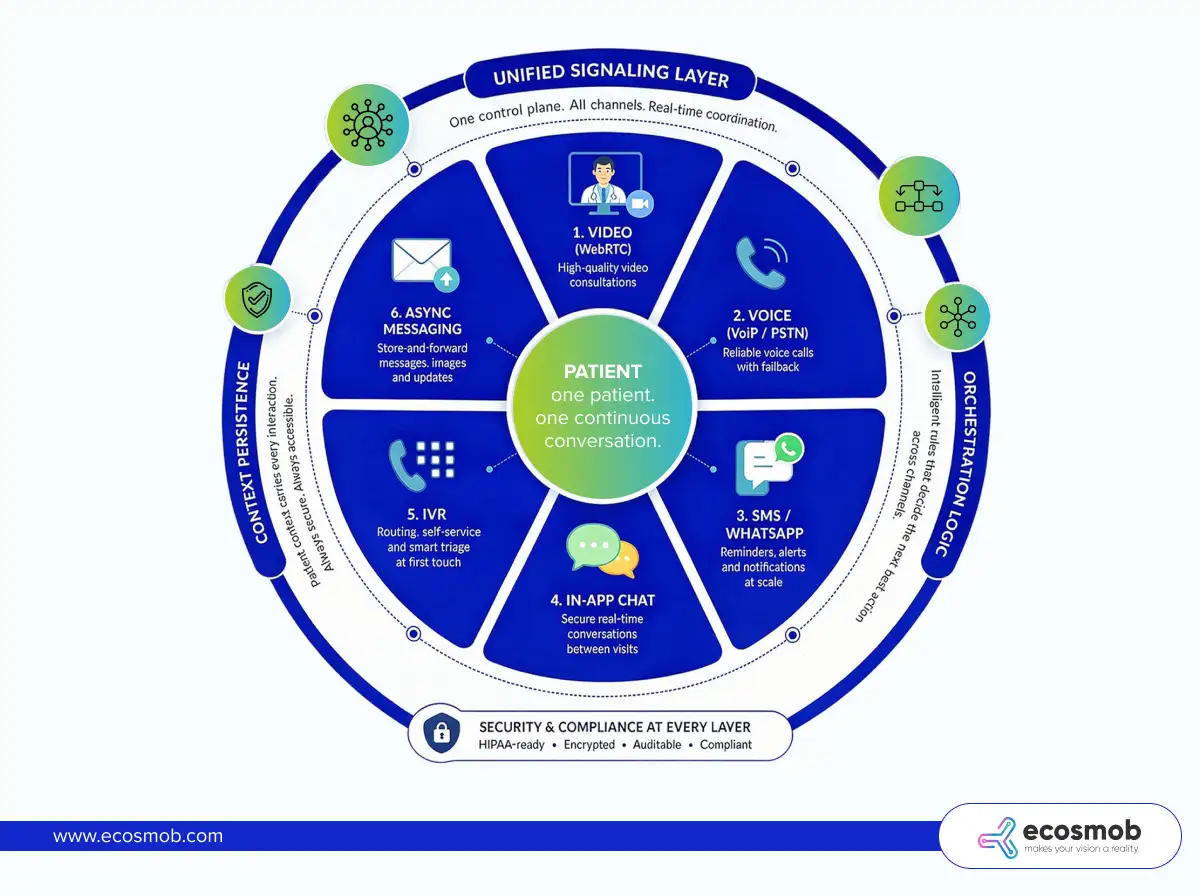 In production, patient communication isn’t a single interaction; it’s a sequence that spans media, often within minutes.
- Video consultations (WebRTC): The visible layer. High-value, real-time care, but only one part of the journey.
- Voice calls (VoIP + PSTN fallback): When video fails or isn’t feasible, voice quietly takes over to keep care moving.
- SMS and WhatsApp reminders: High-volume, time-sensitive nudges that drive attendance and follow-ups.
- In-app messaging (secure chat): Ongoing conversations between visits, questions, updates, and clarifications.
- IVR for routing and triage: It is the first touchpoint that determines where a patient goes and how quickly.
- Async messaging (store-and-forward care): Patients send updates, images, or queries without needing both sides to be present.
Individually, each channel works. Together, they often don’t.
That’s where architecture steps in, not to add more channels, but to connect them.
- Unified signaling layer: One control plane that knows who is communicating, when, and how, across all channels.
- Channel orchestration logic: Rules that decide the next step, switch to voice if video drops, trigger SMS if a call is missed.
- Context persistence across channels: The patient’s story doesn’t reset with every interaction. It carries forward, intact and accessible.
Best omnichannel platforms aren’t about more channels; they’re about one continuous conversation. Which leads to the real question: do you build it, or rely on someone else’s system?
When Should Healthcare Providers Build Custom RTC Infrastructure vs Use CPaaS?
Healthcare providers should use CPaaS when speed and simplicity matter most, and build custom RTC infrastructure when scale, control, compliance, and cost predictability start driving decisions.
In the early days, communication is a feature you add. As you grow, it quietly becomes a system you depend on. That shift is where most teams feel the tension; what once helped you move fast begins to limit how far you can go.
1. Use CPaaS When Speed and Simplicity Matter
CPaaS platforms, often delivered as unified communication managed APIs, are designed to reduce friction. You don’t worry about signaling, media routing, NAT traversal, or scaling logic; you plug in APIs and start communicating.
- Early-stage or low-volume: When concurrent sessions are limited, per-minute pricing remains manageable and predictable.
- Speed to market over optimization: You can launch video consults, voice calls, and messaging workflows in weeks instead of months.
- Limited infrastructure team: No need to manage SFUs, TURN servers, or global scaling; everything is abstracted away.
This model is most effective when communication complements the product rather than serving as its core function.
CPaaS buys you speed by hiding the complexity you don’t yet need to manage. But that hidden complexity doesn’t disappear; it surfaces as you scale.
2. Build Custom RTC Infrastructure When Scale Becomes Predictable
As usage grows, patterns emerge, including daily peaks, seasonal spikes, and workflow dependencies. At this point, communication is no longer occasional traffic; it’s a sustained load.
- High concurrent sessions (video + voice): Media infrastructure costs compound quickly under per-minute pricing.
- Predictable traffic spikes: Appointment reminders, flu seasons, and emergency surges create burst traffic that needs controlled scaling, not reactive billing.
- Strict compliance and data control: You need visibility into where data flows, how it’s stored, and who accesses it.
- Deep EHR and workflow integration: Communication needs to carry patient context across systems, not operate as a disconnected layer.
- Multi-tenant hospital networks: Isolation, routing logic, and policy enforcement become architectural requirements rather than features.
At this stage, you’re no longer consuming communication; you’re operating it.
Custom RTC becomes essential when communication directly impacts care delivery at scale. But the real shift isn’t just technical, it’s economic.
3. The Hidden Trade-Off Most Teams Underestimate
What feels like a technical choice is often a cost curve in disguise.
CPaaS:
- Low upfront investment
- Linear cost growth (every call, message, and minute adds up)
- Limited control over optimization
Custom RTC:
- Higher upfront engineering and infrastructure effort
- Fixed + optimized operational costs
- Marginal cost per session drops significantly at scale
At low volumes, CPaaS feels efficient. At scale, it turns expensive, fast.
The longer you operate at scale, the more CPaaS becomes a convenience tax. To judge that shift, you need to understand what a compliant RTC architecture actually looks like underneath.
How to Estimate RTC Infrastructure Capacity Needs in Healthcare?
You estimate RTC infrastructure capacity by mapping expected concurrent sessions to core system layers, signaling, media, STUN, and TURN in WebRTC, storage, and security, and sizing each for peak load, not averages.
In healthcare, traffic doesn’t grow gently. It arrives in bursts, reminder campaigns, shift changes, and seasonal spikes. Capacity planning isn’t about “how much you use,” it’s about “how much you might need at once.”
Start with the Core Components That Drive Capacity
Every real-time interaction passes through a set of layers. If one is undersized, the whole system feels it.
1. Signaling Layer
Handles session initiation and coordination.
- What to plan for: Requests per second during peak events (logins, call starts, retries)
- Includes: SIP/WebRTC signaling, authentication, and session control
- Failure pattern: Delayed call setup, failed connections during bursts
2. Media Layer
Handles audio/video transport and processing.
- SFU (Selective Forwarding Unit): Routes video streams efficiently across participants
- MCU (optional): Mixes/records streams but adds compute overhead
- What to plan for: Concurrent sessions × streams per session, Bitrate per stream (varies by video quality), CPU and bandwidth per node
3. TURN/STUN Servers
Ensures connectivity when direct peer-to-peer fails.
- What to plan for: Worst-case scenario where a high % of traffic is relayed via TURN
- Why it matters: Hospital networks often sit behind strict firewalls
- Impact: TURN is bandwidth-heavy and cost-sensitive
Underestimating TURN is the fastest way to degrade call quality at scale. Beyond live communication, data persistence adds another layer of load.
4. Recording & Storage
Captures and stores interactions for audit and clinical use, often supported by a SIPREC solution for reliable session recording.
- Encrypted media storage: Secure retention of calls and sessions
- Audit logs: Every interaction must be traceable
- What to plan for: Storage growth over time, Retrieval performance for audits or playback
Storage doesn’t spike; it accumulates quietly and relentlessly. And every layer must operate within strict security boundaries.
5. Security Layer
Protects data across the entire communication lifecycle.
- End-to-end encryption (where applicable)
- Role-based access control (RBAC)
- What to plan for: Encryption overhead on media and signaling, Access validation at scale
Compliance Coverage Shapes Capacity Decisions
Capacity isn’t just technical, it’s regulatory.
- HIPAA + HITECH (US): HIPAA compliance for Data protection, breach accountability
- State-level laws: Additional regional requirements
- PHIPA / PIPEDA (Canada): Patient data privacy and consent
- GDPR (EU patients): Data residency and processing rules
- BAA agreements: Define responsibility across vendors and partners
These requirements influence where you deploy, how you store, and how you scale.
Compliance doesn’t just constrain architecture; it defines it. With capacity mapped across layers, the next challenge is keeping performance stable when real-world surges hit.
How Can Healthcare Providers Handle Real-World Scale Failures in Patient Communication?
Healthcare providers handle real-world scale failures by designing for known surge patterns, spreading load, scaling dynamically, and ensuring continuity even when real-time systems are under pressure.
In healthcare, scale failures are rarely random. They show up in repeatable scenarios, reminder blasts, sudden demand spikes, after-hours queues, and even in how voice agents in healthcare handle rising call volumes. The difference between disruption and continuity lies in how intentionally these moments are handled.
1. Appointment Reminder Bursts
Reminder campaigns can trigger thousands of interactions almost instantly. The real strain comes from the responses that follow, calls, replies, and reschedules, all hitting the system together.
Managing this requires controlled traffic flow. Queueing smooths the spike, rate limiting prevents overload, and batching ensures delivery doesn’t overwhelm downstream systems.
2. Post-Disaster Surge
Events like natural disasters or public health emergencies can drive a sudden surge in teleconsultations. Demand rises sharply, often concentrated in specific regions.
Handling this requires infrastructure capable of scaling in real time. Auto-scaling media servers distribute the load, while geo-distribution ensures traffic is routed to the nearest available capacity without overloading a single region.
3. After-Hours Nurse Triage
After-hours demand creates a different kind of strain. Queues are growing steadily, and delays are beginning to affect patient experience.
This is where prioritization becomes critical. Urgent cases need to move faster, dynamic IVR solutions help guide patients efficiently, and asynchronous messaging acts as a fallback when real-time interaction isn’t possible.
4. Multi-Tenant Hospital Networks
Large healthcare networks operate across multiple hospitals, each with its own workflows and compliance boundaries. As scale increases, so does the need for strict separation.
Ensuring this requires both logical isolation, separating workflows and policies, and infrastructure-level isolation where necessary. This keeps data secure while allowing the system to scale across tenants without conflict.
Isolation directly impacts both data safety and system stability.
The next challenge is integrating this with EHRs and workflows without breaking context or compliance.
How to Integrate RTC with EHR, Contact Centers, and Clinical Workflows in Healthcare?
You integrate RTC with EHRs, contact centers, and clinical systems by connecting real-time interactions to patient data via standards such as FHIR and HL7, while ensuring that every exchange remains secure, auditable, and context-aware.
In practice, integration isn’t just about connecting systems; it’s about making sure every call, message, or video session carries the right patient context and feeds back into clinical workflows without gaps.
Key Integration Points
1. EHR/EMR Systems
RTC needs to both pull and push data into core health records. Patient context, history, demographics, and prior interactions should be available before a session begins. At the same time, outcomes from calls or consultations should be recorded.
- Patient context sync using FHIR APIs
- Appointment-based triggers for communication workflows
2. Contact Centers
This is where communication gets operational. Calls and messages need to reach the right agent or clinician, with visibility into patient history.
- Intelligent call routing based on patient data
- Agent dashboards with real-time context
- Escalation workflows for urgent or complex cases
3. Clinical Systems
Every interaction should translate into action, notes, prescriptions, or follow-ups. RTC should not sit outside clinical workflows; it should actively contribute to them.
- Automated note capture or summaries
- Prescription and follow-up triggers
- Workflow continuity across interactions
Standards That Make Integration Work
- FHIR (Fast Healthcare Interoperability Resources): Enables structured, real-time data exchange
- HL7: Supports legacy systems still widely used across healthcare
- Secure APIs with audit trails: Ensure every data exchange is traceable and compliant
These standards ensure systems don’t just connect, they understand each other.
Common Pitfalls to Avoid
- Breaking compliance during data transfer: Data may be secure at rest, but exposed in transit if not handled properly
- Fragmented patient context: When systems don’t sync fully, each interaction starts from zero
These issues don’t always show up immediately, but they surface when coordination matters most.
How Can Healthcare Teams Use Observability and SLOs to Detect RTC Issues Before Patients Complain?
Healthcare teams detect RTC issues early by continuously monitoring call quality metrics and enforcing SLOs that flag degradation before it becomes visible to patients.
In real-time communication, failures rarely start as outages. They start as small drops in quality, slower connections, slight delays, and unstable video. Without observability, these signals go unnoticed until patients feel them.
1. What to Monitor in Real Time
RTC performance is defined by a few critical metrics. Tracking them consistently gives you an early warning system.
- Call setup success rate: Indicates how reliably sessions are initiated
- Latency and jitter: Reflect delays and variability in media delivery
- Packet loss: Directly impacts audio and video clarity
- TURN usage ratio: Signals how often fallback infrastructure is being used
- Drop rates: Shows how often sessions fail mid-interaction
Each metric tells part of the story. Together, they reveal whether communication is stable or slowly degrading.
2. Define SLOs That Reflect Patient Experience
SLOs (Service Level Objectives) turn raw metrics into actionable standards.
- Call connection time: e.g., under a defined number of seconds
- Video quality thresholds: Minimum acceptable bitrate, latency, and stability
- Uptime targets per region: Ensures consistent availability across geographies
These targets should reflect real patient expectations, not just technical limits.
3. Tooling That Enables Proactive Detection
Observability depends on how quickly you can see and respond to issues.
- Real-time dashboards: Provide a live view of system health and performance
- Alerts on degradation: Trigger warnings when metrics drift, not just when systems fail
This shifts your approach from reactive troubleshooting to proactive management.
What is the Right Decision Framework for Choosing CPaaS vs Custom RTC in Healthcare?
The right decision comes down to three variables: how fast you need to move, how predictable your scale is, and how much control you need over cost, compliance, and patient experience.
In practice, this isn’t a one-time choice. It’s a progression; what works at launch rarely holds at scale. The key is knowing where you are and what your next constraint will be.
1. Choose CPaaS If Speed and Flexibility Matter Most
If your priority is getting to market quickly without heavy infrastructure investment, CPaaS is the practical starting point.
- You need to launch fast and validate workflows
- Your scale is still uncertain or evolving
- Engineering bandwidth is limited and focused elsewhere
This approach lets you focus on product and patient experience without getting pulled into infrastructure complexity too early.
2. Choose Custom RTC If Scale and Control Drive Decisions
As communication becomes core to care delivery, the need for control increases across performance, cost, and compliance.
- Communication is mission-critical to operations
- You operate at high and predictable scale
- Compliance, data control, and reliability are non-negotiable
At this stage, relying entirely on external abstractions starts limiting what you can optimize and guarantee.
3. Take a Hybrid Approach When You’re Transitioning
Most healthcare providers don’t switch overnight. They evolve.
- Start with CPaaS to move fast
- Identify high-volume or cost-heavy workflows
- Gradually offload those to the custom RTC infrastructure
This lets you balance speed with long-term efficiency, without disrupting existing systems.
The smartest strategy isn’t choosing one, it’s knowing when to shift.
The Bottom Line?
Systems don’t get tested on calm days. They get tested when everything happens at once, and still need to work.
Scaling patient communication isn’t about adding more channels. It’s about building a system that stays reliable under pressure, where conversations flow across video, voice, and messaging without losing context or control. What starts as convenience eventually becomes a question of scale, cost, and ownership.
The teams that get this right don’t just fix communication, they make care more consistent when it matters most.
If you’re starting to see those limits, it’s worth rethinking how your communication stack is built.
Ecosmob helps healthcare providers design and scale custom RTC infrastructure that actually holds up in real-world demand.
Frequently Asked Questions
You should consider moving when your communication volume becomes predictable and high, costs start scaling linearly, and you need deeper control over performance, compliance, or integrations. Most teams feel this shift during sustained growth or recurring traffic spikes.
A compliant setup typically includes secure signaling, media servers (such as an SFU), TURN/STUN for connectivity, encrypted storage for recordings, and strict access controls. Compliance extends beyond infrastructure to audit logs, data handling policies, and vendor agreements.
Start with peak concurrent sessions, not averages. Factor in session duration, bitrate, and fallback scenarios like TURN usage. Capacity planning should cover signaling, media, and network layers, with headroom for sudden spikes.
Because degradation starts before failure. Increased latency, packet loss, or overloaded TURN servers can reduce quality without causing outages. Without observability, these issues go unnoticed until users experience them.
By designing for burst patterns. Use queueing, rate limiting, and batching for outbound traffic, and auto-scaling with geo-distribution for real-time sessions. Planning for these scenarios upfront prevents system stress later.