
For the past two decades, the standard approach to building an IVR has been dangerously rigid: a developer writes a static script (in XML, VXML, or Asterisk dialplan) that defines the logic. Press 1 for Sales, Press 2 for Support.
This may work fine for a small business. But it fails catastrophically for a telecom carrier or a large enterprise.
The problem is the workflow. In a traditional setup, the “Menu” is hard-coded into the infrastructure. If the marketing team wants to add a “Holiday Special” prompt, they have to open a ticket with IT. IT has to edit the code, test it, and deploy it during a maintenance window. By the time the change is live, the holiday is over.
At scale, when you are handling secure VoIP switching for thousands of tenants, this bottleneck is fatal. To fix it, we must migrate from traditional IVR to a low-code Custom IVR flow management approach.
How to Update IVR Flows Without Calling a Developer?
The biggest friction point in Customer Experience (CX) is the “Time-to-Deploy.” In legacy systems, the IVR logic is tightly coupled with the telephony server. Changing a menu option often requires restarting the service, which drops active calls.
Modern architectures solve this by decoupling the logic from the telephony. This is the “IVR Canvas” approach.
IVR Canvas Visual Flow Builders
Instead of writing code, administrators use a drag-and-drop web interface that sits on top of the telephony engine.
- The Logic Layer: The canvas acts as a visual JSON generator. When you drag a “Play Audio” node onto the screen, the system generates a standard configuration file.
- The Execution Layer: When a call comes in, the media server fetches this JSON configuration in real-time.
- The Result: When you click “Publish,” the database updates instantly. The next call that hits the system 1 millisecond later loads the new flow. No restarts, no downtime.
How We Solved It
We partnered with a global Unified Communications provider that needed a multi-tenant solution for their resellers. Their challenge was operational: they couldn’t afford to manually build flows for every new customer.
By implementing a Canvas-based custom IVR solution we developed, they reduced the configuration time for a new IVR setup to just 90 seconds. This allowed their non-technical tenant admins to build complex, multi-level menus without writing a single line of code or involving the engineering team.
Static Script IVR vs. IVR Canvas Architecture
| Feature | Static Script IVR (Legacy) | Canvas-Based IVR (Modern) |
| Modification Method | Edit XML/Code files | Drag-and-Drop GUI |
| Deployment Time | Hours/Days (Maintenance Window) | Instant (Real-time DB update) |
| Required Skillset | VoIP Engineer / Developer | Marketing / Admin Staff |
| Risk of Error | High (Syntax errors break calls) | Low (Pre-validated logic blocks) |
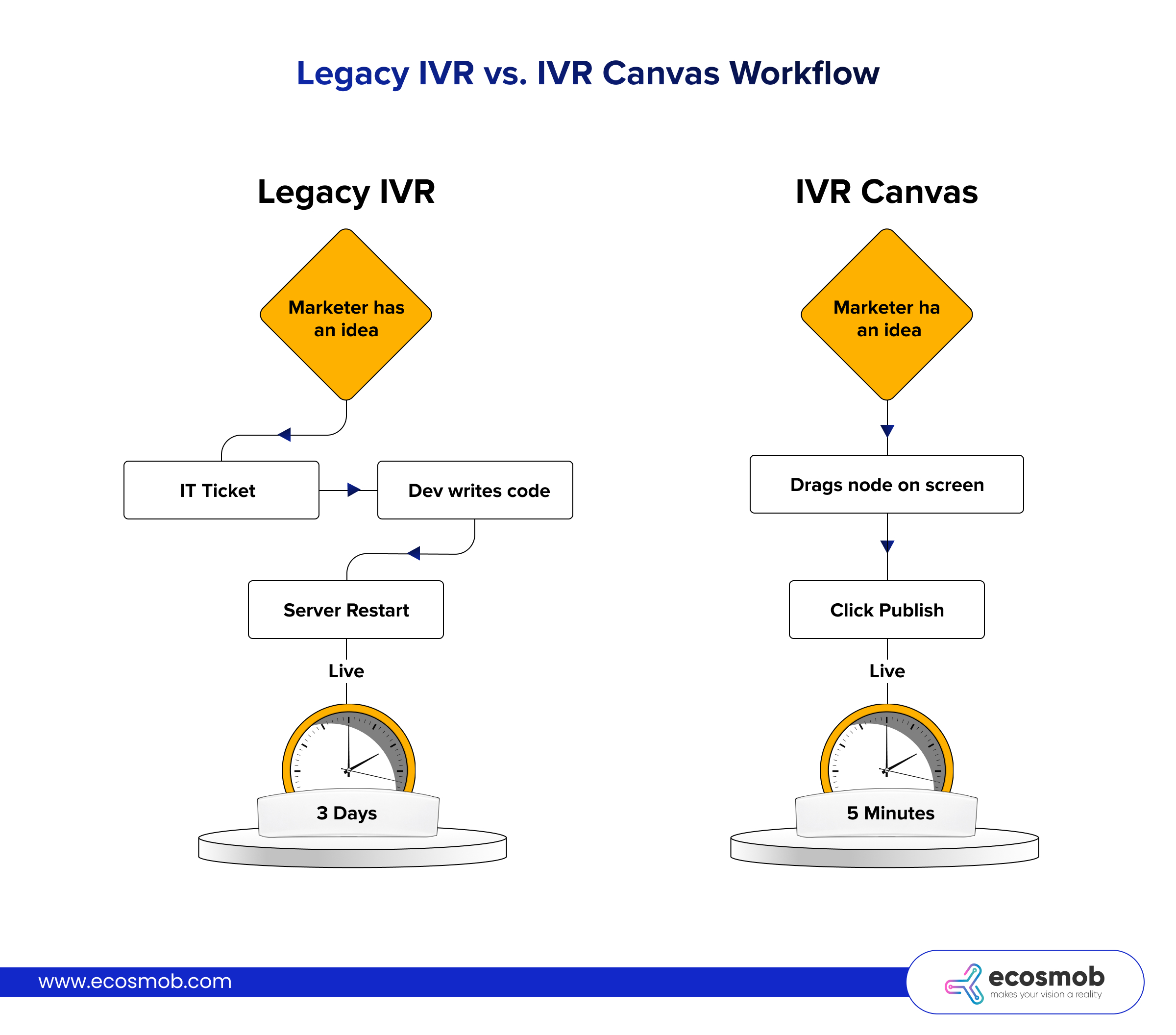 Legacy IVR vs. IVR Canvas Workflow
(Left Side) Legacy IVR
Marketer has an idea -> IT Ticket -> Dev writes code -> Server Restart -> Live.
(Show a clock indicating “3 Days”).
(Right Side) IVR Canvas
Marketer has an idea -> Drags node on screen -> Click Publish -> Live.
(Show a clock indicating “5 Minutes”).
Why Script-Based IVRs Crash at Scale
Many enterprises attempt an IVR migration only after experiencing a crash during peak hours.
These scalability issues in IVR usually stem from “Blocking Operations.” This is a technical term for when the computer processor stops working on everything else to wait for one specific task to finish.
In a legacy script, when a user inputs data (e.g., a credit card number), the media server often pauses to query the database directly. It waits for the database to reply “Approved.”
- If that query takes 2 seconds (common under load), and you have 1,000 concurrent calls, you have just locked up 2,000 seconds of CPU execution time.
- The system creates a backlog.
- The CPU hits 100%.
- New calls get rejected with a “Fast Busy” signal.
The Architecture Fix: Asynchronous Modular Separation
To scale like a carrier, you must separate the components so they never block each other.
- The Gateway (SBC): Handles the SIP signaling. It is stateless and fast.
- The Media Server: Handles the audio (FreeSWITCH is preferred over Asterisk for high-concurrency use cases). It does no logic. It just plays files.
- The Logic Layer: Handles the decision-making via REST APIs.
- The Data Layer: High-speed caching (Redis) for session state.
In this model, the Media Server sends an “Event” to the API (e.g., “User Entered 1234”). It then immediately moves on to process the next packet. It does not wait. The API processes the data and sends a command back later. This “Non-Blocking” design is essential for IVR modernization, and it’s how you handle 10,000 calls on the same hardware that used to handle 1,000.
How We Solved It
A leading BSS/OSS provider for mobile networks approached us with a volume challenge. They needed to process 15,000 to 20,000 calls daily for subscriber management (Subscribing/Unsubscribing to VAS services).
A monolithic script would crumble under this load during peak hours. We architected an API-driven solution where the IVR asynchronously queries its Value Added Services (VAS) APIs. This ensured that database latency never impacted voice quality, allowing them to maintain stability even during massive traffic bursts.
What is the Right Architecture for a Scalable, Dynamic IVR?
If you are planning to modernize your IVR and intend to serve multiple tenants or a massive volume, you cannot run everything on one box.
The “Carrier-Grade” Stack Model
This is the gold standard architecture we recommend for scalable, multi-tenant IVR:
- Layer 1: Ingress (OpenSIPS): This is the “Traffic Cop.” It acts as the gateway. It handles load balancing and directs traffic to the least-busy media node. It protects the core from DDoS attacks.
- Layer 2: Media (FreeSWITCH): This is the “Worker.” It simply plays files and detects DTMF tones based on instructions. It never talks to the database directly, ensuring it remains lightweight.
- Layer 3: Application (Canvas Engine): This is the “Brain.” A web application that interprets the visual flow (JSON) into executable commands for the media server.
- Layer 4: Data (Polyglot Persistence): We use different databases for different jobs to maximize speed:
- MySQL: Stores long-term configuration (e.g., “User A owns IVR B”).
- MongoDB: Stores unstructured logs and Call Detail Records (CDRs) for Big Data analytics.
- Redis: Stores “Hot State” (e.g., “Caller is currently at Node 3”). Redis is memory-based, making it thousands of times faster than a standard database.
This architecture allows you to scale the Media Layer (add more FreeSWITCH nodes) independently of the Application Layer.
Can You Modernize Your IVR Without Disruption?
A common fear is that IVR migration requires ripping out the entire telephony backbone. This is false. The modern approach is to treat the IVR as a distinct application that runs parallel to your core routing.
You keep your existing Class 4 softswitch for routing the calls. But instead of sending the call to the old legacy voicemail system, you configure specific DIDs (Direct Inward Dialing numbers) to route to your new “IVR Application Server.”
Integration Capability
Modern businesses require their IVR to talk to the rest of the stack via APIs.
- CRM Integration: Look up the caller ID to greet the user by name.
- Sentiment Analysis: Use NLP (Natural Language Processing) to detect if the caller is angry and route them to a senior agent immediately.
- VAS Integration: The IVR should directly call provisioning APIs to subscribe/unsubscribe users from services without agent intervention.
This strategy allows you to modernize your IVR and specific customer journeys (like “Bill Pay” or “Support”) one by one, while leaving the rest of the legacy system untouched.
Ecosmob Expert Tip
In high-volume systems, a specific error occurs when an outbound call and an inbound call try to grab the exact same phone line at the exact same millisecond. This causes failed calls and “ghost rings.”
To prevent this without complex code, simply configure your gateway trunk selection order:
- Inbound Traffic: Select channels in Ascending order (1, 2, 3…).
- Outbound Traffic: Select channels in descending order (100, 99, 98…).
This ensures that the two streams only meet when the system is at absolute full capacity, virtually eliminating collision errors.
The difference between a frustrating IVR and a great one is usually agility. If your marketing team has an idea for a campaign, can they launch it today? Or do they have to wait two weeks for IT?
By moving to a Canvas-based IVR architecture, you democratize the customer experience. You allow the people who know the customer best to design the flow. And by backing that visual layer with a robust, multi-tenant architecture (like OpenSIPS and FreeSWITCH), you make sure your infrastructure handles the load when that new campaign goes viral.
At Ecosmob, we don’t offer a boxed IVR product. We architect and implement custom, carrier-grade IVR platforms tailored to traffic patterns, tenant models, and integration needs.
Ready to build a quick setup IVR? Contact our experts!
Frequently Asked Questions
Yes. You can route specific DIDs (Direct Inward Dialing numbers) from your legacy PBX to the new IVR platform via a SIP Trunk. This allows you to modernize your IVR without disrupting the rest of the system.
Security relies on strict data segregation. Using an SBC VoIP security layer ensures that tenants are isolated at the network level. At the database level, each tenant’s flow and logs must be logically separated (using unique Tenant IDs in MySQL/MongoDB) so that Tenant A never sees Tenant B’s caller data.
Yes. A robust IVR Canvas will include an “API Node.” You can drag this node into the flow, paste your endpoint URL (e.g., your CRM or Billing System), and map the JSON response to IVR variables (e.g., “Balance Due”). This allows non-coders to build data-driven flows.
TTS (Text-to-Speech) converts written text into synthetic speech dynamically. It is great for reading variable data like names or account balances. Pre-recorded audio (MP3/WAV) offers higher human quality and emotion. A good scalable IVR supports both, often caching generated TTS files to save processing power on repeat calls.
The initial investment is in setting up the “Application Layer”. However, the long-term ROI is significant because you eliminate the ongoing OpEx cost of paying developers to make minor text changes. The IVR migration can also be done gradually, flow by flow.