

You don’t notice missing call recordings until the one call you need isn’t there.
A compliance check, a dispute, a critical debug, and suddenly the recording is missing. That’s when call recording shifts from a feature to a liability. Most setups work fine until scale kicks in, then gaps appear, metadata breaks, and troubleshooting becomes guesswork.
The issue isn’t just volume, it’s approach. Packet capture tries to “listen in” on calls, while structured session recording builds the recording into the flow itself.
That’s where SIPREC solutions change the game, turning fragile setups into something you can actually rely on.
What is SIPREC (Session Recording Protocol)?
SIPREC (Session Recording Protocol) is a standard defined by the Internet Engineering Task Force that enables reliable SIP call recording by creating a separate recording session alongside the actual call.
Instead of capturing traffic externally, SIPREC builds recording directly into the call flow. When a call starts, a parallel session sends both media (RTP streams) and metadata to a recording server, keeping everything complete and in sync.
Unlike packet capture, which passively “listens,” or B2BUA setups, which add complexity and latency, SIPREC records with intent, not as an afterthought.
It works through two roles: the Session Recording Client (SRC), typically OpenSIPS, which initiates recording, and the Session Recording Server (SRS), which stores the media and metadata.
SIPREC standardizes recording instead of improvising it.
Now let’s see how OpenSIPS fits into this architecture.
How OpenSIPS Enables SIPREC-Based Call Recording
OpenSIPS enables SIPREC-based call recording by acting as the Session Recording Client (SRC), controlling which calls are recorded and initiating parallel recording sessions as part of call recording solutions with advanced playback and tagging.
It ensures synchronized capture of media and metadata by routing them to the recording server without impacting the live call flow.
1. OpenSIPS as the SRC (Session Recording Client)
OpenSIPS acts as the SRC, deciding which calls to record and initiating SIPREC sessions directly from the signaling layer without affecting live traffic.
2. Native Support and Modules
With native SIPREC support and flexible scripting, OpenSIPS lets you trigger recordings, attach metadata, and manage flows efficiently. RTP relays ensure media is duplicated in sync.
3. Interaction with Media Servers and SRS
OpenSIPS works with media proxies to anchor RTP and sends duplicated streams plus metadata to the SRS via a parallel session, while the call continues normally.
And, how does it compare with other SIP platforms?
Kamailio development supports SIPREC but leans more on external orchestration. FreeSWITCH and Asterisk handle recording at the media layer, adding load. OpenSIPS keeps its signaling modular.
A decoupled approach makes OpenSIPS easier to scale. Now let’s break down the SIPREC architecture in action.
SIPREC Architecture Explained
How Does SIPREC Architecture Work in OpenSIPS for SIP Call Recording?
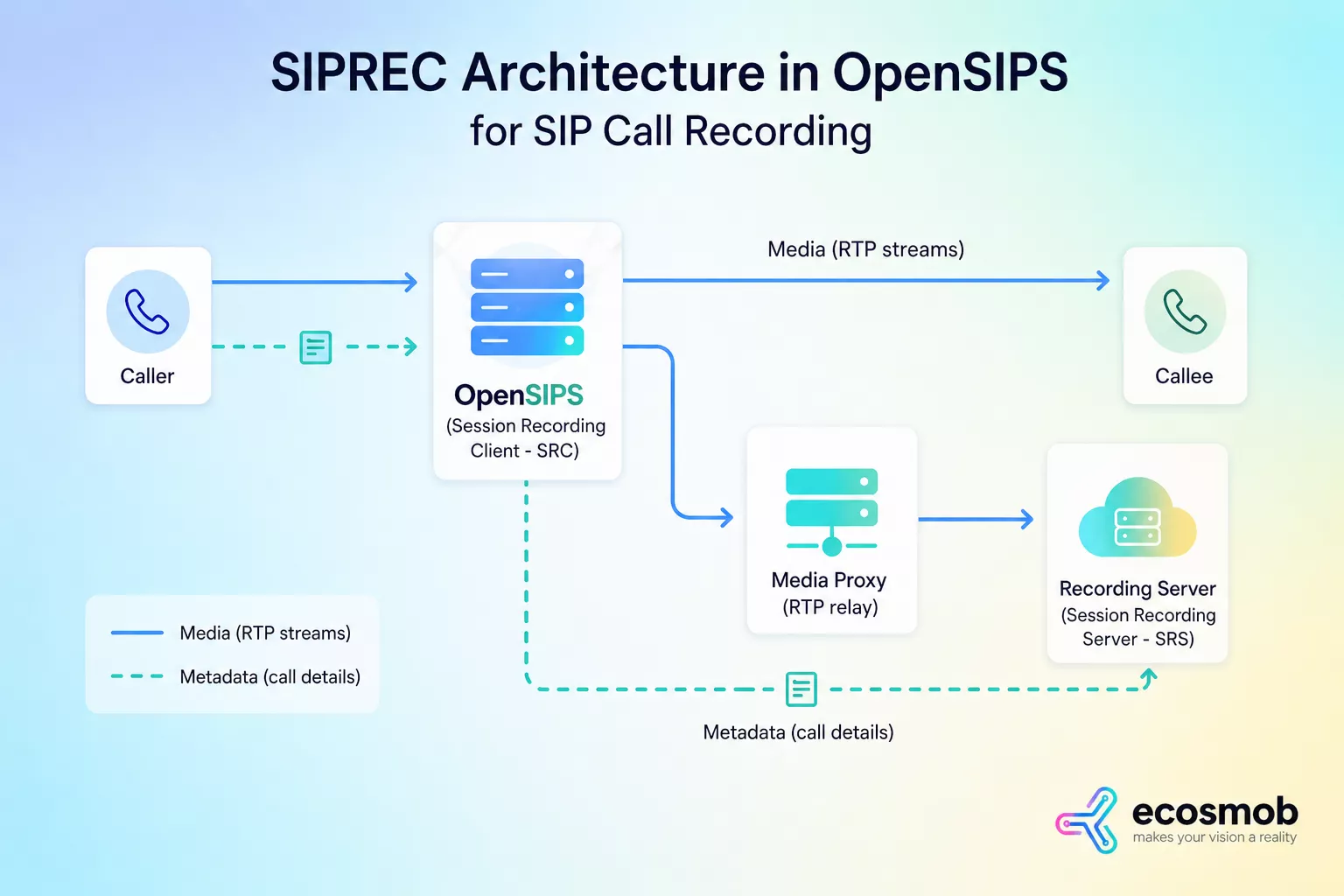
SIPREC architecture in OpenSIPS works by creating a parallel recording session that mirrors the live call while keeping signaling, media, and metadata synchronized.
OpenSIPS acts as the SRC, duplicating RTP streams through a media proxy and forwarding them, along with metadata, to the recording server without affecting the call flow.
Here’s how the flow works:
- A call is established between the caller and callee, with OpenSIPS handling SIP signaling in between
- At the same time, OpenSIPS initiates a parallel SIPREC session to the recording server (SRS)
- Media streams (RTP) are duplicated via a media proxy and sent to the SRS
- Metadata like call IDs, participants, and timestamps is sent alongside, but handled separately from media
This separation keeps recordings clean and usable. Media carries the voice, metadata carries the context, and SIPREC ensures both stay aligned without interfering with each other.
SIPREC works because it separates concerns while keeping everything in sync. That clarity comes from how each component is designed to play a specific role.
Key Components in SIPREC Architecture
- OpenSIPS (SRC): Controls signaling and triggers recording sessions
- Media Proxy (RTP Relay): Anchors and duplicates RTP streams
- Recording Server (SRS): Stores and manages media with metadata
Each component does one job well, which keeps the system modular and scalable.
Clear roles are what make SIPREC reliable at scale.
What are the Key Features of SIPREC That Matter for Business?
SIPREC’s key business features include compliance-ready recording, centralized capture across systems, high scalability, rich metadata tagging for analytics and AI, and seamless integration with storage and data pipelines. These are features your SIPREC can’t miss.
Let’s see in brief!
1. Compliance-Ready Recording
SIPREC ensures every call is captured with full context, making it well-suited for regulated industries like finance and compliant healthcare environments, where missing data can lead to penalties.
2. Centralized Recording Across Distributed Systems
SIPREC enables multiple nodes to feed recordings into a single system, giving unified visibility across regions, teams, and deployments.
3. Scalability for High Call Volumes
By separating recording from the call path, SIPREC allows systems to handle large volumes without performance bottlenecks or dropped recordings.
4. Metadata Tagging for Analytics and AI
SIPREC captures structured metadata alongside media, enabling search, filtering, and AI-driven insights like sentiment analysis and call classification.
5. Seamless Integration with Data and AI Pipelines
SIPREC recordings can integrate with storage systems, analytics tools, and AI models with minimal customization, enabling automation and deeper insights.
SIPREC turns recording from a cost center into a strategic asset. Of course, reality isn’t always clean. Let’s talk about where things break.
What Are the Most Common SIPREC Issues and What Causes Them?
Most SIPREC issues stem from gaps in RTP handling, missing metadata, and poor synchronization between signaling and media.
1. One-Way Audio in Recordings
This usually happens when RTP streams aren’t properly anchored or mirrored. NAT traversal issues or misconfigured media proxies can result in only one leg of the call being recorded.
2. Missing Metadata or Incomplete Sessions
SIPREC relies on metadata for context. If headers, session details, or recording triggers are misconfigured, recordings may exist but lack usable information like caller identity or timestamps.
3. RTP Handling Issues (NAT and Firewall Interference)
Firewalls and NAT can block or alter RTP streams, preventing proper duplication to the recording server. Without a correct RTP relay setup, streams either don’t reach the SRS or arrive partially.
4. Sync Mismatch Between Media and Signaling
If SIP signaling and RTP streams aren’t aligned, recordings may start late, end early, or lose segments. This often happens due to delays in session initiation or improper SIPREC configuration.
5. Performance Bottlenecks at Scale
High call volumes can overload media proxies or recording servers, leading to dropped sessions or partial recordings. Poor resource allocation and lack of load balancing are common causes.
A report by MarketsandMarkets highlights compliance and call-recording gaps as among the top risks in regulated VoIP environments, often leading to financial penalties.
Recording issues aren’t edge cases; they’re common enough to carry real business risk.
How to Set Up Call Recording in OpenSIPS Using SIPREC
Call recording in OpenSIPS using SIPREC is set up by enabling SIPREC support, configuring routing logic to trigger recording, defining the Session Recording Server (SRS), and ensuring proper RTP stream handling via a media relay.
Step 1:Enable the SIPREC Module
Start by activating SIPREC support in OpenSIPS so it can initiate and manage recording sessions alongside live calls.
Step 2: Configure Routing Logic
Define when calls should be recorded, whether all calls, specific users, or conditional triggers. This ensures recording is intentional, not blanket or wasteful.
Step 3: Define the SRS Endpoint
Set up the Session Recording Server (SRS) where recordings will be sent. This is where both media and metadata are stored and processed.
Step 4: Handle RTP Relay (RTPengine / MediaProxy)
Anchor and duplicate RTP streams using a media relay within a robust RTP scaling architecture so both sides of the call are captured and forwarded correctly to the SRS.
A clean setup depends on how well signaling, media, and recording flows are aligned.
That alignment holds only if a few best practices are followed consistently.
Best Practices for a Reliable Setup
- Ensure Proper Media Anchoring
Always anchor RTP streams through a media proxy to avoid one-way audio or missing recordings, especially in NAT environments. - Monitor SIPREC Sessions Separately
Track recording sessions independently from call sessions to quickly identify failures or mismatches. - Log and Debug Intelligently
Enable detailed logging of SIP signaling and RTP handling to diagnose issues such as sync delays or dropped streams without guesswork.
Stability doesn’t come from setup alone; it comes from how well you monitor and maintain it.
SIPREC vs Other Recording Approaches
Not all recording methods fail the same way, but most fail for the same reason: they weren’t designed for scale.
SIPREC vs Packet Capture
| Aspect | SIPREC | Packet Capture (PCAP) |
| Approach | Structured session-based recording | Passive traffic sniffing |
| Reliability | High, designed for recording | Low, depends on network visibility |
| Context | Complete and synchronized | Limited or missing |
| Scalability | Built for distributed systems | Breaks under complex networks |
Packet capture listens, SIPREC records with intent. Another common approach appears more controlled but comes with its own trade-offs.
SIPREC vs B2BUA-Based Recording
| Aspect | SIPREC | B2BUA-Based Recording |
| Architecture | Parallel recording session | Media flows through recording node |
| Performance Impact | Minimal | Adds latency and load |
| Scalability | High, decoupled design | Limited by processing capacity |
| Flexibility | Modular and extensible | Tightly coupled with call handling |
B2BUA records by inserting itself, SIPREC records by design. That doesn’t mean SIPREC is always the right choice.
When NOT❌ to Use SIPREC
- Small-scale deployments with minimal call volume
- Simple recording needs without compliance or analytics requirements
- Environments where adding a recording server is unnecessary overhead
- Systems already tightly coupled with media processing (e.g., single-node setups)
SIPREC is powerful, but its real value shows only when complexity and scale demand it.
When Should Businesses Use SIPREC for SIP Call Recording?
SIPREC makes the most sense in environments that require scalable, compliant, and structured call recording across complex VoIP systems.
1. Telecom Providers Scaling Call Infrastructure
For telecom operators handling high call volumes, SIPREC enables distributed recording without overloading core systems, ensuring reliability as traffic grows.
2. Enterprises Requiring Compliance-Grade Recording
Industries such as finance, healthcare, and legal services need accurate and complete call records, and SIPREC helps businesses ensure compliance by keeping recordings synchronized, traceable, and audit-ready.
3. AI-Driven Voice Analytics Pipelines
SIPREC captures structured metadata alongside media, making it ideal for AI use cases like transcription, sentiment analysis, and call intelligence.
4. Multi-Tenant VoIP Platforms
In multi-tenant systems, SIPREC enables centralized yet logically separated recording across clients, ensuring scalability and operational clarity.
SIPREC fits where recording isn’t optional; it’s mission-critical. That’s where the conversation shifts from tools to outcomes.
The Bottom Line?
Call recording only looks simple until you need it to work every single time.
SIPREC with OpenSIPS brings structure to something that’s often treated as an afterthought, enabling scalable, synchronized, and reliable recording across growing VoIP systems. Most failures aren’t because the technology falls short, but because the architecture behind it isn’t designed to handle real-world complexity.
That’s where the right implementation makes the difference. Ecosmob builds custom SIPREC deployments, AI-ready voice pipelines, and scalable VoIP architectures that ensure recording doesn’t just exist, it performs when it matters.
In the end, it’s not about recording more calls, it’s about recording them right.
Frequently Asked Questions
SIPREC (Session Recording Protocol) in OpenSIPS enables call recording by duplicating live call sessions and sending them to a dedicated recording server without interrupting the original call flow.
Traditional methods often record calls in-line, meaning recording is tightly coupled with the call path. SIPREC separates recording into a parallel stream, avoiding performance impact and single points of failure.
No. OpenSIPS acts as a Session Recording Client (SRC) that forwards call data to an external Session Recording Server (SRS), such as Asterisk or FreeSWITCH.
You need OpenSIPS (as SRC), a recording server (SRS), SIPREC module configuration, and proper media handling (RTP duplication or forking). Storage and monitoring systems are also essential.
Yes. SIPREC is designed for scalability since recording traffic is handled separately from live call traffic, reducing load on the main signaling path.