
Asterisk has been the quiet workhorse behind millions of business phone systems for over two decades. And in 2026, it is still the open-source framework most teams turn to when they want a phone system that bends to their business, instead of the other way around.
But the questions teams ask about Asterisk have shifted. It is no longer just “what is it” or “how do I install it.” Today, the conversations are about which version to commit to, how to size a server for actual call volume, how to fix the “Cannot Connect to Asterisk” error after a reboot, and how to make Asterisk work in multi-tenant call center environments without losing your weekend to log files.
Built for that 2026 reality. Building, troubleshooting, or evaluating Asterisk solutions? We’ve grouped 40 key questions into five clear sections.
Refreshed the answers with data from the current versions, and added structured tables and lists wherever they make the answers easier to scan. If you came here looking for one specific answer, the contents below will get you there in a click.
Asterisk FAQs: Basics
What is Asterisk?
Asterisk is a free, open-source framework for building communication applications. It turns a standard Linux server into a fully programmable phone system, capable of powering IP PBXs, VoIP gateways, conference bridges, IVR systems, call centers, and more.
It is protocol-flexible, supporting:
- SIP (via the modern chan_pjsip module)
- IAX2 for inter-Asterisk trunking
- WebRTC for browser-based calling
- DAHDI for analog and digital PSTN connectivity
Sangoma Technologies and a large global developer community maintain Asterisk.
What are the Core Features of Asterisk?
Asterisk ships with the building blocks of a complete communication platform out of the box. The most-used features include:
| Feature | What It Does |
| Call routing | Sends inbound and outbound calls based on rules in your dial plan |
| IVR | Automated menus that route callers without an operator |
| Voicemail | Personalized mailboxes with email notifications |
| Conferencing | Multi-party audio and video bridges via ConfBridge |
| Call queues | Distributes high call volumes across agents |
| Call recording | Full or selective recording for QA and compliance |
| Music on hold | Streams or files played to callers on hold |
| Transfers & parking | Attended/blind transfers, call park lots |
How does an Asterisk Phone System Work?
An Asterisk system converts voice into digital RTP packets and routes them across IP networks based on rules in your dial plan. It can connect to SIP trunks for external calls, IP phones for users, and legacy PSTN lines via gateways or DAHDI cards, giving you a hybrid voice setup if needed.
What are the Benefits of Using Asterisk in VoIP Solutions?
Asterisk gives businesses a phone system that scales with them without locking them into a vendor’s pricing sheet. When you map out the benefits and applications of the Asterisk solution for your business, here is what teams typically get out of it:
- No licensing fees — released under GPLv2
- Vendor independence — works with most SIP phones, trunks, and codecs
- Custom dial plans — automate call flows your business actually uses
- Open APIs (AGI, AMI, ARI) — integrate with CRMs, helpdesks, and AI tools
- Scales from 10 to 10,000+ extensions — same software, different hardware
- Strong global community — large knowledge base, active forums, plenty of developers
What is the Latest Asterisk Release in 2026, and Which Versions are Actively Maintained?
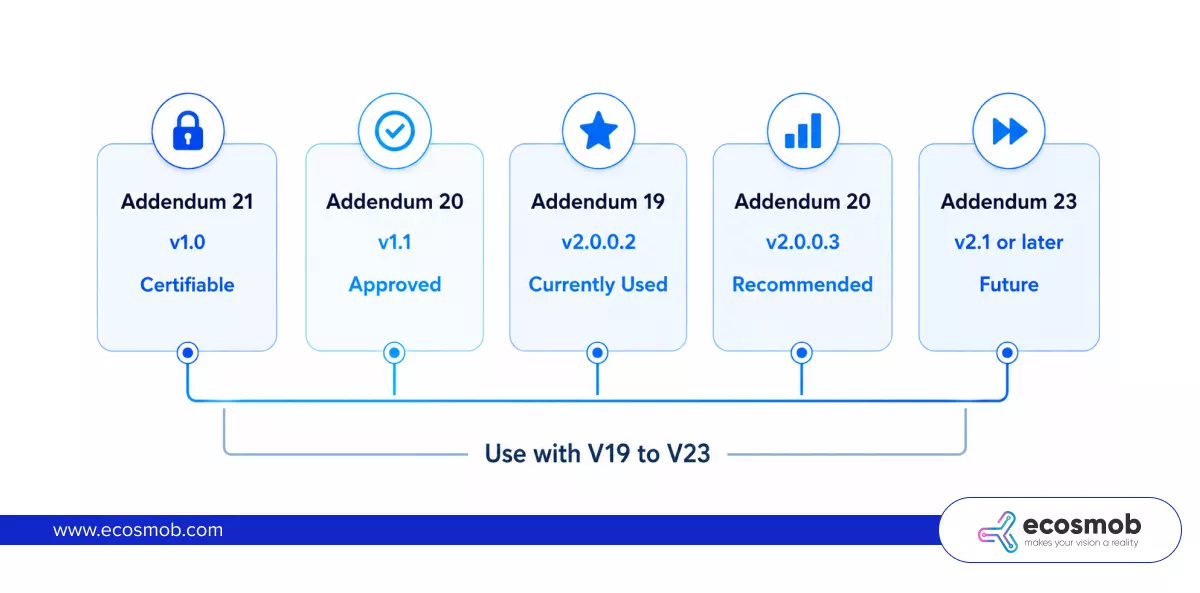
As of 2026, Asterisk 23 is the latest standard release, with 22 LTS as the recommended long-term support branch for production. Asterisk 18 reached End of Life in October 2025, and Asterisk 21 is now in security-fix-only status until October 2026.
| Version | Type | Status (2026) | Recommended For |
| Asterisk 23 | Standard | Active development | Teams that want the newest features |
| Asterisk 22 | LTS | Full support | Production deployments |
| Asterisk 21 | Standard | Security fixes only (until Oct 2026) | Plan to upgrade |
| Asterisk 20 | LTS | Full support | Stable production |
| Asterisk 18 | LTS | End of Life | Upgrade immediately |
Quick rule of thumb: If you are deploying new, go with Asterisk 22 LTS for stability, or Asterisk 23 for the latest features. If you are still on 18, plan your upgrade path now.
 What is Asterisk SIP Trunking?
Asterisk SIP trunking is how your Asterisk PBX makes and receives external calls over the internet rather than through traditional phone lines. You configure a SIP trunk to your VoIP provider in pjsip.conf, and Asterisk handles the registration, routing, and authentication.
The cost savings compared to PRI or analog lines are significant, and you get the flexibility to scale channels up or down on demand.
What are the Differences Between FreeSWITCH and Asterisk?
Both are powerful open-source telephony platforms, but the Asterisk vs. FreeSWITCH decision comes down to which problem you are solving.
Here is how they stack up:
| Factor | Asterisk | FreeSWITCH |
| Architecture | Monolithic with loadable modules | Highly modular, event-driven |
| Learning curve | Gentler, more documentation | Steeper, more reference reading |
| Best for | PBX, call center, IVR | High-volume softswitch, conferencing |
| Community size | Larger, more tutorials online | Smaller but very active |
| Configuration | .conf files + dial plan | XML-based |
| WebRTC | Solid via chan_pjsip | Native, very mature |
Short version: Asterisk is usually faster to get running for PBX use cases. FreeSWITCH tends to win for carrier-grade workloads and very high concurrent call counts.
What is an Asterisk IP Phone?
An Asterisk IP phone is any SIP-compatible phone (hardware or software) registered to an Asterisk server. The phone converts voice into RTP packets and signals call setup over SIP. Popular hardware options include Yealink, Grandstream, Polycom, and Cisco; popular softphones include Zoiper, Linphone, and MicroSIP.
Asterisk FAQs: Setup & Configuration
Once you have a sense of what Asterisk can do, the next question is usually: how do you actually get it running and configured for your environment? This section covers the practical setup answers.
How Do You Install Asterisk on a Server?
Installing Asterisk from source on a fresh Linux server follows a predictable sequence:
- Prepare the OS — Debian 12, Ubuntu 22.04/24.04, or Rocky Linux 9 are the most common
- Install dependencies — Build tools, libxml2, ncurses, openssl, jansson, libsqlite3
- Download the Source — Clone from github.com/asterisk/asterisk or the official tarball
- Run contrib/scripts/install_prereq install— Pulls in the rest of the libs you need
- Configure — ./configure, then make menuselect to pick modules
- Compile and Install — make && make install && make samples && make config
- Start the Service — systemctl start asterisk and verify with asterisk -rvvv
If you prefer a packaged install, FreePBX Distro, AsteriskNOW, or the official Debian/Ubuntu repositories are faster paths.
How Do You Configure Asterisk for VoIP?
You configure Asterisk for VoIP solutions by editing two core files: pjsip.conf for SIP endpoints and trunks, and extensions.conf for the dial plan, which determines what happens to each call. Add SIP credentials for each phone, define inbound and outbound contexts, then reload with pjsipreload and dialplan reload.
Note: Asterisk 21 removed chan_sip entirely. All new deployments should use chan_pjsip.
How Do You Set Up an Asterisk PBX?
Setting up an Asterisk PBX is a structured process. Here is the full flow:
- Install Asterisk on your server using one of the methods above
- Configure SIP trunks to your provider in pjsip.conf
- Create extensions for each user (one endpoint, aor, and auth block per user)
- Build the dial plan in extensions.conf to route calls
- Set up voicemail in voicemail.conf
- Test internally with two extensions calling each other
- Test externally by placing a call to and from your SIP trunk
- Lock it down with firewall rules and fail2ban before going live
For a faster path, FreePBX provides a web UI on top of Asterisk that handles most of this via forms.
How Does Asterisk Handle Call Routing?
Asterisk handles call routing through its dial plan, defined in extensions.conf. The dial plan groups rules into contexts, matches incoming calls to extensions (which can be patterns), and executes applications such as Dial(), Queue(), or Goto(). You can route on dialed number, caller ID, time of day, or any custom condition.
How Do You Set Up an Asterisk IVR?
Building an IVR in Asterisk is straightforward once you understand the dial plan flow:
- Record the Prompts — Either in studio quality or using Record() over the phone
- Place the audio files in /var/lib/asterisk/sounds/custom/
- Create an IVR context in extensions.conf using Background() to play the menu while listening for input
- Map each digit to an action — transfer to a queue, an extension, another IVR, or voicemail
- Add a timeout and invalid-input branch, so callers do not get stuck
- Test every option, including silent hangups and invalid digits
For complex IVR logic (database lookups, dynamic menus), use AGI scripts or ARI to plug in external code.
What are Asterisk Call Queues?
Asterisk call queues sit incoming callers in a virtual line and distribute them to available agents based on the strategy you choose. You configure queues in queues.con, then send calls to them with the Queue() application.
Common strategies include:
- Ringall — Rings every available agent at once
- Least recent — Sends to the agent who has been idle longest
- Fewest calls — Sends to the agent with the fewest completed calls
- Random — Picks an available agent at random
- Linear — Strict order based on agent priority
- Wrandom — Random weighted by agent priority
Queues also support priority levels, member penalties, music on hold, periodic announcements, and full reporting via the queue_log.
How do you implement Asterisk in a Call Center?
Implementing Asterisk in a call center setup means thinking about agents, queues, supervisors, and reporting from day one.
Here is the approach most call center teams follow:
- Design the architecture first, one Asterisk box, or multiple with a SIP proxy in front
- Configure agents as PJSIP extensions, organized into queue memberships
- Build queues for each skill (sales, support, billing) with appropriate strategies
- Customize the IVR for self-service options and skill-based routing
- Set up call recording for QA and compliance (full or on-demand)
- Integrate a CRM via AGI or ARI for screen-pops and click-to-dial
- Add real-time dashboards using AMI or QueueMetrics
- Plan for failover if the call center uptime is business-critical
How does Asterisk Handle Multi-Tenant Environments?
Asterisk supports multi-tenant VoIP deployments by isolating each tenant into its own context in the dial plan, with separate extensions, voicemail, queues, and routing rules. This lets a single Asterisk instance serve multiple companies, departments, or customers without their configurations bleeding into one another.
There are two common multi-tenant patterns:
- Context-Based Isolation — single Asterisk instance, dial plan contexts per tenant, shared trunks with per-tenant routing.
- Multi-Instance Isolation — separate Asterisk process or container per tenant, orchestrated via Docker, Kubernetes, or a SIP proxy like Kamailio in front
For larger hosted PBX providers, FreePBX with its multi-tenant module, or a custom multi-tenant stack built on Asterisk + Kamailio, is the typical production setup.
How Do You Set Up Asterisk for Remote Workers?
Setting up Asterisk for remote workers means giving them secure access to the PBX from outside the office network. You have three solid options: VPN (most secure, easiest for IT), direct SIP over TLS + SRTP (no VPN needed, but you need to open ports carefully), or WebRTC (in-browser, no client install).
Whichever path you choose, enable strong passwords, fail2ban, and TLS for all SIP signaling.
How Do You Set Up Asterisk for International Calling?
Setting up Asterisk for international calling comes down to four things: a SIP trunk provider that supports international destinations, dial plan rules that match country codes, proper outbound CLI configuration, and rate management to control costs.
- Pick a SIP provider with the international coverage and pricing you need
- Add dial plan patterns like _011. (US) or _00. (Europe) to route international calls through that trunk
- Set the caller ID correctly using Set(CALLERID(num)=…) to match what your provider expects
- Restrict by permission — assign outbound classes so only authorized extensions can dial internationally
- Monitor and cap usage to prevent toll fraud
What is Asterisk Cloud PBX?
Asterisk Cloud PBX is an Asterisk-based phone system hosted on cloud infrastructure (AWS, GCP, Azure, or a managed VoIP host) instead of on-premises hardware. You get all Asterisk features without buying servers, but at the trade-off of depending on the host’s network and uptime.
Cloud PBX is usually faster to deploy, easier to scale up or down, and the maintenance burden shifts to the provider.
What is Asterisk Hosted PBX?
Asterisk Hosted PBX is essentially Cloud PBX delivered as a managed service. A provider runs the Asterisk infrastructure, handles updates and security, and gives you a portal to manage extensions, trunks, and call flows. It is the simplest way to get an Asterisk-grade phone system without an IT team.
Asterisk FAQs: Server & Hardware
This section is for the people who have to answer the question, “What server do we actually need to buy?”
What Hardware Do You Need for an Asterisk Phone System?
An Asterisk phone system needs a Linux server, network connectivity, and IP phones at a minimum. If you are connecting to legacy PSTN lines, you will also need a telephony interface card (E.g., Sangoma or Digium) or an analog/digital VoIP gateway.
The actual specs depend on call volume, which is what the next question covers.
What are the Asterisk Server Requirements for Production Deployments?
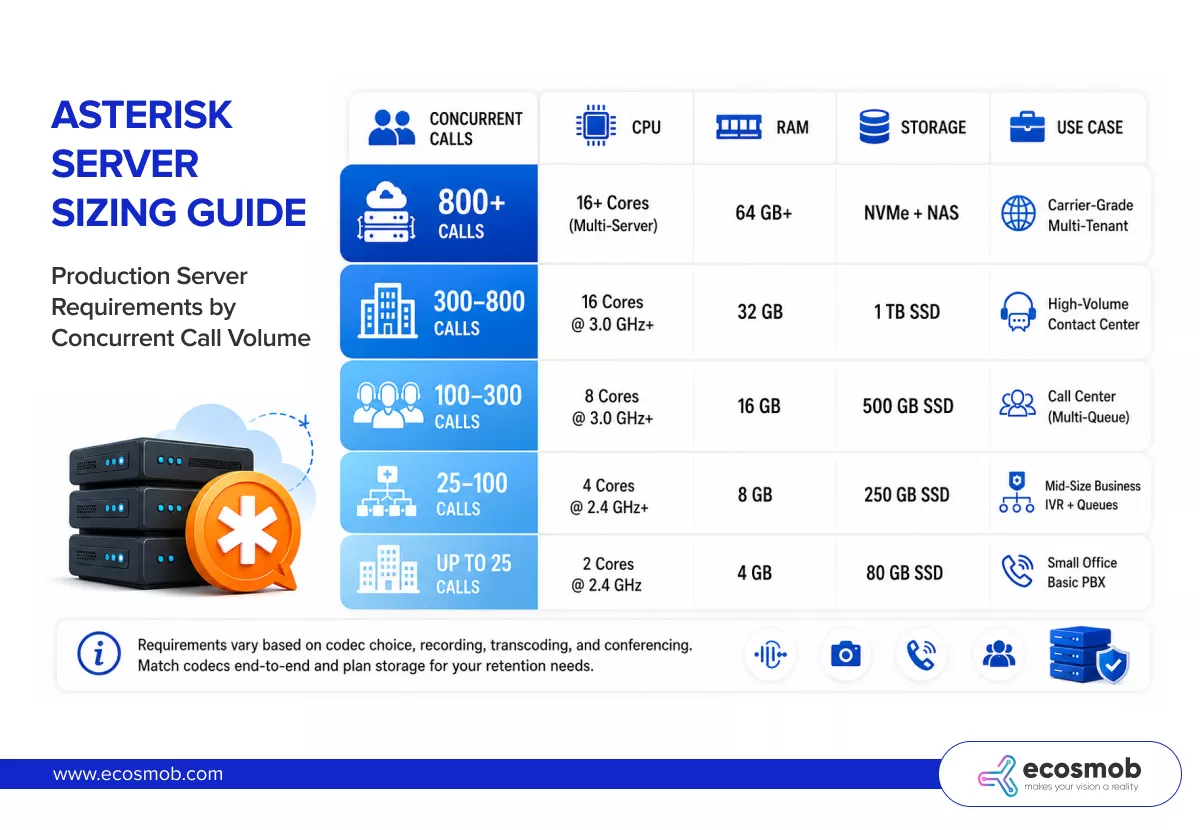
Asterisk server requirements scale with concurrent call volume, codec choice, recording, and transcoding load. The numbers below assume a modern Linux server (Debian 12 or Rocky 9) with G.711 codec, no heavy transcoding, and moderate recording.
| Concurrent Calls | CPU | RAM | Storage | Use Case |
| Up to 25 | 2 cores @ 2.4 GHz | 4 GB | 80 GB SSD | Small office, basic PBX |
| 25–100 | 4 cores @ 2.4 GHz+ | 8 GB | 250 GB SSD | Mid-size business, IVR + queues |
| 100–300 | 8 cores @ 3.0 GHz+ | 16 GB | 500 GB SSD | Call center, multi-queue |
| 300–800 | 16 cores @ 3.0 GHz+ | 32 GB | 1 TB SSD | High-volume contact center |
| 800+ | 16+ cores, multi-server | 64 GB+ | NVMe + NAS | Carrier-grade, multi-tenant |
Things that change these numbers fast:
- G.729 or Opus transcoding can cut capacity by 50–70%, match codecs end to end, where you can
- Call recording roughly doubles disk I/O, plan storage for retention windows
- Conference bridges are CPU-heavy; size up if you run lots of meetings
- Echo cancellation on PSTN traffic adds CPU overhead
 How Do You Optimize Asterisk Performance?
Optimizing Asterisk performance comes down to reducing unnecessary work in the dial plan, matching codecs end-to-end to avoid transcoding, and giving the OS enough resources so it never swaps.
Specifically:
- Use direct media (directmedia=yes) where possible so RTP bypasses Asterisk
- Avoid transcoding by negotiating the same codec on both legs
- Move logs and recordings to a separate disk
- Set priority=99 on the Asterisk process or use real-time scheduling
- Use PJSIP instead of the legacy chan_sip (and it is required from Asterisk 21+)
- Disable unused modules in modules.conf
- Monitor with core show channels, pjsip show endpoints, and a tool like Prometheus + Grafana.
How does Asterisk Handle Failover and Redundancy?
Asterisk handles failover and redundancy through several patterns, none of which are built in by default; you architect them.
| Pattern | How It Works | Best For |
| Active-passive | Primary + standby server, shared IP via keepalived/Pacemaker | Most production setups |
| Active-active | Two Asterisk boxes behind a Kamailio/OpenSIPS proxy | Higher availability |
| Geo-redundant | Active sites in different regions, DNS or SIP-level routing | Large enterprise/carrier |
| Container-based | Asterisk in Docker/Kubernetes with health checks and auto-restart | Cloud-native deployments |
For most businesses, an active-passive pair with shared configuration in Git or a database is enough.
What is Asterisk PBX, and Where Does it Fit?
Asterisk PBX is the catch-all term for any phone system built on Asterisk, whether it is a small office setup, a cloud-hosted IP PBX, or a multi-tenant carrier platform. Asterisk itself is the engine; what you build on top of it (FreePBX, a custom dial plan, a multi-tenant stack) becomes “the PBX” your users interact with.
Asterisk FAQs: Features, Security & Integrations
This section covers what Asterisk can do beyond the basics and how to ensure it stays secure while doing so.
How do you use Asterisk for Call Recording?
Asterisk records calls using the MixMonitor application, which mixes both legs of a call into a single audio file. You add it to your dial plan, point it at a storage path, and Asterisk handles the rest. You can record selectively (only certain queues, only outbound, only flagged calls) or in full.
Key points:
- Use MixMonitor rather than the older, deprecated Monitor
- Store recordings on a separate disk if the volume is high
- Encrypt at rest if you handle regulated data
- Set a retention policy and automate deletion to manage storage cost
- Notify callers of recording where required by law (GDPR, two-party consent states)
What is Asterisk SIPREC?
Asterisk SIPREC (SIP Recording, RFC 7866) is the industry-standard protocol for sending call media and metadata to an external recording platform in real time. While Asterisk does not natively act as a full SIPREC Session Recording Client, you can implement SIPREC integration using ARI, AudioSocket, or by pairing Asterisk with a SIP proxy like Kamailio or OpenSIPS that has dedicated SIPREC modules.
Common SIPREC use cases:
- Compliance recording for finance, healthcare, and government
- AI transcription and analytics, stream audio to STT engines like Whisper or AWS Transcribe
- Real-time fraud detection on banking calls
- Quality assurance in regulated contact centers
For SIPREC-heavy deployments, most teams put Kamailio in front of Asterisk and let Kamailio handle the SIPREC client role.
How do you integrate Asterisk with Other Applications?
Asterisk integrates with external applications through three main interfaces:
| Interface | What It Does | Typical Use |
| AGI | Runs an external script during a call (synchronous) | IVR logic, database lookups, custom routing |
| AMI | TCP socket for monitoring and control (asynchronous) | Real-time call events, click-to-dial, dashboards |
| ARI | Modern REST + WebSocket API | Building custom apps, voicebots, and AI integrations |
For new integrations in 2026, ARI is the recommended path because it is REST-based, language-agnostic, and works cleanly with modern microservice and AI architectures.
How do you integrate Asterisk with CRM Systems?
Integrating Asterisk with a CRM gives your agents screen-pops, click-to-dial, and automatic call logging. The integration path depends on the CRM, but the building blocks are consistent:
- Use AMI or ARI to listen for call events (ringing, answered, hangup)
- Match the caller’s number to a CRM contact record via the CRM’s API
- Push a screen-pop URL to the agent’s browser when the call connects
- Write call details (duration, outcome, recording link) back to the CRM after hangup
- For outbound, use Originate (AMI) or ARI to launch click-to-dial from inside the CRM
Popular CRMs like Salesforce, HubSpot, Zoho, and Pipedrive all have community or commercial Asterisk connectors.
What are Asterisk AGI and AMI?
AGI (Asterisk Gateway Interface) and AMI (Asterisk Manager Interface) are two of the oldest ways to extend Asterisk with external code.
- AGI runs a script (in any language) during call processing. The dial plan invokes the script; the script reads call information from stdin and writes responses to stdout. Great for “do something custom during this call” logic.
- AMI is a persistent TCP connection that streams call events out and accepts commands in. Great for dashboards, real-time monitoring, and triggering calls from external systems.
ARI is the modern successor to both and is recommended for new integrations.
How does Asterisk Support Custom IVR Development?
Asterisk supports custom IVR development through three main approaches, each suited to different complexity levels:
- Pure dial plan — for simple menus, write everything in extensions.conf using Background(), Read(), and Goto()
- AGI scripts — for IVRs that need database lookups, REST API calls, or dynamic branching, call out to a Python/PHP/Node.js script
- ARI applications — for full conversational IVRs or Asterisk LLM voicebots, run a standalone app that controls calls via REST + WebSocket
Asterisk also supports TTS engines such as Polly, Google Cloud TTS, and ElevenLabs via AGI or ARI, so dynamic IVR prompts can be generated on the fly.
What are Asterisk’s Video Conferencing Capabilities?
Asterisk supports video calls and video conferencing through the ConfBridge application, which handles multi-party audio and video bridges. Video calls work over SIP with codecs like VP8, VP9, H.264, and H.265, and you can mix video conferences with screen-sharing-capable clients using Asterisk WebRTC and chan_pjsip.
For business-grade video meetings, most teams combine Asterisk with Jitsi, BigBlueButton, or a custom WebRTC frontend.
What is the Role of Asterisk in Unified Communications?
Asterisk is often the voice core of a Unified Communications (UC) stack. It handles calls, voicemail, conferencing, and IVR, while other tools layer on top of these with chat, presence, video meetings, and team collaboration. Common pairings include Asterisk + Rocket.Chat, Asterisk + Mattermost, or Asterisk + a custom UC frontend talking to ARI.
How Secure is Asterisk?
Asterisk is as secure as you configure it to be. Out of the box, it is reasonably hardened, but every production deployment needs a defense-in-depth setup.
The non-negotiables in 2026:
- Strong endpoint passwords — never use defaults or the extension number as a password
- TLS for SIP signaling and SRTP for media — encrypt everything end-to-end
- fail2ban — auto-bans IPs after failed registration attempts
- Firewall rules — only open SIP and RTP ports to known sources where possible
- AMI restrictions — permit/deny rules on the manager.conf, never expose AMI to the internet
- Disable guest calls — allowguest=no inpjsip.conf
- Regular updates — patch Asterisk and the underlying OS on a schedule
- Audit logs — monitor messages and full logs for anomalies
What are the Best Practices for Asterisk Security?
Best practices for Asterisk security match the hardening checklist above, plus a few habits worth building into your operations:
- Review SIP registration logs weekly for unusual sources
- Rotate AMI and ARI credentials quarterly
- Turn off any modules you do not use
- Use jurisdiction-aware call limits to cap toll fraud exposure
- Run a vulnerability scan against your Asterisk host on the same cadence as the rest of your infrastructure
How does Asterisk Ensure Data Privacy and Compliance?
Asterisk gives you the building blocks for compliance, but compliance itself is something you architect.
The relevant features:
- SRTP and TLS for in-transit encryption
- At-rest encryption for recordings using OS-level disk encryption or per-file encryption
- Granular access controls in manager.conf and ari.conf
- Detailed call logs in CDR/CEL for audit trails
- SIPREC for regulated industries that need an immutable recording stream
Can Asterisk Integrate with Legacy Telephony Systems?
Yes. Asterisk integrates with legacy PSTN, PRI, BRI, and analog systems through telephony interface cards (Sangoma, OpenVox) or external VoIP-to-PSTN gateways. This is how most businesses run a hybrid setup during the transition from legacy lines to SIP trunks — Asterisk speaks both languages at once.
How does Asterisk Handle Call Quality and Reliability?
Asterisk handles call quality through several built-in mechanisms: jitter buffering smooths out network variation, packet loss concealment masks small drops, and adaptive buffers adjust based on real-time conditions. You can also monitor MOS scores, RTCP stats, and per-call quality metrics through AMI or ARI.
For consistent quality, the bigger levers are usually on the network side: quality of service, sufficient bandwidth, and low-jitter routes to your SIP provider.
What are the Licensing Requirements for Asterisk?
Asterisk is released under the GPLv2 license, which means you can use, modify, and distribute it freely. There are no per-seat or per-channel fees. If you distribute a modified version of Asterisk, you must comply with the GPL terms (release your source code). For purely internal use, you have very few restrictions.
Some commercial modules (e.g., the G.729 codec and certain Sangoma add-ons) incur separate licensing fees if you use them.
What are the Key Differences Between On-Premises and Cloud Asterisk Solutions?
The choice between on-premises and cloud Asterisk usually comes down to control, cost shape, and operational overhead. Here is the trade-off:
| Factor | On-Premises | Cloud |
| Upfront cost | Higher (hardware, setup) | Low (pay-as-you-go) |
| Ongoing cost | Lower long-term | Predictable monthly |
| Control | Full | Shared with the provider |
| Maintenance | Your team | Provider handles infra |
| Scaling | Buy more hardware | Scale instantly |
| Best for | Regulated industries, full data sovereignty | Fast deployments, distributed teams |
Asterisk FAQs: Troubleshooting & Support
How do you Troubleshoot Common Asterisk Issues?
Most Asterisk troubleshooting follows the same pattern: check if the service is running, check the logs, check the config, check the network.
Specifically:
- Is Asterisk running? — systemctl status asterisk and asterisk -rvvv
- Check the logs — /var/log/asterisk/full and /var/log/asterisk/messages
- Verify config syntax — dialplan reload, and pjsip reload will surface errors
- Test SIP registrations — pjsip show endpoints shows who is registered
- Check network reachability — tcpdump, sngrep, or Wireshark on SIP/RTP ports
- Check firewall rules — iptables -L or firewall-cmd –list-all
- Validate codec negotiation — most one-way audio issues trace back to codec or NAT problems
Why does FreePBX show “Cannot Connect to Asterisk” After a Reboot?
“Cannot Connect to Asterisk” in the FreePBX GUI usually means FreePBX cannot reach the Asterisk Manager Interface (AMI), even though Asterisk itself may be running fine. After a reboot, the most common causes are an AMI credential mismatch or a missing or incorrectly configured asterisk.ctl socket, or a service start-order issue.
Quick troubleshooting checklist:
- Verify Asterisk is actually running systemctl status asterisk -and asterisk -rx “core show version.”
- Check that the AMI socket exists: ls -la /var/run/asterisk/asterisk.ct.l If it is missing, Asterisk did not finish starting. Check /var/log/asterisk/fu for boot errors.
- Verify the AMI password matches Compare ampmgrpass in the FreePBX database against the secret in /etc/asterisk/manager.conf.
If they differ, update one to match the other.
- Check file permissions chown -R asterisk:asterisk /var/run/asterisk /etc/asterisk /var/lib/asterisk
- Restart cleanly fwconsole stop && systemctl stop asterisk && systemctl start asterisk && fwconsole start.
- Check for a port conflict. Sometimes another service grabs port 5038 (AMI) before Asterisk does
- Review service dependencies. If MariaDB or HTTPD starts after FreePBX, fix the systemd ordering.
What Asterisk Support Options are Available?
Asterisk support comes in three flavors, depending on how much hand-holding your team needs:
| Support Type | What You Get | Best For |
| Community support | Free help on forums (community.asterisk.org), GitHub issues, Stack Overflow | Hobbyists, dev teams comfortable with open source |
| Commercial support | Paid SLA from Sangoma (Asterisk’s maintainer) or third-party providers like Ecosmob | Production deployments, regulated industries |
| Managed services | Full deployment, monitoring, and 24/7 ops handled by a partner | Teams without in-house VoIP expertise |
For mission-critical Asterisk deployments, most businesses combine community learning resources with a commercial support contract to ensure response-time guarantees.
How do you Remove Old or Unnecessary Files from Asterisk?
Asterisk creates files in several places that grow over time: call recordings, voicemail, logs, and old config backups. A clean maintenance approach:
- Logs —/var/log/asterisk/* with logrotate , keep 30–90 days
- Recordings — set a retention policy (e.g., delete files older than 90 days) and automate with find … -delete in cron
- Voicemail — voicemail.conf has built-in retention via maxsecs and external deletion scripts
- Old config backups — clean /etc/asterisk/*.bak periodically
- Core dumps — if you find core files in /var/spool/asterisk, capture them for support and then archive
Never delete files in /etc/asterisk or /var/lib/asterisk unless you know what they are.
Wrapping Up
Asterisk in 2026 is still the most flexible open-source path to a serious phone system, but it rewards teams who plan for it: pick the right version, size the server for actual call volume, lock down security from day one, and have a clear support path before you need it.
If you got this far and you are weighing an Asterisk deployment, or stuck on one, Ecosmob’s Asterisk team has been building production VoIP infrastructure for over a decade. From custom dial plans and multi-tenant PBX setups to SIPREC integrations and call center scale-outs, we have probably already solved the problem you are facing.