
Are you a “just text me” person or a “let’s connect over a call” person?
Doesn’t matter. Your customers are both!
Some want to type. Some want to talk. Some started typing…, got frustrated, and now want to talk to a manager. (We’ve all been there.)
The point is that the “chatbot vs voicebot” debate isn’t really about technology. It’s about where your customers already are, and whether your stack is ready to meet them there.
Spoiler : MOST AREN’T!
Most teams treat this like a simple choice, text or voice, and move on. That’s where things start breaking.
Because the real decision is about context and system design, not features. And when that’s ignored, you lose conversations mid-way, no matter how strong your chatbot development approach looks on paper.
Here’s how to get there.
What is the difference between a chatbot and a voicebot?
A chatbot is a text-based system that interacts with users through messages on the web, apps, or messaging platforms. A voicebot is a voice-based system that interacts with users over calls using speech recognition and real-time responses.
Now think about the last time you contacted support.
You probably started with chat. Quick, low-effort, no-pressure.
Then something didn’t work. And suddenly, typing felt slow. You wanted to just say it once and be done, like you would in a typical voicebot for call center interaction.
That switch right there? That’s the difference.
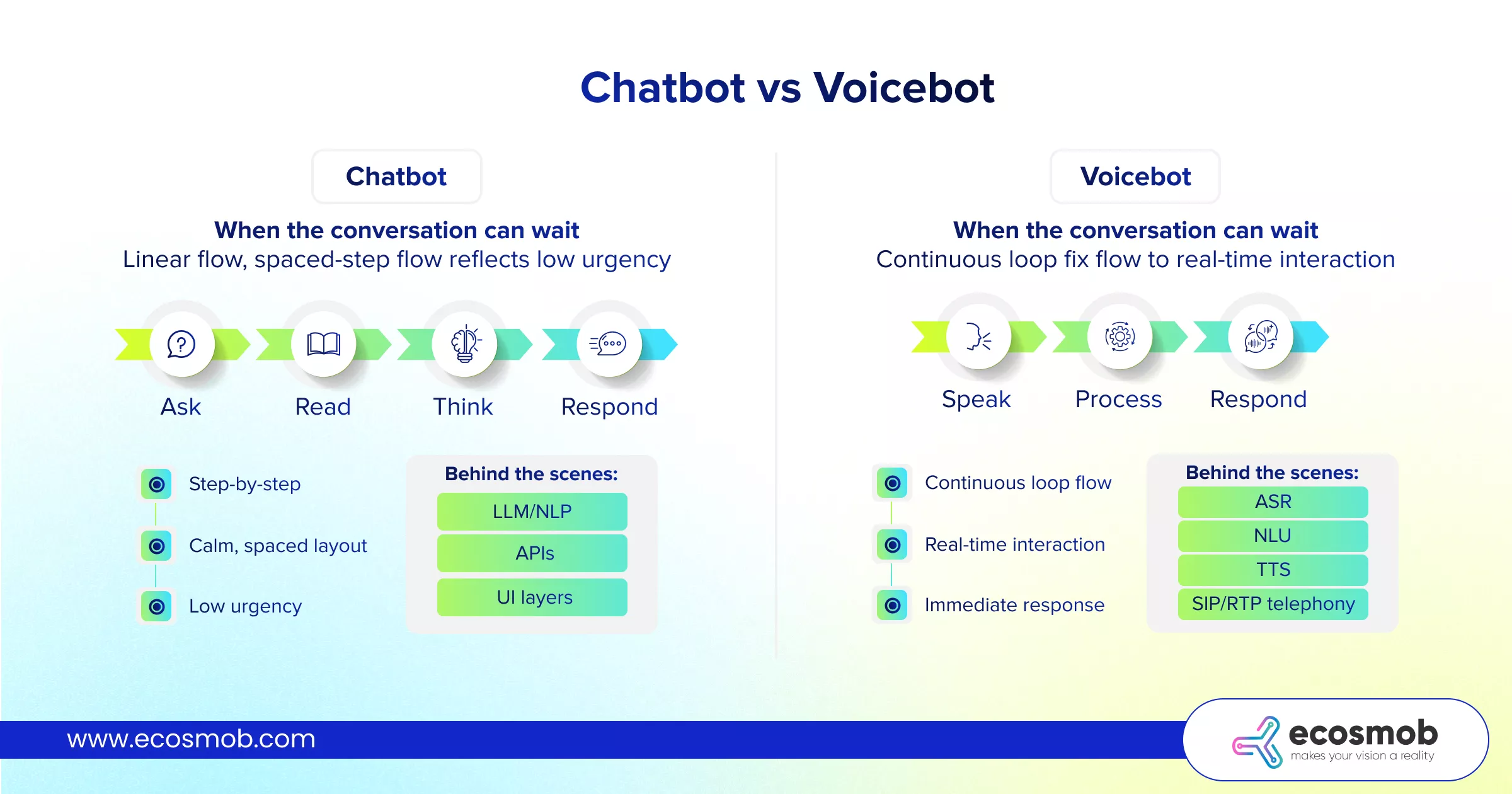
If you noticed, the difference isn’t just chat vs voice, it’s flexible interaction vs real-time expectation, which is exactly where a well-designed custom voicebot solution starts to matter.
And once you see it that way, it’s hard to unsee. And that’s where things start to change when you look at how these systems actually work.
Voicebot vs Chatbot Architecture Comparison (Side-by-side)
Both chatbot and voicebot look like conversational AI, something you’ll notice across many real-world conversational AI examples. One is a clean application stack. The other is an application sitting on top of a live communication system.
Here’s what that difference looks like, layer by layer:
| Layer | Chatbot Stack | Voicebot Stack |
| Core AI Engine | LLM / NLP engine to understand text input | ASR (speech-to-text) + NLU to process spoken input |
| Response Generation | Text response via LLM or logic layer | Text generation and TTS (text-to-speech) for voice output |
| Integration Layer | API orchestration to fetch data or trigger actions | API orchestration with real-time response constraints |
| User Interface | Web, mobile apps, messaging platforms | Phone calls via SIP-based telephony systems |
| Data & Context | CRM and database integrations | CRM integrations + live call context handling |
| Communication Layer | Not required | SIP trunk for call routing |
| Call Control | Not applicable | PBX / SBC for call handling and control |
| Media Handling | Not applicable | RTP for real-time audio transmission |
A chatbot stack stays within your application environment.
A voicebot stack extends into telecom infrastructure, where timing, routing, and audio quality directly impact experience.
That’s why voicebots don’t just “fail gracefully.” They drop calls, delay responses, or feel unnatural if the stack isn’t tight.
Now the real question: when does that complexity actually make sense?
When Should a Business Use a Voicebot Instead of a Chatbot (and When Not To)?
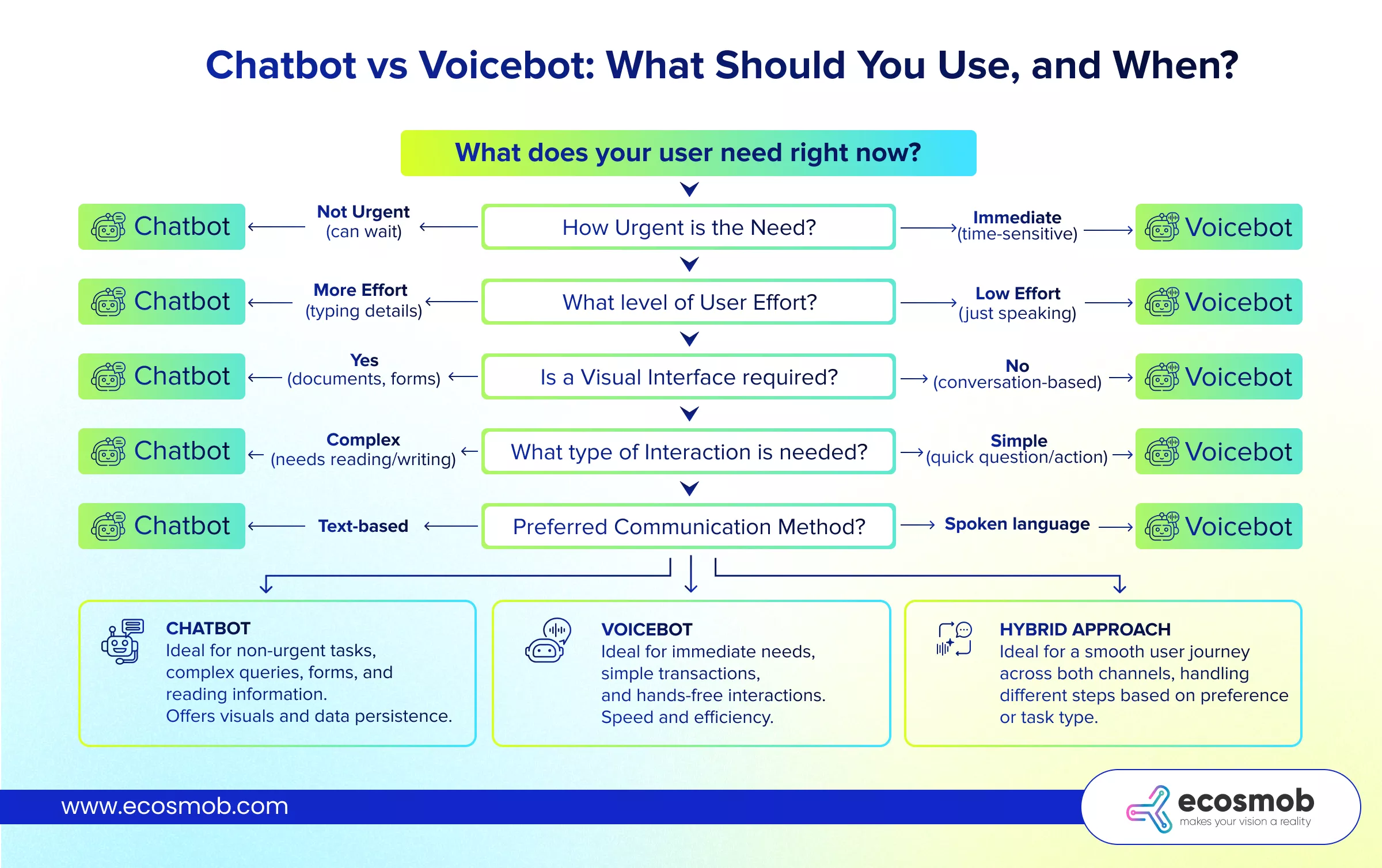
Choose between a chatbot and a voicebot based on the user’s context, urgency, and effort required to resolve the issue.
Most teams don’t struggle with building these systems. They struggle with using them in the right moments. Your customer isn’t choosing between chat or voice. They’re choosing what gets their problem solved with the least friction, which is where decisions like voice bot integration with CRM start to make a real difference.
So instead of thinking in features, use this checklist.
1. How urgent is the interaction?
If the issue is low urgency, users are fine-typing, reading, and moving step by step. But the moment something feels time-sensitive, patience drops. Typing starts to feel slow, and users want faster resolution.
Low urgency → Chatbot
High urgency → Voicebot
2. How much effort will the user tolerate?
Typing, reading, and navigating options takes effort. Users are okay with it when the task is simple. But as complexity increases, that tolerance drops quickly and they prefer speaking instead.
Comfortable effort → Chatbot
Low tolerance for effort → Voicebot
3. Does the interaction need a visual layer?
Some interactions need more than conversation. They need forms, links, comparisons, or structured steps. These are easier to handle when users can see and interact with elements on a screen.
Needs visual guidance → Chatbot
Pure conversation → Voicebot
4. Is the conversation predictable or open-ended?
Chatbots perform best when conversations follow a defined flow. But when users jump between topics, explain things partially, or need flexible back-and-forth, voice handles that better.
Structured flow → Chatbot
Unstructured interaction → Voicebot
5. Can your system handle real-time expectations?
Chatbots can tolerate small delays without breaking the experience. Voice interactions can’t. Even a short lag feels unnatural, which means your backend and telephony setup need to be reliable.
Delay tolerance exists → Chatbot
Real-time response required → Voicebot
6. Will the user journey stay simple or evolve?
Many interactions don’t stay in one mode. Users often start with chat and switch to voice when things get complex. If your system supports that shift, the experience feels smooth. If not, it breaks at the worst moment.
Single-step journey → Either works
Multi-step journey → Use both
This is exactly where something like an Ecosmob Voicebot connector can be a bridge to close the gap, ensuring users can move from chat to voice without losing context or restarting the interaction.
Now that you know where each fits, the next step is connecting them so users don’t feel the switch.
How Do a Chatbot and a Voicebot Work Together in the Same System?
A chatbot and a voicebot work together in the same system by sharing the same backend, data, and intent layer, allowing users to switch between chat and voice without losing context.
The better systems are designed so the user never has to choose between chat and voice. Because real interactions don’t follow a fixed path, even across different chatbot use cases. A user might start casually, explore a few options, get confused, and suddenly want things resolved fast.
A hybrid model solves this by treating the entire interaction as one continuous journey, not separate channels.
1. How the Hybrid Model Is Structured
A hybrid system is a shared intelligence layer. This means the system doesn’t “reset” when the channel changes.
The same NLU understands intent whether the user types or speaks. The same backend handles logic, data retrieval, and responses. So when a user moves from chat to voice, the system already knows:
- What the user asked earlier
- What step they’re in
- What context needs to be carried forward
This is what makes the experience feel connected instead of fragmented.
2. Role of Chatbot in the Hybrid Flow
Chatbots handle the early and low-friction parts of the interaction. This is where users are still figuring things out:
- Browsing options
- Asking general questions
- Following guided steps
- Interacting with forms or links
Chat works well here because it gives users control. They can read, think, and move at their own speed without pressure. It also helps filter intent, so by the time the interaction becomes serious, the system already has context.
3. Role of Voicebot in the Hybrid Flow
Voicebots come into play when the interaction shifts from exploration to resolution. This usually happens when:
- The issue becomes time-sensitive
- The user is frustrated or stuck
- The conversation becomes harder to structure through text
Instead of continuing a long back-and-forth in chat, the user can switch to voice and explain the issue naturally. Voice reduces effort and speeds up resolution, especially for complex or urgent cases.
4. What Makes the Integration Actually Work
The difference between a good hybrid system and a broken one is in how well the transition is handled. A working setup includes:
- A unified backend connecting CRM, APIs, and business logic
- Separate input/output layers for chat and voice
- A seamless handoff mechanism where users can switch channels without losing context
If this is done right, the user doesn’t notice the switch. They just feel like the conversation continued. If it’s done wrong, they repeat themselves, lose progress, and drop off.
Benefits for User Experience?
Instead of forcing users into one mode, you’re allowing them to move naturally. They can:
- Start with chat for convenience
- Switch to voice when things get complex
- Move to a human if needed
All without restarting the interaction. That flexibility is what makes the system feel reliable.
So the real advantage isn’t choosing one, it’s designing how both work together, especially when evaluating the best AI voice bot platforms, because in real-world journeys, it’s rarely one or the other, it’s how both work together.
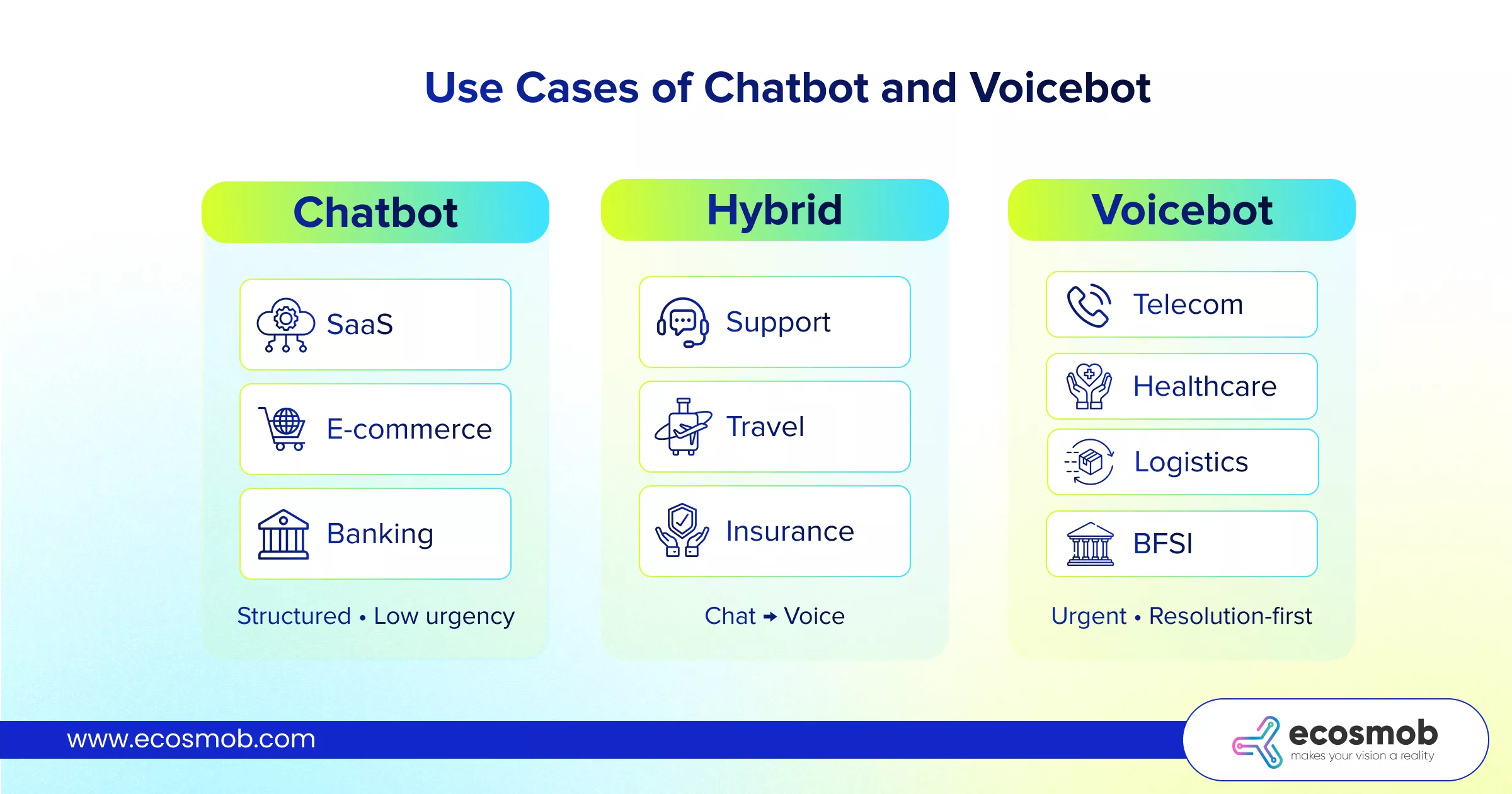
If you want to see where this hybrid approach actually shows up in real-world use cases, here’s a quick visual breakdown.
If voice is where things get serious, then what’s running underneath it decides whether it actually works or not.
Why VoIP and SIP Integration Changes Everything for Voicebots
Voicebot discussions around AI transforming enterprise telephony often focus on capabilities such as speech recognition and response accuracy. However, in real-world deployments, the overall experience is equally influenced by the underlying telephony infrastructure.
Unlike chatbots, which operate within application environments, voicebots depend on VoIP networks, SIP routing, and call control systems, making this layer critical to performance.
1. Call Flow Architecture in Voicebot Systems
A voicebot interaction follows a structured call flow that includes SIP trunking, PBX or SBC routing, AI processing, and response delivery. Each component in this chain contributes to the overall experience, and inefficiencies at any stage can introduce latency or disrupt the interaction. Since this flow operates in real time, even minor delays can affect conversation quality.
2. Latency Sensitivity in Voice Interactions
Voice-based systems operate under strict timing expectations. Unlike chat interfaces, where small delays are acceptable, voice interactions require near-instant responses to maintain a natural flow. This places performance demands on speech processing, backend systems, and audio transmission, all of which must operate with minimal latency.
3. Role of Call Control and Session Management
Voicebots must manage active call sessions in addition to processing user input. This includes handling call routing, transfers, interruptions, and fallback scenarios. Effective integration with PBX and SBC systems ensures that these functions operate reliably, allowing the interaction to remain stable throughout the call.
4. Impact of Telephony Integration on System Reliability
In many implementations, voicebots are designed with a primary focus on AI, while telephony integration is treated as a secondary concern. This often leads to issues such as call drops, routing inconsistencies, and degraded audio quality in production environments. These challenges are rooted in the communication layer rather than the AI itself.
So, what does a robust voice bot infrastructure look like?
A reliable voicebot system combines AI capabilities with a well-structured telephony setup. This includes
stable SIP trunking for consistent call routing,
efficient RTP handling for high-quality audio transmission,
strong PBX or SBC integration for call control, and
optimized communication between AI and telephony layers to reduce latency.
With that clarity, the decision becomes much simpler.
The Bottom Line?
It’s easy to get pulled into the “chatbot vs voicebot” debate as if one has to replace the other. But, in reality, they solve different parts of the same problem.
Chatbots are built to scale communication. They handle volume, streamline routine interactions, and keep things efficient where structure and clarity matter.
Voicebots, on the other hand, scale conversations. They step in when speed, context, and real-time interaction become critical to resolving issues.
Most real-world systems don’t rely on just one approach. Hybrid setups combine both, handling scale while still resolving complex interactions fast. The real impact comes from how they work together, not which one you pick.
The conversational AI market hit $7.09B in 2024, with voicebots projected to grow from $8.69B in 2025 to $66.24B by 2035 (22.5% CAGR), clear proof that businesses are rapidly shifting to voice-first experiences.
At Ecosmob, this is exactly where the focus lies: building conversational AI systems that don’t just work in isolation, but integrate deeply with your VoIP, SIP, and backend infrastructure to support real-world interactions at scale.
The right choice isn’t about what’s trending, it’s about what your users need at each moment!
Frequently Asked Questions
A chatbot interacts through text-based interfaces such as web, mobile, or messaging platforms, while a voicebot interacts through spoken conversations over telephony systems. The difference also extends to their underlying architecture, where chatbots rely on application-layer AI, and voicebots depend on both AI and real-time telephony infrastructure.
A business should use a voicebot when interactions require immediate responses, involve complex or time-sensitive issues, or when users prefer speaking over typing. Voicebots are more suitable for high-volume call environments, escalations, and scenarios where faster resolution is critical.
Yes, a chatbot and voicebot can work together within a unified system by sharing the same backend, data sources, and intent recognition layer. This allows users to move between chat and voice channels seamlessly without losing context or restarting the interaction.
A voicebot is generally more expensive to implement due to additional components such as speech recognition, text-to-speech, and telephony integration. However, the cost should be evaluated based on use case and expected return, as voicebots can reduce operational costs in call-heavy environments.
VoIP and SIP integration directly impact voicebot performance by determining call routing, latency, and audio quality. Poor integration can lead to delays, call drops, and degraded user experience, while optimized telephony infrastructure ensures smooth and real-time interactions.