
When an enterprise deploys an AI voicebot, the real engineering challenge isn’t just getting the bot to speak. It is making sure the bot knows who it is speaking to and what to do with the conversation afterward.
An automated voice agent operating in isolation is just a modern, glorified IVR. If the bot cannot pull real-time account data from your CRM mid-call (or update the customer’s record the exact millisecond the call drops), your operational workflow breaks. Customers get frustrated repeating themselves, and human agents are left cleaning up unindexed call histories.
Deploying an AI voice agent directly to your business tools requires a unified control plane.
Rather than building separate API integrations for your telephony engine, your AI models, and your CRM, you can manage the entire interaction through a single interface: FreeSWITCH’s Event Socket Layer (ESL).
What Is FreeSWITCH ESL and How Does It Control Call Flow?
FreeSWITCH Event Socket Layer (ESL) is an asynchronous, TCP-based control protocol that allows external applications to monitor system events, manipulate channel variables, and execute telephony commands remotely without running code inside FreeSWITCH’s core process.
Instead of writing application logic inside static XML dialplans or executing thread-blocking embedded scripts on the switching server, ESL completely decouples your control logic from the media plane. Your application server connects to FreeSWITCH over a standard TCP socket (typically port 8021), subscribing to real-time events (such as when a channel answers, DTMF keys are pressed, or a call hangs up).
Because ESL operates asynchronously, your external code (written in Node.js, Python, Go, or Java) can issue non-blocking commands (bgapi) to steer the call, inject audio playout, or fork media streams over WebSockets while the underlying telephony chassis maintains raw RTP packet processing at near-wire speeds.
How Does FreeSWITCH Connect to an AI Voicebot Through ESL?
FreeSWITCH connects to an AI voicebot through ESL by establishing a persistent TCP socket that streams real-time channel state events to an external orchestration daemon (which controls audio playback, media forking, and channel routing asynchronously).
The Event Socket Layer acts as the central control plane for FreeSWITCH. Instead of writing application logic inside static XML dialplans or running blocking scripts directly on the telephony server, ESL allows an external service (built in Node.js, Python, or Go) to manage call channels remotely over a TCP connection.
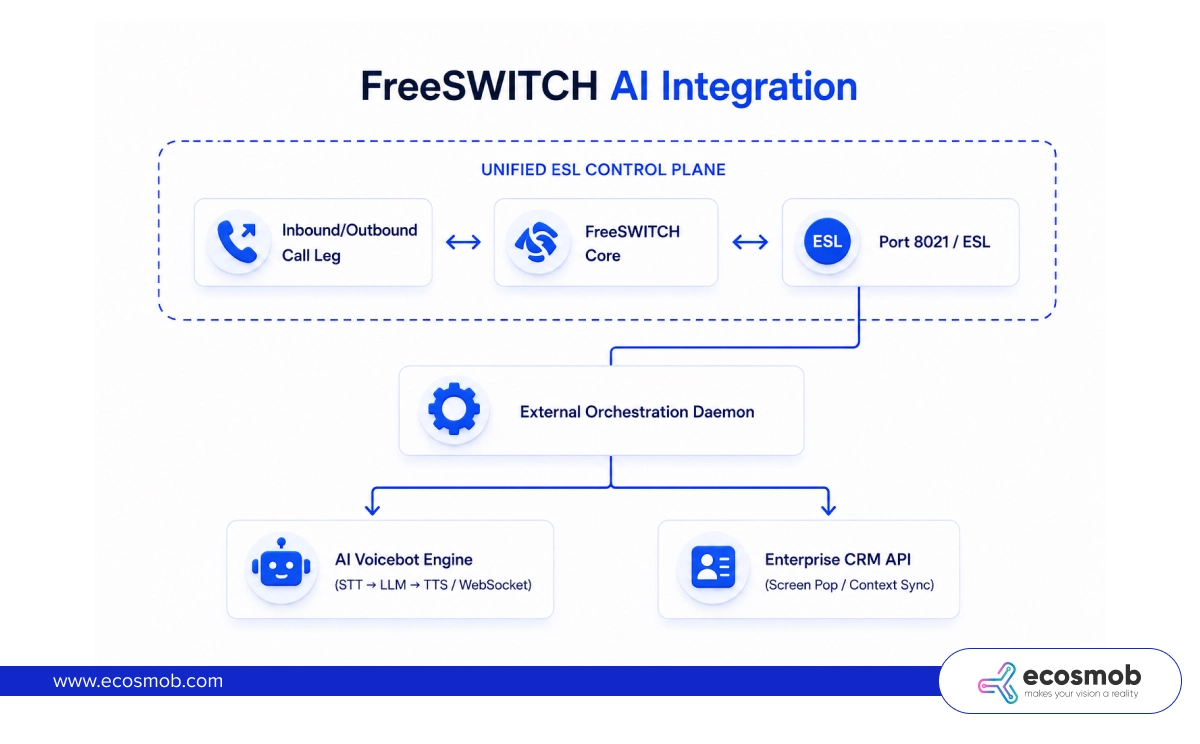
In a FreeSWITCH AI voice agent architecture, ESL handles three core responsibilities:
- Event Listening: The external daemon subscribes to specific channel events (like CHANNEL_ANSWER, CHANNEL_BRIDGE, or CHANNEL_HANGUP) to track the exact lifecycle of every call.
- Media Stream Control: When an inbound call lands, the daemon uses ESL commands to attach a media bug (via mod_audio_stream or mod_audio_fork), duplicating the raw linear PCM audio and streaming it over WebSockets to your Speech-to-Text (STT) engine.
- Playout Execution: As your LLM generates response tokens and streams them to a Text-to-Speech (TTS) engine, the daemon uses non-blocking ESL commands (such as uuid_broadcast or uuid_displace) to play the synthesized audio back into the channel leg without stalling the primary call thread.
Difference Between ESL Inbound and Outbound Mode for AI
The primary difference between ESL inbound and outbound mode is which component initiates the TCP connection:
In inbound mode, your external application connects to a running FreeSWITCH instance.
In outbound mode, FreeSWITCH reaches out to your external application the moment a call triggers the dialplan.
Choosing the right socket mode determines how your application scales and handles incoming voice traffic.
1. ESL Inbound Mode (Application-Initiated Connection)
In inbound mode, your external orchestration application acts as a TCP client that logs into FreeSWITCH’s management port (typically port 8021). The application authenticates, subscribes to global system events, and actively polls or monitors all running channels across the server.
- Best Used For: Platform monitoring, background call control, launching outbound dialer campaigns, and running global CRM record updates after a call finishes.
2. ESL Outbound Mode (Telephony-Initiated Connection)
In outbound mode, FreeSWITCH acts as the client. The moment an incoming call hits a specific extension context in the dialplan, FreeSWITCH executes the socket application, opening an exclusive TCP connection straight to your external middleware server:
<!– FreeSWITCH Dialplan Context for AI Voicebot using ESL –>
<extension name=“ai_voicebot_ingress”>
<condition field=“destination_number” expression=“^ai_bot$”>
<action application=“answer”/>
<!– Forward call control to an external ESL middleware asynchronously –>
<action application=“socket” data=“127.0.0.1:8084 async”/>
</condition>
</extension>
- Best Used For: High-concurrency AI voicebots. Because the connection is established per-channel and runs asynchronously (async mode), your external middleware controls that specific call leg in isolation. If your middleware needs to restart or scale out, it handles connections dynamically without locking the core FreeSWITCH switching chassis.
How Does One ESL Connection Drive Both the Voicebot and the CRM?
A single ESL connection drives both the voicebot and the CRM by acting as an event-driven middleware hub where real-time speech events automatically trigger CRM data lookups and database writes alongside call routing commands.
Instead of maintaining separate integration layers (where your telephony server talks to your CRM, and your AI engine attempts to sync with your database independently), the ESL daemon unifies these operations inside a single, synchronized loop:
- Call Ingress & Context Retrieval: The moment a call arrives, ESL fires a CHANNEL_DATA event containing the caller’s phone number (caller_id_number). The middleware immediately queries your CRM API to fetch the customer’s name, recent support tickets, and account status before the bot even speaks its first word.
- Dynamic In-Flight Prompting: The middleware passes this CRM context into your LLM’s system prompt (e.g., “You are speaking with John Doe who has an open order #4920”). The voicebot can now address the caller personally and reference relevant account details seamlessly.
- Automated Post-Call Write-Back: When the caller hangs up, ESL fires a CHANNEL_HANGUP_COMPLETE event. The middleware captures the full conversation transcript from the AI engine, extracts the intent and disposition flags, and writes a structured activity log back to the customer’s CRM record automatically.
Can an AI Voicebot Trigger CRM Lookups in the Middle of a Call?
Yes, an AI voicebot can trigger mid-call CRM lookups by issuing function calls (tool definitions) from the LLM to your middleware over the active socket loop (fetching live data dynamically while keeping the audio stream responsive).
A common operational hurdle is handling queries where the required data isn’t known at the start of the call, such as a customer asking, “What is the balance on my latest invoice?” or “Can I reschedule my appointment for Thursday?”
According to an IBM Institute for Business Value study on customer service trends, nearly two-thirds (65%) of customer service executives expect combining generative models with conversational AI frameworks to significantly elevate overall customer satisfaction.
Unlocking that satisfaction boost requires moving past static scripts to build a non-blocking, tool-calling pipeline that accesses real-time data:
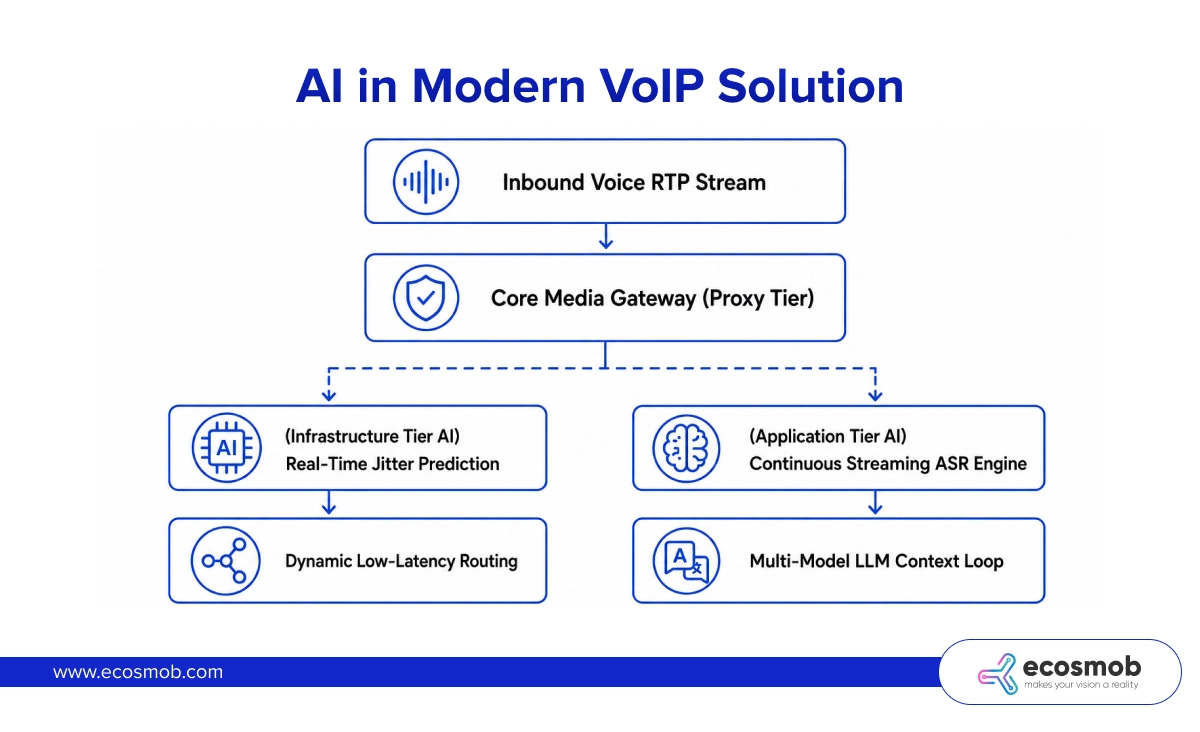
When the caller requests specific account info, the LLM identifies the need for external data and outputs a structured tool-call payload (e.g., get_invoice_details(account_id=”8821″)).
This is how that goes:
- Your middleware intercepts this request.
- Executes a fast, asynchronous REST query against your CRM or ERP database.
- Returns the JSON result back to the LLM’s context window within milliseconds.
- The LLM then synthesizes the answer into a natural text response and streams the audio back into FreeSWITCH over the open ESL channel.
💡 Ecosmob Expert Tip
If an external CRM database lookup or a complex third-party API query takes longer than 400ms to return data, the silence on the line will feel unnatural to the caller.
To prevent awkward dead air, configure your middleware daemon to fire an immediate, lightweight audio playout command over ESL (uuid_broadcast). Play a natural filler phrase (such as “Let me check that account detail for you…”) the exact millisecond a tool-call triggers. This keeps the caller engaged while your backend finishes fetching the live CRM payload.
Handing Off an AI Call to a Human Agent With Full CRM Context
You hand off an AI call to a human agent with full CRM context by using ESL to attach user metadata directly to the channel variables before executing an asynchronous bridge command to the agent queue.
When a customer’s query becomes too complex for an automated voicebot, the transfer to a human representative must happen smoothly. Forcing a customer to repeat their issue after being transferred is one of the fastest ways to damage customer satisfaction.
To execute a context-rich handoff cleanly, your middleware executes a structured three-step escalation workflow:
- Inject Channel Metadata
The middleware issues ESL commands to update the active FreeSWITCH channel variables with the AI’s conversation summary, intent score, and customer ID:
bgapi setvar <channel_uuid> ai_summary=“Customer requested supervisor regarding billing dispute on invoice #402”
bgapi setvar <channel_uuid> customer_crm_id=“CRM_USER_88201”
- Trigger Agent Screen Pop
Simultaneously, the middleware sends a WebSocket notification to your agent desktop application or CRM interface using the customer_crm_id. The agent’s browser screen instantly pops open the customer’s profile, displaying the live AI conversation transcript and intent summary.
- Execute Channel Bridge
Once the screen pop is confirmed, the middleware sends an ESL uuid_transfer or bridge command, moving the caller out of the AI socket loop into the live agent’s SIP extension queue cleanly.
Does ESL Add Latency to a Real-Time AI Voice Conversation?
ESL does not add measurable latency to a real-time AI voice conversation because it operates on an asynchronous, event-driven TCP protocol that processes call control commands in milliseconds without touching the physical RTP media path.
A common misconception among telecom developers is that routing call control through an external ESL daemon creates an audio bottleneck. In a properly configured architecture, ESL handles signaling and control commands, not raw media packet transport.
The heavy binary audio frames (16kHz Linear PCM) travel directly between FreeSWITCH media bugs and your STT/TTS engine nodes over dedicated, persistent WebSockets. ESL merely sends lightweight JSON or text-based control strings (like “start playback”, “flush buffer”, or “set variable”).
Because these control frames consume minimal bandwidth and execute in under 2 to 5 milliseconds, the total latency of your voice conversation is determined entirely by your AI models and speech processing engines (not by the FreeSWITCH ESL control loop).
FreeSWITCH AI Voice Agent Complete Call Flow
To illustrate how this unified control plane operates in production, trace the complete lifecycle of a call from initial ingress through to post-call CRM logging:
| Pipeline Stage | Telephony Action (FreeSWITCH / ESL) | AI Engine Processing | CRM & Data Layer Integration |
| 1. Call Ingress | Inbound call lands; dialplan triggers socket in async mode over ESL. | Middleware initializes AI session state; pre-allocates audio buffers. | Middleware queries CRM API using caller_id_number to fetch customer profile. |
| 2. Active Dialogue | Media bug streams raw PCM audio; ESL executes non-blocking audio playout. | STT transcribes speech; LLM generates responses; TTS streams audio frames. | LLM executes mid-call tool calls via middleware to pull live database records. |
| 3. Call Escalation | ESL attaches channel variables and executes uuid_transfer to human queue. | AI generates conversation summary and flags final call intent. | Middleware pushes WebSocket screen pop containing transcript to agent browser. |
| 4. Call Teardown | Channel hangs up; FreeSWITCH fires the CHANNEL_HANGUP_COMPLETE event via ESL. | AI pipeline closes WebSocket connection and releases local audio buffers. | Middleware posts full transcript, sentiment score, and activity log to CRM record. |
Building a scalable, production-grade voice AI platform requires treating your telephony server, your AI pipelines, and your business software as a single integrated ecosystem. FreeSWITCH’s Event Socket Layer gives you the exact tools needed to bridge these worlds cleanly.
By using a single outbound ESL daemon to orchestrate live call streams, execute mid-call CRM lookups, and automate post-call data logging, you eliminate system complexity and protect your system’s uptime.
If your engineering team is hitting obstacles with ESL socket dropouts, audio streaming lag, or CRM integration architecture, we can help!
Connect with an Ecosmob FreeSWITCH expert today to build your AI voice stack!
Frequently Asked Questions
You can build your ESL daemon using open-source, vendor-neutral libraries across major programming languages, such as modesl or esl for Node.js, python-ESL for Python, or go-esl for Go.
These libraries wrap raw TCP socket frames into clean event-driven objects, allowing your middleware to interface with any Speech-to-Text provider (e.g., Deepgram, Whisper), any LLM (e.g., OpenAI, Anthropic, local Llama), and any CRM API (e.g., Salesforce, HubSpot, or custom SQL databases).
While the active call is running, your orchestration middleware collects real-time text tokens generated by the Speech-to-Text engine and LLM context loops. The middleware buffers these serialized strings in memory alongside the channel’s Unique-ID. When FreeSWITCH emits the CHANNEL_HANGUP_COMPLETE event over ESL, the daemon triggers an asynchronous background job that formats the buffered transcript into a JSON payload and posts it directly to the customer’s CRM activity timeline.
Yes. Using ESL in inbound mode, your external application issues a bgapi originate command to FreeSWITCH, instructing it to dial an outbound customer number. The moment the remote party answers (CHANNEL_ANSWER), FreeSWITCH connects the live channel to your AI socket daemon, which fetches the customer’s record from the CRM, initializes the voicebot context, and begins the conversational loop automatically.
If a mid-call tool-call to your CRM times out or returns a 500 server error, your middleware daemon catches the exception asynchronously without crashing the socket. The middleware instructs the LLM to handle the failure gracefully (e.g., “I’m having trouble pulling that invoice record right now, but I can send a summary to your registered email”), ensuring the voice conversation continues smoothly without dropping the call or freezing the telephony channel.
A unified ESL control plane operates on an asynchronous, single-threaded event loop within your middleware daemon. Because all channel state updates (like call bridging, audio playout, and agent transfers) and CRM API calls flow through a central event dispatcher using the channel’s immutable Unique-ID, action commands are queued and executed sequentially. This prevents race conditions, such as triggering an agent screen pop before the call transfer has actually been initiated by FreeSWITCH.