
A new AI sales tool promises to save your team hours, improve customer conversations, and take care of repetitive tasks. The demo looks great, but a few weeks later, your sales representatives are still doing half the work manually.
What went wrong?
I think the problem often starts with choosing a tool before understanding what your sales team actually needs. An AI based sales assistant can do much more than automate follow-ups. Depending on your requirements, you might also explore AI voicebot solutions to automate routine customer calls, but not every tool offers the same capabilities or fits every workflow.
Before you invest in one, let’s look at how these tools work and what you should consider when choosing the right one for your team.
First, let’s look at what happens behind the scenes.
What is AI Sales Assistant Software?
AI based sales assistant software uses artificial intelligence to automate repetitive tasks, analyze customer interactions, and help your sales team make better decisions. For voice-based interactions, custom AI voicebot solutions for intelligent customer conversations can help you deliver more relevant responses and support customers throughout their journey.
Think of it as an extra pair of hands for your sales team, not another dashboard to manage.
What Can an AI Based Sales Assistant Do?
Imagine you’re preparing for a sales call. Instead of switching between tabs to find customer details, review past conversations, and prepare questions, your AI powered sales assistant brings the relevant information together.
It can help you:
– Before a call: Research prospects and prepare talking points.
– During a call: Surface relevant answers and suggest ways to handle objections.
– After a call: Summarize the conversation, draft follow-ups, and update CRM records.
The exact capabilities depend on the tool you choose.



Platform covers four of your six workflows? Our engineers build the assistant around the sales process you already run.

How is it Different From a CRM?
Your CRM stores customer information and tracks sales activities. An AI sales assistant uses that information to recommend next steps, automate tasks, or support live conversations.
For example, your CRM might show that a prospect raised a pricing concern. An AI assistant could help your representative prepare a relevant response for the next call. With a voice bot integrating to your CRM, you can also connect voice interactions with customer records to support more contextual conversations and streamline follow-ups.
The difference is simple: your CRM records what happens, while your AI assistant helps you decide what to do next.
Some tools focus on administrative tasks, while others support real-time conversations. Knowing this distinction helps you identify what your sales team actually needs.
But how does it turn raw customer data into useful sales suggestions? Let’s follow the process.
How Does an AI-Powered Sales Assistant Work?
An AI-powered sales assistant collects sales data, understands customer interactions, retrieves relevant information, and generates useful suggestions. Similar capabilities power solutions such as an AI voicebot for L1 support, which handles routine customer queries. Depending on your setup, a sales assistant can guide your representatives during live calls or automate tasks after a conversation.
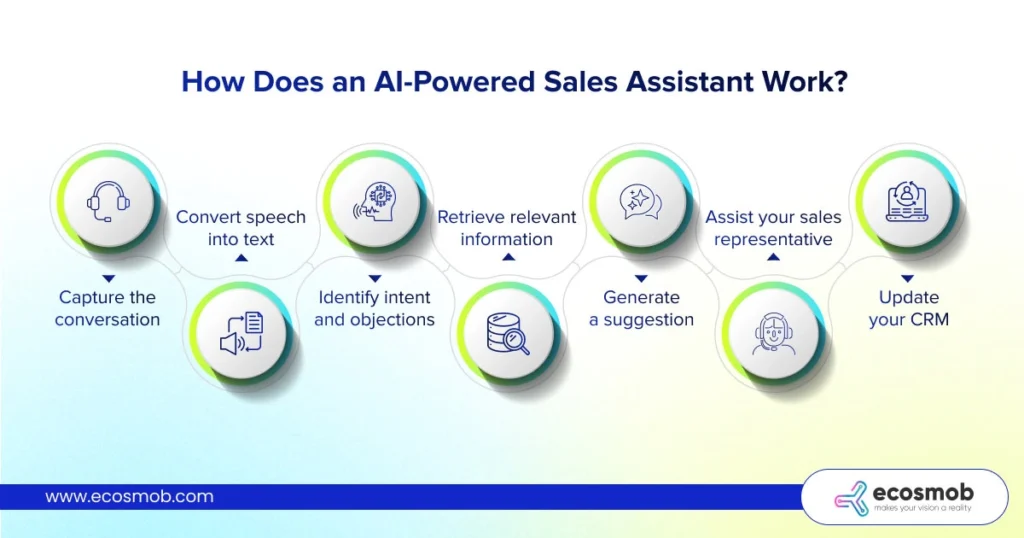
Here’s what happens behind the scenes.
1. Capture the conversation
For voice-based sales, the system receives call audio through your phone platform or communication application.
2. Convert speech into text
Speech-to-text technology transcribes the conversation so the system can analyze what your prospect says.
3. Identify intent and objections
AI detects buying signals, customer concerns, and questions that may need your representative’s attention.
4. Retrieve relevant information
The system searches your approved product information, knowledge base, or sales playbook for context.
5. Generate a suggestion
An AI model uses the conversation and retrieved information to recommend an answer or the next best action.
6. Assist your sales representative
The suggestion appears on the representative’s screen, where they can decide whether it fits the conversation.
7. Update your CRM
The assistant can prepare call summaries, log key details, and draft follow-ups. Approved integrations can write these updates back to your CRM.
The important part is how these steps work together. A useful suggestion depends on accurate transcription, relevant information, and enough time to reach your representative while it still matters.
This is also where reducing LLM hallucinations in real-time sales assistants becomes essential, as inaccurate suggestions can lead to misleading answers or unapproved claims.
For example, if a prospect questions your pricing, the assistant could retrieve your approved pricing guidance and suggest a relevant response. Your representative stays in control of what to say.
Not every AI sales assistant uses this entire pipeline. Some analyze conversations afterward, while others provide guidance during the call.
That brings us to an important distinction: not every AI sales tool plays the same role.
What are the Different Types of AI Powered Sales Assistants?
AI sales assistants come in different forms, from tools that guide your sales representatives to autonomous agents that handle specific tasks. Knowing the difference helps you choose a solution that matches your team’s needs.
1. AI Sales Assistant
Supports your representatives with prospect research, follow-up drafts, CRM updates, and live-call suggestions. Your team stays in control of customer conversations and decisions.
2. AI SDR Agent
Handles defined prospecting tasks, lead qualification, and outreach with less manual input. You set the rules and decide when human intervention is needed.
3. AI Virtual Assistant
Takes care of routine requests, scheduling, and information retrieval. It helps your team spend less time coordinating tasks and more time engaging prospects.
4. Conversation Intelligence Software
Analyzes recorded calls or meetings to identify objections, recurring questions, and coaching opportunities. Your managers use these insights to improve sales performance.
These categories can overlap, so don’t assume every platform fits just one. Some combine several capabilities in a single solution.
One distinction matters most: does your team need AI to assist during a conversation, analyze it afterward, or handle parts of the sales process independently?
Once you’ve identified the role, the next step is understanding the value it can bring to your team.
What are the Benefits of an AI Based Sales Assistant?
An AI sales assistant can help you reduce repetitive work, improve customer conversations, and give your sales team more time to focus on closing deals. The real value depends on how well it fits your workflow and where your team needs support.
McKinsey estimates that more than 30% of sales-related activities can be automated with today’s technology, highlighting the potential to reduce manual work across the sales process.
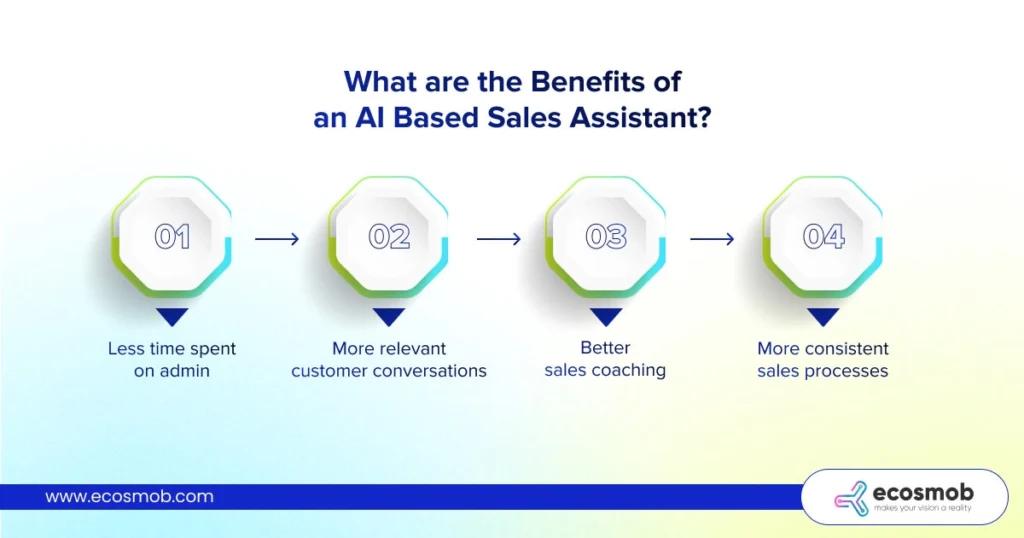
Here’s what that can look like in practice.
1. Less time spent on admin
Your representatives can automate meeting summaries, CRM updates, and follow-up drafts instead of handling every task manually.
2. More relevant customer conversations
Live suggestions can help your representatives address objections and find accurate product information without searching through multiple documents.
3. Better sales coaching
Call analysis can reveal recurring objections, missed questions, and areas where your team needs additional training.
4. More consistent sales processes
Your team can follow approved playbooks, maintain better records, and keep follow-ups from slipping through the cracks.
Consider a representative who finishes six calls and must update the CRM, summarize each conversation, and draft follow-ups. An AI assistant can prepare those records for review, leaving the more time for the next prospect.
But saving time is only half the story. If suggestions arrive too late or the tool cannot access the right customer information, the benefits quickly shrink.
That’s why choosing the right AI sales assistant matters as much as understanding what it can do.
How to Choose the Right AI Based Sales Assistant?
Choosing the right AI-based sales assistant starts with identifying your biggest sales bottleneck. If your needs go beyond off-the-shelf tools, you may also explore how to develop AI voice assistant for businesses around your specific sales workflows.
From there, evaluate the tool’s capabilities, real-time performance, integrations, security, and measurable business outcomes before committing to a platform.
Here are five things I would check before making that decision.
1. Match the Tool to Your Sales Workflow
Start with the problem you want to solve. Is your team spending hours on CRM updates, struggling with customer objections, or missing follow-ups?
- For administrative work: Look for automated summaries, CRM updates, and follow-up drafts.
- For live sales calls: Prioritize real-time guidance and access to approved product information.
- For outbound sales: Evaluate prospect research, lead qualification, and outreach automation.
Don’t pay for capabilities your team won’t use.
2. Test Real-Time Performance and Accuracy
A suggestion is useful only if it arrives while your can still use it. During a live call, even a relevant answer can lose its value if it appears after the conversation has moved on.
Test the assistant using your own call recordings. Include interruptions, accents, product names, background noise, and common objections.
Check whether its suggestions are accurate, relevant, and timely. Also, verify that it doesn’t invent product details or recommend unapproved claims.
3. Check Integration With Your Existing Systems
Your AI sales assistant should fit into your current workflow, not create another disconnected tool.
Phone systems: Check compatibility with your SIP trunks, PBX, softphones, or dialers if your team sells over phone calls.
Meeting platforms: Verify support for Zoom, Microsoft Teams, or Google Meet if your team sells through virtual meetings.
CRM and business applications: Check whether the tool can access relevant customer records and update information without duplicate or incomplete entries.
A CRM connection alone may not provide access to live call audio. If you need real-time coaching, confirm that the complete communication workflow is supported.
4. Review Security and Compliance
Your sales conversations may contain personal details, pricing, contracts, or confidential business information.
Before deployment, check:
- Recording consent and applicable privacy requirements.
- Data retention and deletion policies.
- Role-based access and audit trails.
- How third-party AI providers process your data.
- Whether sensitive information is used for model training.
- AI voice agent disclosure architecture and customer notification requirements.
A useful AI tool should protect your customer data as carefully as it handles your sales workflow.
5. Measure Results Before Scaling
Start with a small pilot instead of rolling out the tool across your entire sales team.
Compare performance before and after implementation using metrics such as:
- Time spent on administrative tasks.
- CRM completeness and follow-up completion.
- Accuracy and acceptance of AI suggestions.
- Representative adoption and user feedback.
- Call outcomes and conversion rates.
I would also ask your representatives one simple question: Does this tool make your work easier, or have you given it another task to manage?
Their feedback, combined with measurable results, can help you decide whether to expand the deployment.
The right choice isn’t the tool with the longest feature list. It’s the one that solves your actual problem without creating new ones.
Let’s wrap up here!


Call recordings leaving your environment won’t pass a compliance review.
The whole pipeline can run inside your own network instead, and that’s what we set up.
The Bottom Line?
The wrong AI sales assistant can cost you more than money. It can cost your team time, customer trust, and missed opportunities.
Before choosing one, look beyond the features. The real advantage lies in how well it fits your sales workflow. That’s where Ecosmob’s expertise in AI and VoIP integrations connects technology with real business needs.
Frequently Asked Questions
A CRM stores customer records, tracks deals, and manages your sales pipeline. An AI sales assistant uses customer data to suggest next steps, automate tasks, or support conversations. You can integrate both to make your sales workflow more efficient.
An AI sales assistant can automate repetitive tasks and support customer interactions, but it doesn’t automatically replace your sales team. Your representatives still play an important role in negotiations, relationship-building, and complex decisions.
Real-time AI assistance provides suggestions during a conversation, helping your representatives respond to questions and objections. Post-call assistance analyzes completed conversations to generate summaries, identify coaching opportunities, and prepare follow-ups.
Look for features that match your sales workflow, reliable AI responses, integration with your existing systems, strong data security, and measurable results. If your team sells over the phone, check whether the tool supports your communication infrastructure.
The cost depends on the features, number of users, integrations, and level of automation you need. Some tools charge per user, while others offer usage-based or custom pricing. Compare the total implementation and operating costs, not just the subscription fee, before choosing a solution.