
Hallucination (n.) — perceiving something that isn’t there.
Right now you might be picturing a mountain. In reality, you’re at your desk, trying to work out why your voicebot invented a discount tier that doesn’t exist.
Here’s the difference between the two. You know you’re daydreaming. Your assistant doesn’t. It states the invented price with exactly the same confidence as every correct answer it gave that morning.
And on a live call, your representative has about four seconds to catch it.
That four-second window changes everything. Your AI voicebot solutions have to listen, understand context, retrieve the right information, generate a response, and put it in front of your representative without slowing the conversation down.
I’ve seen teams focus heavily on prompts and models while overlooking the rest of the pipeline. How to reduce hallucinations in LLM systems is not just a question of making the model more accurate. You need to control what it can access, what it can generate, what requires verification, and when it should stay silent.
Before fixing the answer, let’s trace the mistake back to its source.
What Causes Hallucinations in Real-Time AI Sales Assistants?
Real-time AI sales assistants hallucinate when incorrect audio, missing context, weak retrieval, or unconstrained generation passes through the pipeline and reaches your representative as a confident answer. The LLM is only one part of the problem.
Think of your assistant as a chain:
Call audio → Speech-to-Text → Context → Retrieval → LLM → representative UI
A failure at any point can change the answer your representative sees.
- Audio: Background noise or overlapping speech can distort what your prospect actually said.
- Speech-to-Text: A wrong transcription can give the model the wrong question.
- Retrieval: Outdated or irrelevant documents can supply the wrong facts.
- LLM: Even with good context, the model may fill gaps with something that sounds plausible.
- Representative UI: A confident suggestion without its source can make a wrong answer look trustworthy.
I’ve found that teams often jump straight to the LLM when investigating how to reduce hallucinations in LLM systems. But if your retrieval layer sends outdated pricing, changing the model will not magically fix the answer. The same principle applies when you develop AI voice assistant for businesses: reliability depends on every stage of the pipeline, not just the model generating the response.
Where hallucinations can enter your AI pipeline
Imagine your prospect asks, “Does the enterprise plan include priority support?”
Your STT mishears enterprise as standard. Retrieval finds the standard-plan documentation. The LLM then gives a perfectly fluent answer based on the wrong context.
Nothing looked broken. Yet the final answer was wrong.
That is why reducing hallucinations starts with tracing the complete path from what your customer said to what your representative finally sees.
The next question is simpler: how do you stop bad information from reaching the model in the first place?
How to Reduce Hallucinations in LLM-Based Sales Assistants?
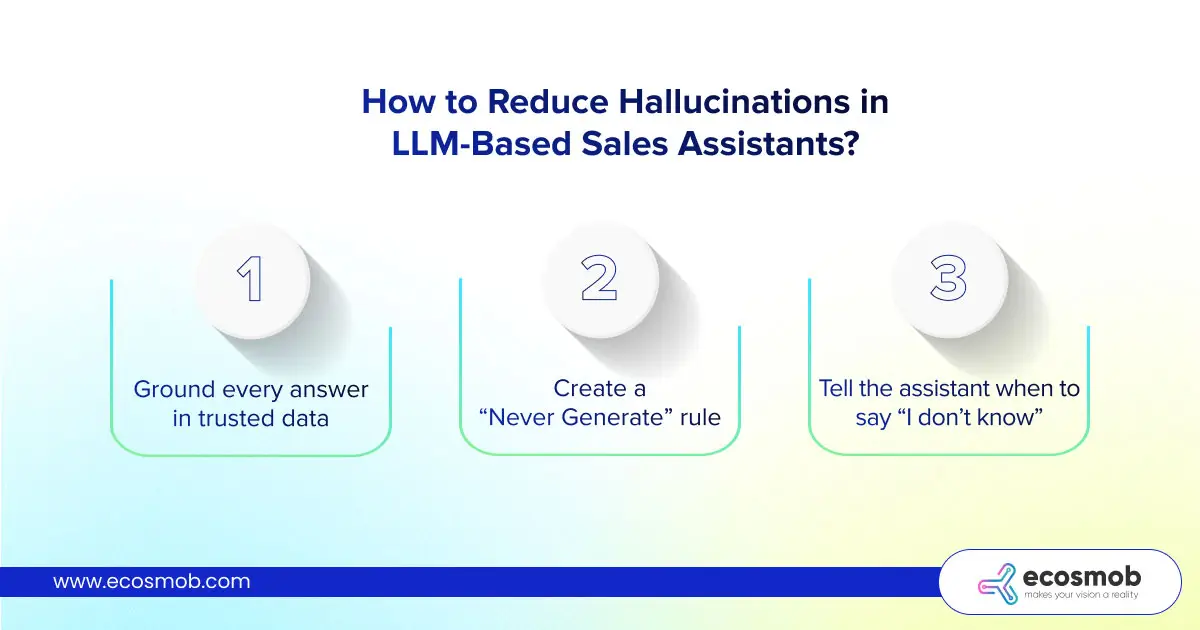
To prevent LLM hallucinations in sales assistants, ground responses in trusted business data, restrict what the model can generate, and verify high-risk answers before showing them to your rep. RAG helps, but it should not be your only safety layer.
1. Ground every answer in trusted data
Your assistant should retrieve information from sources you actually trust, such as:
- Product knowledge bases
- Records with voicebot integrated to CRM
- Pricing and CPQ systems
- Approved sales documents
- Policy databases
The goal is simple: give the model evidence before asking it to give you an answer.
RAG is useful here because your LLM can work with current, relevant information instead of relying entirely on its training data. But there is a catch. Retrieved information can still be outdated, incomplete, or irrelevant.
So, if you’re reducing LLM hallucinations, validate the retrieved content before it becomes the model’s context.

Your assistant invents a price, and nobody catches it. Grounding, validation, and safe fallback layers are what Ecosmob builds to stop that from reaching your rep.
2. Create a “Never Generate” rule
Some information is too important to leave to free-form generation.
Your AI should never invent:
- Pricing or discounts
- Contract terms
- Product availability
- Compliance claims
- Eligibility or policy decisions
Instead, retrieve these values from the appropriate structured system.
For example, if your prospect asks about an enterprise discount, your assistant should check the CPQ or pricing system, not calculate an answer from a sales document.
I’d apply the same principle to compliance claims. If the system cannot find an approved source, silence is safer than creativity.
3. Tell the assistant when to say “I don’t know”
A reliable assistant needs an escape route.
You can instruct your model to answer only when the retrieved context supports the claim. When it doesn’t, the UI can show “No verified answer found” instead of handing your representative a polished guess.
That small change can make a major difference.
The aim isn’t to make your AI answer every question. It’s to make the answers it does give defensible.
With the data and generation boundaries in place, the next challenge is keeping your safeguards fast enough for live calls. Introducing our custom AI voicebot solution for intelligent customer conversations means balancing reliable responses with the speed your customers expect.
What Guardrails Reduce LLM Hallucinations in Real-Time Agent Assist?
Effective guardrails combine clear instructions, controlled generation, answer validation, and the ability to abstain. Your AI should not only know how to answer. It should know when an answer isn’t supported.
1. Give the model clear boundaries
Don’t simply ask your assistant to “provide the best answer.” Tell it where that answer must come from.
Your instructions can require the model to:
- Use only approved sources
- Avoid unsupported claims
- Flag missing information
- Never invent pricing, policies, or product details
A lower temperature can also reduce unnecessary variation in responses. But remember, a less creative answer isn’t automatically a more accurate one.
2. Put high-risk answers through a verification layer
Imagine your representative asks the AI about an enterprise discount.
You don’t want the model deciding whether that discount exists. You want your CPQ or pricing system to provide the value, with the AI explaining it to the rep.
The same principle applies to contracts, compliance statements, product availability, and other sensitive information.
“If the answer can affect money, policy, or compliance, verify it before displaying it.”
3. Give your AI permission to say nothing
This may be the most important guardrail of all.
If your assistant cannot find reliable evidence, don’t force it to produce an answer. Show your representative something like:
⚠️No verified answer found!
You can also display the source snippet beside each recommendation, giving your representative a quick way to check the claim.
I’d rather see an empty card than watch an AI confidently invent a discount during a live sales call.
A good agent assist isn’t about answering more questions. It’s about making fewer dangerous guesses.
How to Prevent Hallucinations in LLM Without Increasing Real-Time Latency?
You don’t need to run every hallucination check while your representative is on a live call. Keep fast, high-risk checks in the conversation path and move deeper evaluation to post-call processing.
Your real-time layer should answer one question quickly:
“Is this suggestion safe enough to show the representative right now?”
That means retrieval validation, source grounding, pricing or policy lookups, and basic claim checks happen before the suggestion reaches your rep.
Everything that requires deeper analysis can wait until the call ends.
Live call
→ Retrieve approved information
→ Check high-risk claims
→ Confirm supporting evidence
→ Show or suppress the suggestion
After the call
→ Review the full conversation
→ Detect unsupported claims
→ Score hallucinations by category
→ Test changes before the next deployment
I wouldn’t try to squeeze every possible verification step into your live path. A perfectly verified answer that arrives after the prospect has moved on is not much help to your rep.
If you’re looking to fix voicebot latency real-time voice AI systems can experience, start by separating essential live checks from deeper post-call analysis. You can protect response speed without removing the safeguards that keep your assistant’s answers grounded.
Think of latency as part of your hallucination strategy, not a separate engineering problem.
Next, you need a way to prove that these safeguards are actually working.
How Do You Measure and Detect LLM Hallucinations in Production?
Reducing LLM hallucinations requires testing the complete conversation pipeline, not just the LLM response. Replay real call audio through STT, retrieval, generation, and the agent interface, then compare suggestions against approved sources.
Your live calls are messier than isolated prompts. Prospects interrupt, use unfamiliar product names, change topics, or ask questions missing from your knowledge base. A small transcription error can send the wrong context into retrieval.
That is the failure your evaluation needs to catch.
Take a set of representative calls and replay them through the same pipeline your reps use:
Call audio → STT → retrieval → LLM → validation → agent UI
Then compare every AI suggestion against your approved sources. Research on LLM-generated citation inaccuracies also highlights why AI-generated information needs verification. Don’t stop at a single hallucination percentage either. A wrong product description and an invented discount may both count as one error, but they don’t carry the same business risk.
| Hallucination Category | What you should check |
| Pricing | Discounts, plan costs, quotes |
| Product | Features, integrations, capabilities |
| Policy | Contrasts, refunds, eligibility |
| Compliance | Regulatory or legal claims |
| Context | Whether the answer actually matches the conversation |
I’d also treat every change to your AI system as a reason to rerun the evaluation. A new prompt, model, knowledge-base update, or retrieval change can introduce a regression you won’t notice during a few manual tests.
That gives you something far more useful than a generic accuracy score: a growing test set that tells you where your assistant fails, how serious the failure is, and whether your latest change actually made it safer.
And once you can measure reliability, the next decision becomes much easier: do you need to build this system yourself, or can an existing platform handle it?
Should You Build or Buy a Real-Time AI Sales Assistant?
You should buy an existing platform when standard agent-assist features meet your workflow, but consider a custom build when your AI must work deeply with your telecom, RTC, CRM, or compliance infrastructure. The right choice depends less on the model and more on how much control your system needs.
If you’re evaluating platforms such as Gong, Cresta, or Balto, you may already have much of what you need. They can make sense when your priority is getting agent guidance, conversation intelligence, and workflow support running without building the entire stack yourself.
But your requirements can change the equation.
When launching your voice AI stack, consider how your existing infrastructure, custom CRM workflows, data controls, and deployment requirements will shape the build. Suppose your sales calls already run through Asterisk or FreeSWITCH, and you need to retain control over your SIP infrastructure or deploy on-premises.
Now you’re not simply choosing an AI assistant.
You’re deciding how much of your communication stack you want someone else to control.
A custom approach can make more sense when you need:
- Your own RTC or PBX stack – You need the AI connected directly to your existing voice infrastructure.
- Custom business logic – Your assistant must pull pricing, customer context, or policies from systems specific to your business.
- Stricter compliance controls – You need tighter control over where call data, transcripts, and AI outputs are processed.
- Deeper AI orchestration – You want to control retrieval, guardrails, model selection, validation, and fallback behavior instead of accepting a fixed workflow.
I wouldn’t treat build vs. buy as a question of which option has “better AI.” The better question is whether the platform gives you enough control over the parts that can create risk.
If your requirements are straightforward, buying can save significant engineering effort. If your AI has to fit into a complex RTC environment, the integration architecture may matter more than the assistant itself.
And that brings us to the architecture that ties all these safeguards together.
What is the Best Architecture for a Low-Hallucination AI Sales Assistant?
A low-hallucination AI sales assistant needs more than a capable LLM. Your architecture should ground the model in trusted data, validate sensitive answers, and give your representative a safe fallback when the evidence isn’t enough.
The simplest way to think about it is as a controlled path:
Live call → Speech-to-Text → Conversation context → Retrieval → Business data → LLM → Validation → Agent UI
Each layer has a job.
Your STT layer turns the conversation into usable text. The context layer keeps track of what your prospect actually asked. Retrieval then finds relevant information from your approved knowledge sources.
If you’re connecting these components to an existing calling system, a voicebot connector guide for real-time call automation can help you understand how the voicebot fits into the wider call flow.
For high-risk questions, you can take a different route.
- Pricing? → CPQ
- Customer details? → CRM
- Contract terms? → Policy system
- Product information? → Approved knowledge base
The LLM can then explain the verified information instead of inventing it.
I think the most important design decision sits near the end of the pipeline. Don’t send every model response straight to your representative. Put validation between generation and the UI.
If the answer has sufficient evidence, show it with its source. If the evidence is weak, let the assistant abstain.
That gives you three simple rules to build around:
- Ground before generating.
- Validate before displaying.
- Abstain when evidence is missing.
You don’t need an architecture that makes your AI incapable of making mistakes. You need one that makes dangerous mistakes harder to produce and easier to catch.
And that is ultimately the difference between an AI assistant that sounds smart and one your sales team can actually trust.
We’ve traced hallucinations from the live call to the final AI suggestion, looked at prevention, guardrails, latency, testing, and architecture. Now, let’s bring it all together.


Planning a real-time assistant and want the safeguards built in from day one? Architecture decisions made early cost far less than retrofitted guardrails.
The Bottom Line?
Reducing LLM hallucinations isn’t about finding a smarter model. It’s about building an AI sales assistant that knows what it can prove, what it must verify, and when it should stay silent.
That means looking beyond the LLM and controlling the full path from live audio to the answer your representative sees.
At Ecosmob, that approach starts with the communication layer, trusted business data, real-time validation, and safe fallback mechanisms working together.
If you skipped straight to the conclusion, you now know the principle. The real advantage lies in knowing where hallucinations enter your pipeline and stopping them before your representative sees them.
Frequently Asked Questions
No, LLM hallucinations cannot be eliminated completely. You can reduce their frequency by grounding responses in trusted data, validating claims, restricting generation, and allowing the model to abstain when evidence is insufficient.
No, RAG alone cannot prevent all hallucinations. If your system retrieves outdated, irrelevant, or incomplete information, the LLM can still produce incorrect answers. Combine RAG with source validation, output guardrails, and abstention rules.
Lowering temperature can make responses more consistent, but it does not guarantee factual accuracy. Your model can still confidently repeat incorrect information, so use trusted sources and validation checks for fact-sensitive answers.
Replay representative conversations through your complete AI pipeline and compare generated answers against approved sources. Track errors by category, such as pricing, product features, and compliance, then rerun evaluations whenever your model, prompts, or knowledge base changes.
Keep essential checks, including source validation and structured pricing lookups, in the live response path. Move detailed transcript analysis and deeper hallucination evaluations to post-call processing to protect accuracy without delaying your sales conversations.