

Here’s the scene that is playing out in some enterprise IT department somewhere right now:
Leadership signs off on a shiny new cloud platform. The sales demo was stunning. The agent browser interface looks clean, CRM screen pops are lightning-fast, and the supervisor dashboard has real-time charts that make executives happy.
The team schedules a cutover for a long weekend.
Then Monday morning rolls around, and the floor descends into chaos.
It’s almost never the software UI that breaks. The disaster happens because the underlying telecom layer was treated like an afterthought. A critical toll-free number didn’t finish porting from the old local carrier. An edge Session Border Controller (SBC) renegotiates audio from G.711 to Opus mid-transfer, causing one-way audio on customer calls. Half your remote agents start complaining about robotic, choppy audio because nobody audited their home firewall UDP timeouts for WebRTC media.
To cap it all off, someone discovers that your billing department’s entire lookup flow relied on a twenty-year-old, undocumented script tied to an on-prem Avaya box that nobody on the team knows how to rewrite.
If you treat a contact center cloud migration like a simple SaaS upgrade, you’re setting yourself up for an expensive week. An on-prem PBX (whether you’re running Cisco UCCE, Avaya Aura, or legacy Genesys Engage) isn’t just software. It’s an intricate, messy web of carrier circuits, hardware timers, proprietary integrations, and deeply ingrained operational habits.
Let’s look at how to engineer a cloud contact center migration that doesn’t drop a single customer call.
What Is CCaaS Migration?
A CCaaS migration (Contact Center as a Service migration) is the end-to-end process of moving an organization’s on-premises contact center infrastructure (including PBXs, automatic call distributors (ACDs), IVRs, and carrier trunks) to a multi-tenant, cloud-based communication platform.
What Are the Common Drivers of a Cloud Contact Center Migration?
A cloud contact center migration is driven by the need to eliminate aging on-premises hardware maintenance, scale agent concurrency elastically during volume surges, and unify voice and digital channels into a single routing engine.
Organizations take on a major infrastructure migration because aging on-prem platforms eventually hit an operational brick wall:
Eliminating Peak-Capacity Hardware Taxes
Hardware PBXs force you to buy and maintain enough server blades, DSP cards, and PRI circuits to survive your single busiest day of the year. If you run retail, that means paying to keep idle hardware powered, cooled, and licensed for ten quiet months just to handle December traffic. Executing a CCaaS migration lets you scale concurrent seats up on Monday and back down on Friday.
Escaping the “Franken-Stack” Integration Trap
Try adding modern digital channels like WhatsApp, SMS, or web chat to a fifteen-year-old on-prem ACD. It usually requires buying three separate third-party server appliances, writing fragile middleware glue, and praying the pieces don’t break after the next OS patch. A contact center modernization project replaces that patchwork with a unified, cloud-native routing core.
Dodging End-of-Life Support Escalations
On-prem chassis reach vendor end-of-support, replacement parts get scarce on secondary markets, and proprietary maintenance contracts jump 20% year after year. Moving to the cloud shifts the burden of hardware obsolescence, operating system patching, and high availability directly to the provider.
How Cloud Contact Center Migration Unlocks Real-Time AI and Agent Copilots
A primary reason leadership funds a CCaaS migration today is not just to replace an aging telephone system. It is largely to satisfy an executive mandate for artificial intelligence.
Legacy on-premises PBXs create a physical roadblock for AI. On-premises hardware was built to write static audio recordings to a hard drive after a call ends.
But modern generative AI (such as real-time transcription, live agent copilots, and conversational voicebots) requires forking two-way audio streams in continuous 20ms frames over low-latency WebSockets while the call is still happening. Tying modern streaming LLMs to an on-prem chassis requires expensive, fragile third-party middleware that rarely scales.
Executing a contact center cloud migration turns your telecom media plane into an AI-ready data pipeline, unlocking three high-ROI capabilities:
- Real-Time Agent Copilots: While your agent speaks with a customer, the AI listens on a secondary audio track, queries your knowledge base, and surfaces the exact troubleshooting steps or compliance reminders on the agent’s screen before the caller finishes speaking.
- Zero-Touch Post-Call Summaries: Instead of forcing agents to spend two to four minutes typing notes and tagging tickets after every call, cloud-native AI models generate structured transcripts, capture customer sentiment, and update CRM records the second the call disconnects.
- Conversational Self-Service: You can replace multi-tier touch-tone IVR trees with conversational voice agents that resolve routine tier-1 inquiries (like tracking shipments or processing authenticated payments) autonomously without queuing for a human rep.
❗ Migration Warning
Never launch complex generative AI features on cutover day.
Modernize your core voice routing, SIP trunks, and CRM integrations first. Once your cloud telephony baseline is stable and your agents are comfortable with the new interface, enable AI summarization and copilots as an iterative phase-two enhancement.
What Should You Audit Before a CCaaS Migration?
A comprehensive pre-migration audit should catalog both the CX routing estate (active skills, queues, agent licenses, and IVR logic) and the physical telephony estate (DID inventories, carrier contracts, SBC configurations, and E911 endpoints) to eliminate legacy technical debt before moving to the cloud.
The fastest way to blow your timeline is attempting to copy every single existing configuration straight into your new cloud platform. Over ten or fifteen years of turnover and emergency patches, enterprise phone systems accumulate an unbelievable amount of operational clutter.
You need to run a pre-migration audit across two distinct operational areas before setting a cutover date:
- The CX and Routing Estate
Ghost Queues and Forgotten Skills
Legacy ACDs are full of queues set up for one-off marketing promotions that ended years ago. Run a report on call volume by skill group over the last six months. If a queue hasn’t taken a live call in 90 days, archive it. Do not waste engineering cycles rebuilding it during your contact center migration.
The Agent License Reality Check
Compare your paid software licenses against real active logins. You will almost certainly find that 15% to 20% of your on-prem licenses belong to employees who left the company months ago or seasonal contractors whose profiles were never de-provisioned.
IVR Call Flow Simplification
Actually dial your own main numbers and map every branch. Legacy environments are notorious for five-level-deep touch-tone trees designed back when keypad menus were the only self-service option available. Contact center modernization favors clean, intent-driven menus or conversational speech routing.
Hidden Database Hooks
Track down every single screen-pop script, custom database dip, and reporting database connector currently plugged into the PBX. If an integration touches customer data, you need to know exactly what API endpoints it relies on before you unplug the box.
- The Telephony and Media Estate
Number Inventory and Carrier Porting
Build a line-by-line spreadsheet of every active Direct Inward Dialing (DID) number, toll-free circuit, and outbound caller ID profile. Identify which carrier owns each block, track down your Billing Account Numbers (BANs), and verify customer service records (CSRs) early.
Finding out two days before launch that a legacy carrier rejected your port request over an address mismatch is an absolute nightmare.
SBCs and Codec Profiles
Document your edge hardware, whether you’re running AudioCodes, Ribbon, or Oracle SBCs. Map your incoming carrier codecs and see how your internal network handles G.711, G.729, or Opus. Transcoding mismatches between your carrier and your new cloud WebRTC endpoints are the number-one cause of mysterious one-way audio bugs in any CCaaS migration.
Emergency Dispatch (E911)
Moving agents to browser softphones and remote work setups completely breaks legacy, hardwired 911 location tables. In the US, compliance with federal mandates from the Federal Communications Commission (FCC) on Kari’s Law and RAY BAUM’S Act demands dynamic location routing. This means your system must dispatch the caller’s real-time, dispatchable physical location during an emergency.
Why Choose Bring Your Own Carrier (BYOC) for CCaaS?
Bring Your Own Carrier (BYOC) is a good way to go for CCaaS because unbundling telecom from your cloud software through BYOC allows organizations to retain wholesale per-minute pricing, avoid multi-week number porting delays, and maintain direct SIP routing control for zero-downtime failovers.
When planning your contact center cloud migration, one of the biggest architectural choices is whether to buy bundled calling minutes directly from your CCaaS vendor or bring your own carrier contracts along with you.
Software vendors love selling bundled minutes because it gives them an easy recurring margin. They package software and minutes into a neat, all-in-one bill. But for enterprise teams with serious call volume, that convenience comes with major architectural trade-offs: higher per-minute rates, zero leverage during carrier outages, and zero control over your routing paths.
Here are the three main reasons you should decouple your telephony:
- Zero-Downtime Parallel Cutover
If you terminate your carrier trunks into an independent Session Border Controller (like Kamailio or an enterprise SBC) before calls reach the platform, you control the SIP signaling directly. You can route 90% of your calls to the old Avaya system and divert 10% to the new cloud platform for a small test team on Monday morning.
If something goes sideways, you can reroute that traffic back to on-prem in seconds without waiting on a third-party support desk.
- Dodging the Number Porting Trap
Porting numbers between telcos takes anywhere from two to six weeks, and delays are common. With a BYOC setup, your phone numbers never move. They stay with your existing carrier; you simply update your SIP signaling destination to point to the cloud provider’s SIP URI.
- Wholesale Telecom Pricing
CCaaS vendors frequently mark up domestic and international voice minutes by 50% to 200%. Keeping your direct contracts with wholesale Tier-1 carriers preserves your aggressive volume pricing as call minutes scale up throughout your cloud contact center migration.
How To Perform A CCaaS Migration? (Key Steps For A Successful Contact Center Cloud Migration)
The four key steps in a CCaaS migration are: auditing legacy telephony and routing estates, building core cloud queues and testing REST integrations, executing a parallel canary run using SIP traffic splitting, and rolling out departments progressively before decommissioning hardware.
Here’s how you successfully execute each step:
Step 1: Estate Audit and Telecom Architecture
- Dig into your on-prem PBX configuration tables to identify active versus abandoned skill groups, queues, and dialplan patterns.
- Choose your telephony architecture: decide whether bundled minutes make sense for your volume or if a decoupled BYOC setup is necessary for your contact center cloud migration.
- Document baseline performance on your existing system: Average Handle Time (AHT), call abandonment rates, and current Mean Opinion Scores (MOS) for call clarity.
Step 2: Platform Configuration and Pilot Group Build
- Configure your primary queues, agent profiles, and simplified IVR flows inside the cloud CCaaS console.
- Wire up your CRM, ticketing systems, and customer databases using clean, authenticated REST APIs.
- Pick a single, low-risk team to serve as your pilot group (a 20-agent tier-1 customer support team works well).
- Run comprehensive media plane testing: verify two-way audio clarity, test codec negotiation (G.711 to Opus), and confirm emergency E911 dispatch records.
Step 3: The Parallel Run and Canary Testing
- Terminate your primary carrier trunks into an intermediate SIP proxy or edge SBC.
- Split your live production calls: route 10% of incoming volume to the cloud pilot group while leaving the remaining 90% running safely on your on-prem PBX.
- Track real-world telemetry: monitor agent desktop stability, observe CRM screen-pop speeds under load, and check for audio packet drops.
- Run an intentional rollback drill during a scheduled off-peak window to prove your team can divert traffic back to the legacy system in under 60 seconds if an emergency arises during the contact center migration.
Step 4: Phased Department Rollout and Decommissioning
- Transition subsequent departments, business units, and regional branches over in planned 25% increments.
- Finalize any necessary carrier number porting once queues are running smoothly in production.
- Extract historical call recordings from proprietary on-prem storage and ingest them into cold cloud storage (like AWS S3 Glacier) to satisfy data retention mandates.
- Power down, unrack, and decommission your legacy PBX hardware, DSP gateways, and old telco circuits.
💡 Ecosmob Expert Tip
Never cut over to a cloud CCaaS platform by simply changing your public DNS records or pointing your primary phone numbers directly to a vendor’s cloud endpoints. Place an agile SIP proxy (like Kamailio or an edge Session Border Controller) in front of both environments. If your cloud vendor has a platform outage or an unpredicted CRM webhook loop breaks agent screen pops on launch day, you can divert calls back to your legacy on-premises queues with a single SIP redirect rule. This will help prevent outages without waiting hours in carrier ticket queues.
How To Calculate the Total Cost of Ownership for CCaaS Migration?
A complete CCaaS migration Total Cost of Ownership (TCO) model balances monthly software subscriptions and implementation services against the total elimination of hardware maintenance, data center footprint, and telco circuit costs.
When you build the business case for a contact center modernization program, don’t just compare your current hardware maintenance invoice to the vendor’s software seat price. That misses half the financial picture:
- Software Seat Licenses: Base CCaaS subscription tiers typically range from entry-level packages for simple voice to full-featured digital omnichannel suites with workforce engagement management and AI assistance.
- Telephony and Usage Rates: Purchasing bundled calling minutes through a CCaaS software vendor carries a convenience markup. In contrast, routing through a dedicated Tier-1 carrier via BYOC allows high-volume contact centers to secure wholesale carrier rates, yielding significant operational savings as call concurrency climbs.
- One-Time Implementation and Engineering: Plan for one-time professional services costs to cover custom IVR script translation, complex CRM schema integrations, and network stress-testing during the CCaaS migration.
- Direct Hardware and Facilities Offsets: Moving to the cloud directly wipes out recurring PBX vendor hardware maintenance contracts, data center rack space leasing, power and cooling expenses, and the recurring capital cost of replacing aging server blades every five years.
How To Handle Legacy Custom Integrations and Call Recordings During a Cloud Contact Center Migration?
When migrating your cloud contact center, legacy custom integrations should be refactored into lightweight REST API microservices invoked via HTTPS webhooks. And proprietary on-prem call recordings should be extracted, converted to standard WAV/MP3 formats, and ingested into encrypted cloud object storage with automated retention policies.
Many enterprise contact centers put off a contact center migration for years because of two major architectural headaches: proprietary back-office database scripts and massive archives of legacy call recordings.
1. Modernizing Custom Business Logic
Older on-prem contact centers are often held together by custom Visual Basic scripts or proprietary CTI code that reads data directly off local SQL servers or mainframe databases. Trying to copy and paste that code into a cloud platform’s modern flow builder will not work.
- The Fix: Wrap those legacy database lookups in lightweight, secure REST API microservices running inside your private cloud. Your new cloud CCaaS platform triggers those microservices via secure HTTPS webhooks, retrieving customer data in under 200ms without exposing your core databases directly to the public web.
2. Extracting Historical Call Recordings
Regulatory frameworks like PCI-DSS, HIPAA, and GDPR often require companies to keep customer call audio for three to seven years. Keeping an entire on-premises PBX chassis running just so compliance officers can look up an occasional audio file is an expensive waste of budget.
- The Extraction Strategy: Decouple your audio archive before you power down the hardware. Extract your legacy recordings, convert any proprietary vendor audio formats into standard WAV or MP3 files, tag them with their original Call Detail Record (CDR) metadata, and move them into an encrypted cloud object bucket with automated lifecycle deletion policies.
CCaaS Migration Pre-Cutover Checklist
Before anyone touches a production call path on cutover morning, run through this operational sanity check:
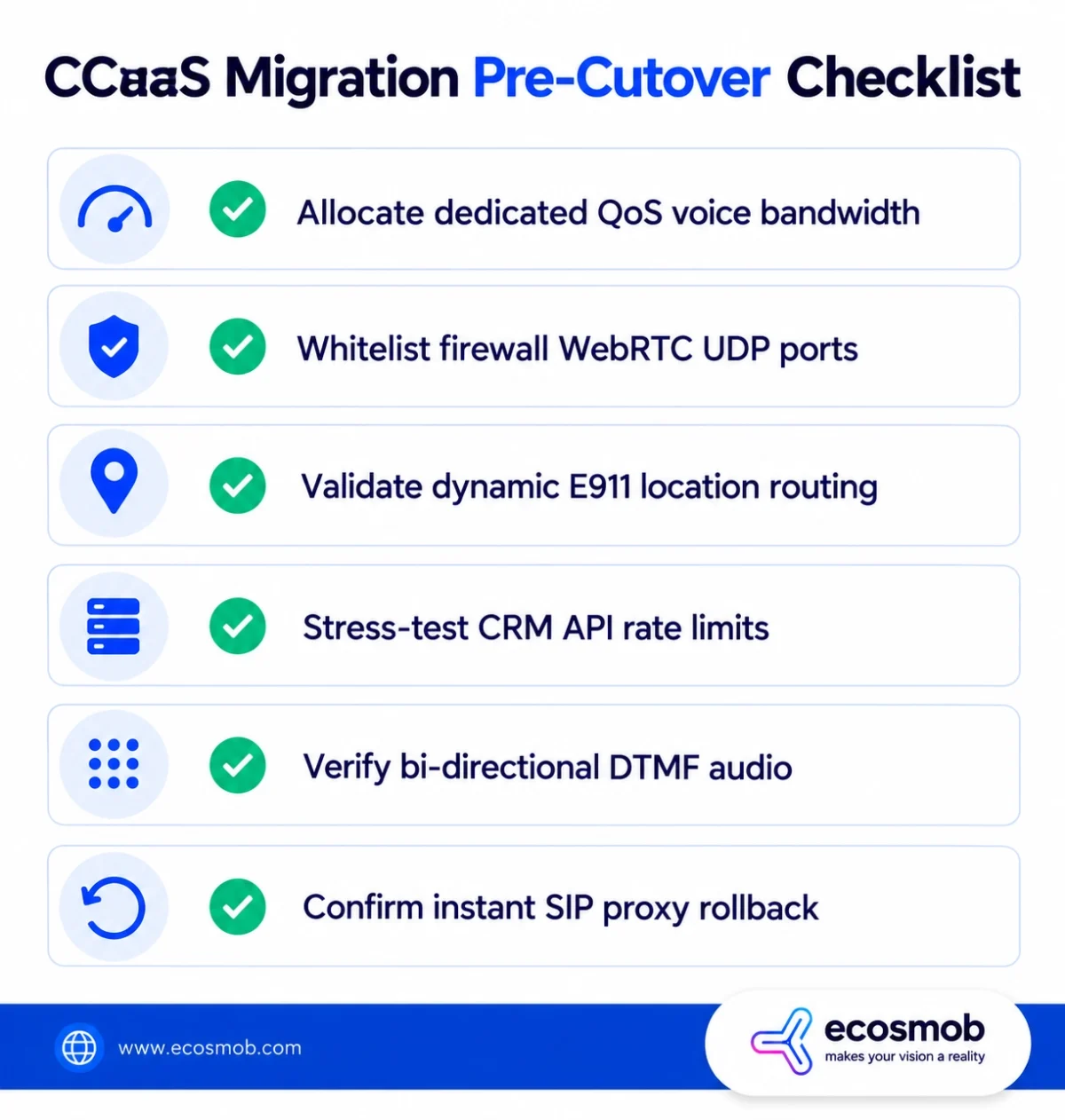
- Network & Bandwidth Allocation: Confirm your agent internet connections have dedicated QoS policies prioritizing voice traffic (budget at least 100 kbps per concurrent call using G.711).
- Firewall & UDP Rules: Whitelist your CCaaS provider’s signaling IP ranges and open outbound UDP ports for WebRTC/SRTP media (typically ports 10,000–20,000) and TLS signaling (ports 5061/443).
- Dynamic E911 Validation: Confirm that remote and in-office agent profiles correctly map to their physical emergency dispatch addresses.
- CRM API Concurrency Checks: Verify that your internal CRM and customer database endpoints won’t rate-limit or crash when hundreds of agents receive simultaneous screen pops during a call spike.
- Carrier Voice Path Testing: Place manual test calls across every inbound trunk to verify that DTMF keypad presses work correctly and that audio is clean in both directions.
- Emergency Rollback Validation: Make sure your team has tested the SIP redirect rule on your edge proxy and confirmed you can route calls back to the legacy system in under 60 seconds if needed.
In short, a successful CCaaS migration is about building a modern, flexible communication stack that won’t hold your business back.
When you take the time to clean up obsolete routing logic, decouple your carrier contracts, and run a phased parallel cutover, you protect your customer experience and ensure your new platform delivers real operational leverage from day one.
If you are planning an enterprise contact center cloud migration and want experienced telecom architects to design your SIP routing, manage SBC integrations, and de-risk your cutover, our senior engineering team is ready to step in.
Schedule a contact center migration assessment with Ecosmob!
Frequently Asked Questions
A CCaaS provider delivers complete contact center software (including automatic call distribution (ACD), interactive voice response (IVR), omnichannel routing, and supervisor analytics) over the cloud via a subscription model, removing the need to buy or maintain on-premises PBX hardware.
A typical CCaaS migration spans 8 to 12 weeks for mid-market teams (50–250 seats), 15 to 23 weeks for mid-sized enterprises (250–1,000 seats), and 26 to 40 weeks for global multi-site organizations requiring complex custom CRM integrations and multi-region carrier routing.
It depends entirely on your operational footprint. Genesys and NICE fit global operations needing heavy workforce management, while Five9 excels at rapid CRM-centric rollouts. If you want to escape recurring per-seat license taxes and own your media core, Ecosmob provides custom-engineered CCaaS solutions built on carrier-grade FreeSWITCH and Kamailio stacks that give you total data ownership and wholesale carrier margins.
A lift-and-shift contact center migration simply rebuilds existing legacy menus and routing rules in the cloud, carrying over historical technical debt. A process redesign audits customer journeys first, flattening complex IVR trees and adding automated self-service before configuring the new cloud platform.
You can avoid dropped calls during a cloud contact center migration if you use an intermediate Session Border Controller (SBC) or an agile SIP proxy layer in front of your telephony. This lets you split inbound carrier traffic between the legacy PBX and the cloud system gradually, validating audio quality before decommissioning the old hardware.