
We’ve all slammed our phones onto our desks in sheer frustration after wrestling with a support line.
You dial in, navigate a painfully sluggish menu, key in your 16-digit account number, wait on hold listening to distorted elevator music for ten minutes, and the second an actual human answers? “Thanks for calling. Can I get your account number?”
It’s a terrible ritual. It treats your customers like ticket numbers, turns your best support reps into burned-out human database queries, and drains budget on basic, repetitive triage.
Real, modern contact center automation isn’t about building an automated fortress to hide your team from callers. It is about engineering an intelligent, event-driven pipeline that authenticates users instantly, handles mundane requests on the wire, and hands off tricky situations to your human team with the whole story already sitting on their monitors.
Whether you’re scaling a 50-agent support floor or routing millions of carrier-grade VoIP minutes, here is how you build a real-world, scalable contact center automation solution without breaking a sweat.
What Is Contact Center Automation and Why Does It Matter Today?
At its core, contact center automation is the integration of real-time telephony protocols, speech models, and backend business APIs to resolve customer interactions without manual triage.
Instead of routing callers down brittle, pre-recorded IVR branches, a production-grade contact center automation solution connects bidirectional audio streams, intent extraction models, and enterprise databases into an event-driven loop.
The business case boils down to simple math. According to benchmarking research from Gartner, the median cost of an automated self-service resolution is just $1.84, compared to $13.50 for a human-assisted interaction. When half your inbound queue consists of people asking “Where is my order?” or “Can I get a copy of my invoice?”, forcing human reps to answer those by hand burns budget and burns out your team
The Core Business Benefits of Contact Center Automation
Automating routine workflows is all about how it transforms the way your entire contact center breathes during high-stress moments:
- Handling Surges with Zero Wait Times: When an outage hits or a holiday sale spikes traffic, your SIP infrastructure and conversational engines scale instantly. Customers get immediate answers instead of sitting in a 40-minute queue.
- Eliminating After-Call Work (ACW): Agents usually spend a couple of minutes after every call typing up summaries and tagging tickets. Modern AI models listen in, generate structured notes, and populate your CRM fields the millisecond the call wraps.
- Boosting First-Contact Resolution: When your system actually understands what someone needs on sentence one, it either resolves the request immediately or routes the caller straight to the specialist who can.
- 100% Quality Assurance Coverage: Most QA teams only have time to review 1% to 2% of call recordings. Automated speech analytics inspect every single conversation for compliance, script adherence, and customer frustration in real time.
The 4-Layer Contact Center Automation Framework
If you want a contact center architecture that won’t fall apart during peak morning traffic, you have to separate your media streams from your business rules. Here is the four-tier blueprint to follow:
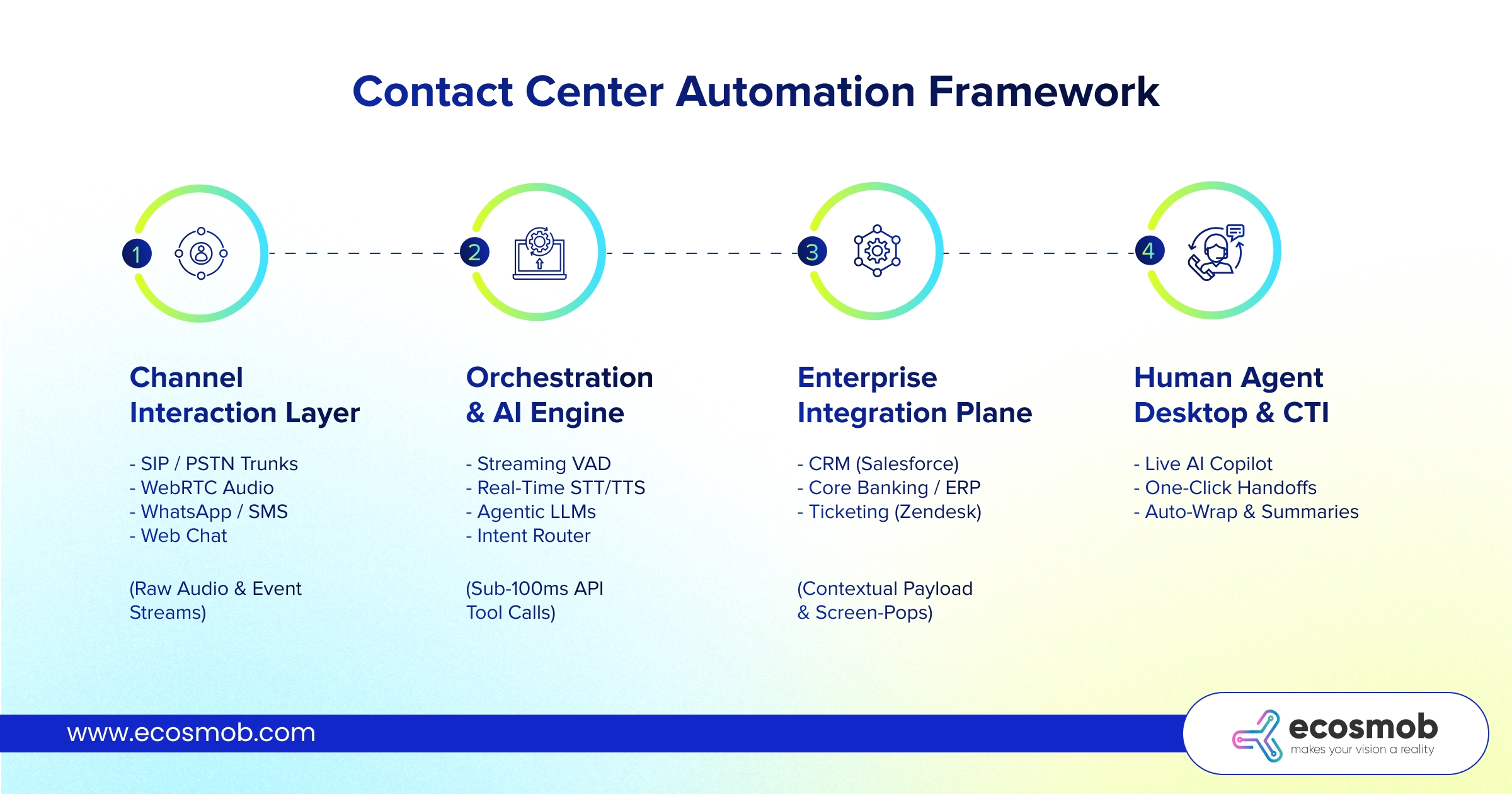
- Channel Interaction Layer (Omnichannel Ingestion)
This is the front door. It handles incoming traffic across SIP trunks, WebRTC browser connections, SMS, WhatsApp, and in-app chat. For voice, your media servers must fork audio as a live binary stream over low-overhead WebSockets (WSS) every 20ms, rather than saving clunky .wav files to disk.
- Orchestration & AI Engine
This is the operational brain. For voice, it manages lightning-fast Voice Activity Detection (VAD), streaming Speech-to-Text (STT), conversational language models, and natural Text-to-Speech (TTS). It figures out what the user wants, handles interruptions smoothly, and decides what to do next.
- Enterprise Integration Plane
An AI bot that cannot talk to your database is pretty much useless. This layer turns conversational intent into real-time API queries across your CRM (Salesforce, HubSpot, etc.), ERP, payment gateways, and backend databases to fetch balances or update records on the fly.
- Human Agent Desktop & CTI Plane
When a conversation requires human judgment, your Computer Telephony Integration (CTI) bridges the call to an agent queue while pushing an instant screen-pop. The agent sees who is calling, what they’ve already tried, and a bulleted summary of the interaction so far.
What Are the Top Contact Center Automation Use Cases Delivering High ROI?
Don’t try to automate your entire customer journey overnight. The teams getting the fastest returns focus squarely on high-volume, structured tasks:
Instant Caller Authentication
Stop burning the first 60 seconds of every call playing security trivia. Match the incoming phone number (ANI) and run passive voice biometrics in the background while the caller simply explains what they need.
Autonomous Tier-1 Resolutions
Routine, high-frequency requests (like checking delivery dates, pulling up balances, updating addresses, or resetting logins) can be resolved entirely by automated bots without queuing for a human.
Secure Phone Payments (PCI-DSS)
Keeping payment details away from human eyes and ears is mandatory. An automated flow temporarily mutes call recordings, captures card details securely via DTMF or speech, runs the tokenized charge, and drops the customer right back into the conversation.
Real-Time Agent Copilots
While your rep speaks with a customer, an AI listener monitors the conversation, runs vector searches across your internal documentation, and displays the exact answer on screen before the customer even finishes speaking.
Instant Post-Call Summarization
The instant a call disconnects, the system drafts an interaction summary, assigns tags, records sentiment, and updates CRM records automatically.
How to Roll Out a Contact Center Automation Solution? (A Phased Roadmap)
A structured contact center automation deployment follows a phased, risk-managed progression to protect customer experience and platform stability:
Phase 1: Audit and Intent Discovery
- Analyze historical call logs and chat transcripts to identify your top 5 to 10 contact drivers by volume.
- Benchmark operational baselines: Average Handle Time (AHT), First Contact Resolution (FCR), and cost per contact.
- Test backend REST APIs to verify that CRM and database endpoints respond within 150ms under load.
Phase 2: Digital Channels and Agent Copilots
- Launch conversational automation on lower-risk digital channels like web chat, SMS, and WhatsApp.
- Implement automated post-call summarization and CRM note sync for live agents to reduce handle times immediately.
- Deploy real-time knowledge-assist copilots to accelerate rep onboarding and response accuracy.
Phase 3: Conversational Voice AI and Smart Routing
- Configure low-latency WebSocket audio streaming on your Session Border Controllers (such as FreeSWITCH or RTPEngine).
- Build conversational voicebots to resolve your top 2 or 3 structured phone inquiries.
- Implement contextual SIP REFER handoffs so escalated calls transfer to human agents with full transcripts and metadata intact.
Phase 4: Full-Loop Optimization and 100% QA
- Enable predictive routing that matches callers with specific agents based on prior history and real-time sentiment.
- Deploy automated speech analytics across 100% of calls to track compliance, script accuracy, and audio quality (MOS).
- Continuously refine prompt templates and API tool-calling logic based on weekly escalation trends.
Automating your contact center is all about stripping out the repetitive, robotic tasks that burn out your reps and drive your customers crazy.
When you put a well-engineered contact center automation solution in place, your human agents can focus on high-value conversations that actually need a human touch, while your automated media plane quietly handles the routine heavy lifting in the background.
If you are ready to modernize your telecom core, deploy low-latency voice AI, or integrate custom FreeSWITCH and Kamailio routing with AI, our senior engineering team is here to help. Schedule a consultation with Ecosmob!
Frequently Asked Questions
Contact center automation is the combination of artificial intelligence, telecom media routing, and backend software integrations that handles customer support tasks, routes incoming traffic, and resolves common inquiries without requiring human intervention.
Automation in contact centers is how you can remove the boring, repetitive chores that eat up an agent’s day. It verifies caller identities before connection, surfaces real-time knowledge base articles during live calls, and writes up ticket summaries automatically, giving reps more time to help customers with complex problems.
The top contact center automation use cases include automated caller identity verification, self-service order tracking and balance checks, secure over-the-phone PCI payments, real-time agent-assist copilots, and automated post-call CRM logging.
They execute a contextual SIP transfer (like SIP REFER) directly through your media gateway. The automation engine packages the conversation summary, customer intent, and verified ID into custom SIP headers (e.g., X-AI-Summary), which triggers an instant screen-pop for the human agent the moment they answer.
Contact center automation cuts AHT in three ways: it verifies customer identity before the agent picks up, gives human agents real-time AI search recommendations during the conversation, and generates post-call summaries automatically. This can reduce 2 to 4 minutes of manual After-Call Work (ACW) down to a few seconds.